My Space and My Place

    • Home
    • Inquiry 2021
    • Digital Technologies Site
    • VTaL Site
    • VTaL G+

How to celebrate Matariki at home Me pēhea te whakanui i a Matariki i te kāinga


The presentation in this blog post includes examples of some of the ways in which my whānau celebrates Matariki at home.

This includes different ways of learning and talking about whakapapa, acknowledging tīpuna and sharing ideas about whānau celebrations through vision boards, time spent creating and reflecting on taonga, and Josh blogging about our marae in Te Teko through his school Science project for Strength of Structures.  I'm sure that he would appreciate some feedback and comments on his blog posts. 


How to celebrate Matariki Me pēhea te whakanui i a Matariki

The last slide in the presentation includes links to various Matariki activities that are happening around Auckland this year.


 .


Share
Tweet
Pin
Share
2 Comments


My Inquiry Focus for CoL 2018, has been "Integrating VTaL Visible Teaching and Learning with cultural visibility and responsive practices to raise Māori student achievement in NCEA years 11-13" in alignment with Achievement Challenge 1.  The focus group for my inquiry this year was students who I taught DigiTech NCEA Level 2.

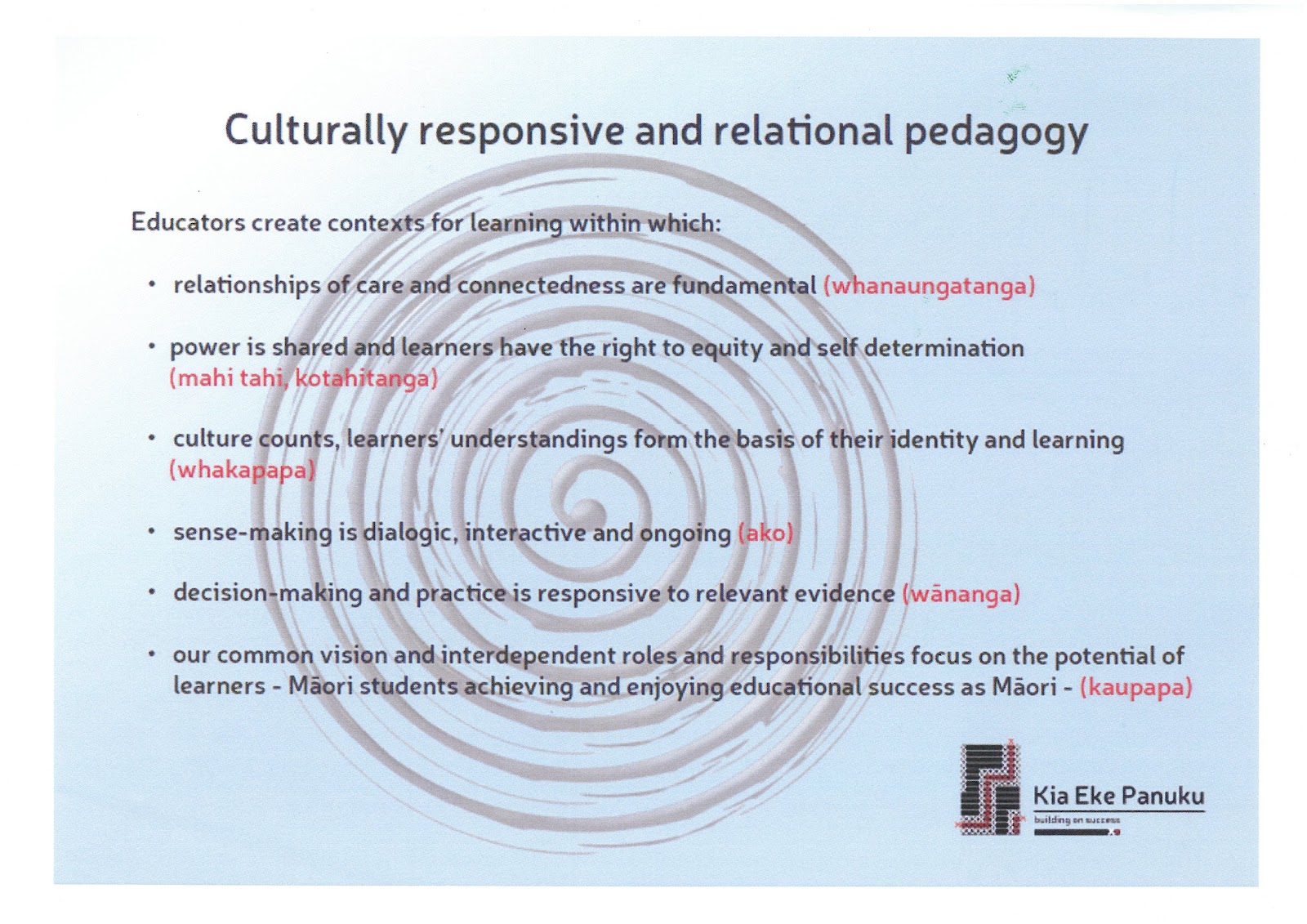
In order to appreciate what is meant by cultural visibility and responsive practices, it is important to understand the intent of Culturally responsive and relational pedagogy as outlined in the following image sourced from the Kia Eke Panuku site.


Throughout the year, I integrated various pedagogical practices relating to Cultural responsiveness into my teaching practice.  This included, but was not confined to, the following:
  • Whanaungatanga 
  • Mahi Tahi
  • Manaakitanga 
  • Wānanga 

In a previous post, entitled Connecting VTaL to Culturally Responsive and Relational Pedagogy, I outlined ways in which VTaL Visible Teaching and Learning could be incorporated within teaching and learning, to enable Culturally Responsive and Relational Pedagogy to be applied.

In order to give context to what happened throughout the year, in terms of the intent of my teaching practices, and the learning outcomes for students, I will give a brief description of how VTaL could be used with the following aspects of Culturally Responsive practices.  I will then outline what actually happened in terms of learning outcomes for students, and describe other variables that impacted on the teaching and learning process.  After which, I will outline 'What happened for the Learners?', "What evidence do I have for this?', 'What did I do to make this happen?' and 'Wonderings about what next'.


Whanaungatanga - Google+ Communities

The following is a description of how VTaL Visible Teaching and Learning can be integrated with Whanaungatanga - Where relationships of care and connectedness are fundamental.
Collaborative Learning Opportunities are provided for students:
  • Class discussions about context ideas
  • Sharing completed tasks in Google+ as a tool to guide the learning of others
  • +1 and Commenting on tasks shared in Google+
  • Peer feedback in Evaluations

The following blog post describes how Whanaungatanga was applied with the focus group this year:
  • Whanaungatanga - VTaL in Senior DigiTech StartUp and Deconstructing the Year Ahead


Mahi Tahi, Manaakitanga - Google+ Communities and Workspaces

The following is a description of how VTaL Visible Teaching and Learning can be integrated with Mahi Tahi Kotahitanga - Where power is shared and learners have the right to self-determination. Empowerment for students:
  • Students can use Student Check Lists to track their own progress within this unit of work
  • Wananga between kaiako-tauira to select standards according to their interest in IT and DigiTech.  The standards available in DigiTech can be located within the DigiTech site under each NCEA Level (Assessment Information, and, Overview and Calendar)

The following blog post describes how Mahi Tahi Kotahitanga was applied with the focus group this year:
  • Mahi Tahi and Manaakitanga - VTaL in DigiTech and Collaborative Learning
  • VTaL - Mahi Tahi and Manaakitanga : Tuakana-Teina

Wānanga - Tracking Sheets

The following is a description of how VTaL Visible Teaching and Learning can be integrated with Wānanga - Decision-making and practice in response to relevant evidence. Kaiako-Tauira Wananga are provided for students:
  • Use Class Task Lists and Student Check Lists to have discussions around progress and support for developing learning
  • Wananga between kaiako-tauira to select standards according to their interest in IT and DigiTech.  The standards available in DigiTech can be located within the DigiTech site under each NCEA Level (Assessment Information, and, Overview and Calendar)

The following blog post describes how Wānanga was applied with the focus group this year:
  • VTaL - Reflecting on School Goal 3 in Term 1 for NCEA Level 2 DigiTech Students

Understanding the Variables

In April this year, I delivered a presentation at the EdTech GAFE Conference in Auckland about how VTaL Visible Teaching and Learning Tracking Sheets were being used to Track Student Progress.  As part of the presentation, I gave a description of the background of who the learners were.  This is shown in the following slide from the presentation.


The description of the Multi-level Senior DigiTech Class outlines a range of variables that needed to be taken in consideration, when planning to teach and prepare learning activities for the students within the class.


What happened for the Learners?

Learners achieved when they had my full attention.  When I was with other learners from Level 1 and/or Level 3 during a lesson, the Level 2 learners often didn't focus consistently on completing tasks.  I found this quite odd that all of the Level 2 students who were consistently present in lessons, all functioned in this same way.  This was not the case with Level 3 students.  There was often a range of focus and work output shown from the Level 3 students.  Some worked well to complete tasks, while others did not.  However, all of the Level 2 students worked at a particularly slow pace, which was not conducive to keeping up with assessment deadlines.  This meant that the Level 2 students did not achieve in all standards across the entire year, even after having achieved the credits for the first standard.  Culturally responsive and relational pedagogy was not enough on it's own to enable student achievement to continue.

After having discussions with an external provider, who through another program at school, was familiar with this same set of learners, we looked at ways of identifying the way in which students learn by using Gregorc Learning Styles.  For the students who were present, I was able to have them undertake exercises and determine the their learning styles:
  1. Learner 1 - Abstract Random
  2. Learner 2 - Abstract Sequential/Abstract Random
  3. Learner 3 - Concrete Sequential/Abstract Random
  4. Learner 4 - Abstract Random
As shown above, each of the learners demonstrated a close affinity to being Abstract Random in their preferred learning styles.  The following is a description of the characteristics of learners who identify as Abstract Random:

"Abstract – Random (AR)
Abstract – Random (AR) learners prefer an unstructured environment and learn holistically. They show strong visual preferences for taking in information and toward instruction. They prefer physically pleasing, personalized, flexible environments; emotional sensitivity and strong relationships with others; and flexibility in time, activity and demands. They may need repeated coaching to focus their time and activity on learning tasks, vs. on interpersonal relationships in learning or in teamwork environments. Can’t say “no” even when they should, and need incubation time before responding! (They aren’t “slow,” they’re just pondering – and instructors need to recognize this publicly.) Abstract-Randoms ask “If?”. Nickname: People Person, Absent-Minded Professor, or Crazy Artist (musician, etc.). Key words: Imaginative/Perceptive/Social."

Unfortunately, these characteristics are not conducive to independent learning strategies, that I had implemented using VTaL, in order to address the broad range of learning needs of three NCEA levels of learners in my Senior DigiTech class.


What evidence do I have for this?

The types of evidence that I had acquired throughout the year to identify formative feedback of their progress was tracking sheets for the different standards.  I also asked students to share back to me, what they had identified as their preferred learning style.

Tracking Student Progress
  • Create a Website Tracking Sheet
  • Planning for Practice Tracking Sheet
  • Conceptual Design Tracking Sheet

Learning Styles
  • Learner 1 - Abstract Random
  • Learner 2 - Abstract Sequential/Abstract Random
  • Learner 3 - Concrete Sequential/Abstract Random
  • Learner 4 - Abstract Random


What did I do to make this happen?

The following are a range of strategies and interventions that I applied throughout the year to enable students to achieve:
  • Tuakana-Teina Learning Approach - This worked well with the NCEA Level 2 Students in terms of enabling the students to engage in learning, with the support of NCEA Level 3 Students to guide them as to how to complete the work.
  • Wānanga - Conferencing with Students - This worked well to inform the NCEA Level 2 Students (as well as the other two NCEA Levels) of where they were at within the standard that they were focussing on at any given time throughout the year.  However, the overall impact of the conferencing had two different effects, depending on whether students exhibited high levels of motivation and effort to achieve, or whether they didn't.  Whilst I was able to conduct conferences with the NCEA Level 2 students regarding their current level of achievement, this did not motivate the students to work any faster, or to work independently to complete work.   
  • Group Learning Tasks - After identifying the student's preferred learning styles, I stacked some of the learning activities to be group focussed.  This worked particularly well.  However, once students had to progress beyond the group activity to conduct individual analysis of their previous work, students defaulted back to their previous learning approach of slow work output.
  • Whānau Contact - Discussions with Parents and Caregivers - I made contact with parents and caregivers to discuss their child's progress or lack of progress within their projects.  Irrespective of having constructive conversations with parents, this did not translate into an improved work output or faster work output by students.
  • Catchup Sessions - Wednesdays After School from 3pm - 5pm, Labour Day - I ran after school catchup sessions as well as a full day catch up session on Labour Day for students to complete their projects.  This was to address the issue of timelines and time required for students to complete work.  However, it was always the students from the other NCEA Levels, who exhibited a highly productive work ethic and high intrinsic motivation, who attended these sessions.  The NCEA Level students would have attended 10-20% of the catchup sessions that I had offered.


Wonderings about what next

The blog posts and photographs relevant to Culturally Responsive teaching and learning interventions, indicates that these strategies were highly effective in engaging the learners to participate in the learning process.  However, the evidence shows that the Culturally Responsive teaching and learning interventions, in isolation, were not effective in enabling this particular focus group of learners to achieve.  Regardless of this, I will continue to incorporate Culturally Responsive teaching and learning interventions in future units of work, if this continues to engage learners.

Some wonderings that I have about what next, includes teaching students how to effectively self manage, and well as investigating strategies to improve intrinsic motivation and effort, so that students can still progress through tasks and achieve, without requiring my full and absolute attention during lessons if I am tending to other learners.

I intend exploring more ideas around workflow for students, that further breaks down task criteria.  This would entail connecting learning outcomes, learning instructions, evidence expectations and task criteria within Workspaces.  Hopefully this will address the issue of students waiting to be verbally told what they need to do next within a project in order to proceed forward with work.  I have begun experimenting with this approach in both my Year 10 and NCEA Level 1 JumpStart units of work, and intend continuing to investigate whether this is more or less effective in units of work that I will deliver next year.  These can be viewed in my DigiTech with Ms Anderson subject site as follows:

  • 10PSd Tools and Techniques Workspace
  • 1101DGT JumpStart 2018


Share
Tweet
Pin
Share
No Comments

Tuakana - Teina Collaborative Teaching Strategy

Level 2 students completing their first project were starting to fall behind with specific tasks within the project.  In order to support students to catch up on their work, I teamed up the Level 2 students with some of the Level 3 students from last year who had completed the standard in 2017.

The Level 3 students directed the Level 2's to the exemplars in the DigiTech Level 2 Google+ Community.  The Level 2's followed the instructions in the Workspace, and using both the support of the Level 3 students, as well as the exemplars in the Google+ Community, completed and submitted tasks for Activity 1 in the project.


Share
Tweet
Pin
Share
6 Comments


The Scenario

This year the Senior DigiTech class, is again a multi-level Level 1, Level 2 and Level 3 class; and  mostly made of students who undertook Senior DigiTech in 2017.  In addition, there are four new Level 3 students who did not take DigiTech in Level 1 or Level 2, as well as two Level 2 students who did not take DigiTech in Level 1.  Students who undertook DigiTech as either a Level 1 or Level 2 student, are familiar with how to access Learning Information, Information about Progress

The Idea!

The idea that I had for students to collectively gain an understanding of the course and assessment information for the year, was for students to collaborate within a Google doc.  This is not a new concept at all.  However, the way in which the collaborative process was implemented, in that the strategy itself was deliberate in terms of integrating principles of Mahi Tahi - Collaboration and Manaakitanga - Support for Others, is what makes the learning strategy purposeful and meaningful to the students.

The idea also aligns well with "Manaiakalani Achievement Challenge 1, and what I am doing to lift the language capabilities of my students", as discussed in a recent Middle Leaders Professional Learning Group.


The VTaL Tools and Processes Used

The following are some of the VTaL Tools used and applied in the Learning Process:

  • Subject Google Site - Students located the Project Instructions through my Subject Site
  • Subject Google+ Communities - Students located exemplars of work by Tamaki College students, to assist with responses to questions about the assessment information
  • Workspace - A Group Evidence Google Doc was used as the collaborative tool


Mahi Tahi me te Ako - The Collaborative Learning Process

Students accessed the assessment information and project instructions via my DigiTech with Ms Anderson Subject Site, and then develop questions about the assessment that they wanted clarity on.

Students then individually logged their questions into a Google doc, which was set up as Group evidence in a Workspace, accessible through the Student Dashboard.


In pairs, students then worked together to identify responses (information, links to Tamaki College exemplars in the DigiTech Google+ Communities, links to external exemplars on NZQA, links to websites etc) that would hopefully address many of the questions.   Any response that was logged, students could also tag their name to the response to demonstrate how they have contributed back into the collaborative learning process.

How Effective was the Teaching and Learning Strategy?

This particular teaching and learning strategy was effective in enabling all learners to collectively contribute into the collaborative learning task.  Students who did not, were soon identified, due to their lack of names tagged against responses to queries.  Students therefore had a vestured interest in the learning process.  Students knew that contributing into the process benefited all, just as they also knew that not contributing into the process demonstrated a lack of manaakitanga, or support for their peers.  There was no consequence to this from a teaching point of view; it was more that students understood and valued the collaborative process, Mahi Tahi, and due to responding in pairs, felt safe about contributing their responses because the richer the document was with responses, the more useful the document became.  Thus, promoting support and care amongst the students, Manaakitanga.

The following links are the Q & A sheets that students collaborated on at each level, and is available for future use and references by all students.

  • NCEA Level 3 Project 1 Questions and Answers - 91609 Q & A - 41301DGT12018
  • NCEA Level 2 Project 1 Questions and Answers - 25655 Q & A - 41201DGT12018
  • NCEA Level 1 Project 1 Questions and Answers - 18739 Q & A - 41101DGT12018


Share
Tweet
Pin
Share
1 Comments


StartUp

I started off the beginning of our first Senior DigiTech lesson with Whanaungatanga.  The students sat around the front table, and discussed their holidays as well as their interest in DigiTech, with fruit and biscuits.  This enabled the students to reconnect with each after the long break.  It also enabled students who are new to the course, to be brought into the mix.  This worked well and students appeared to enjoy the introductory whanaungatanga session.

Deconstructing the Year Ahead

From here, I decided to get the students to deconstruct what the year ahead would look like.  This entailed students locating information about the NCEA Standard Entries 2018, located in my DigiTech with Anderson subject site.  The students then identified information about the standards, and unpacked the explanatory notes that would enable the students to gain Achieved, Merit and Excellence for each standard.  In addition to this, students also located NZQA Exemplars, and explained how the various grades were achieved.  This process enabled the students to develop a resource for themselves, to better understand the standards within the DigiTech course, and the requirements of meeting the criteria for each of the standards.  Some of the students shared their DigiTech presentations into the DigiTech Year Level Google+ Community.  The following links are three of these examples.


  • Dell - Level 3 DigiTech Information
  • Gustavo - Level 3 DigiTech Information
  • Issam - Level 3 DigiTech Information


  • Applying strategies such as these enable the students to become more empowered, more informed, and better equipped in terms of their understanding of the course content and course requirements for the year.


    Share
    Tweet
    Pin
    Share
    No Comments

    SC65400559 15073006350.jpg

    The following are some examples of how various aspects of VTaL may be utilised and align with contexts of Culturally Responsive and Relational Pedagogy.  The examples below are embedded within the unit plan that I will be delivering during JumpStart this year, 11DGT Create a Web Page US18734.

    Whanaungatanga - Where relationships of care and connectedness are fundamental.
    Collaborative Learning Opportunities are provided for students:
    • Class discussions about context ideas
    • Sharing completed tasks in Google+ as a tool to guide the learning of others
    • +1 and Commenting on tasks shared in Google+
    • Peer feedback in Evaluations

    Mahi Tahi Kotahitanga - Where power is shared and learners have the right to self-determination.
    Empowerment for students:
    • Students can use Student Check Lists to track their own progress within this unit of work
    • Wananga between kaiako-tauira to select standards according to their interest in IT and DigiTech.  The standards available in DigiTech can be located within the DigiTech site under each NCEA Level (Assessment Information, and, Overview and Calendar)

    Ako - Where learning is interactive and spirals.
    Ako is interactive and spirals in terms of learning workflow, by applying the following in the learning process:
    • Year Level Calendar, Project Instructions, Learning Activities, and Student Progress (Class Task Lists and Student Checklists) are embedded in the Subject Google Site, and visible to learners
    • Year Level Calendar with Hyperlinked Learning Activities communicates the focus for the lesson each day and is a rewindable resource
    • Project Instructions communicates the big picture of the project to students
    • Learning Activities communicates the individual task requirements to students
    • Student Progress (Class Task Lists) communicates to students where students are tracking at with regards to task completion towards completing the overall standard
    • Communities provides examples of work to guide learning

    Wananga - Decision-making and practice in response to relevant evidence.
    Kaiako-Tauira Wananga are provided for students:
    • Use Class Task Lists and Student Check Lists to have discussions around progress and support for developing learning
    • Wananga between kaiako-tauira to select standards according to their interest in IT and DigiTech.  The standards available in DigiTech can be located within the DigiTech site under each NCEA Level (Assessment Information, and, Overview and Calendar)

    Share
    Tweet
    Pin
    Share
    No Comments


    Image result for unit plan


    The unit of work that I am delivering for the JumpStart program in Term 4 is 11DGT Create a Web Page US18734.  The unit plan itself shows the extent to which VTaL Visible Teaching and Learning can be integrated into all aspects of learning within the unit of work.  The unit plan template has been developed by Middle Leaders in consultation with the Senior Leadership Team, Curriculum Committee and Teaching Staff, to encapsulate aspects of the Curriculum.

    The following are sections of the unit plan that applies various components of VTaL Visible Teaching and Learning:
    • Teaching and Learning - Learning Activities, Resources
    • Assessment - Prior Assessment, Formative Assessment, Summative Assessment
    • RISE Values - Respect, Integrity, Success, Responsibility
    • NZC Key Competencies - Thinking, Relating to Others, Understanding Language, Symbols and Text, Managing Self, Participating and Contributing
    • SAMR - Redefinition
    • NZC Literacy and Numeracy - Literacy
    • SOLO Taxonomy - Unistructural (Identify), Multistructural (Describe), Relational (Apply), Extended Abstract (Evaluate)
    • Differentiation - Process, Learning Environment
    • Kia Eke Panuku - Whanaungatanga, Mahi Tahi Kotahitanga, Wananga
    • Career Management Competencies - Exploring Opportunities, Deciding and Acting

    Share
    Tweet
    Pin
    Share
    No Comments


    I delivered this presentation to staff during Te Wiki o te Reo Māori, to outline ways in which staff could apply cultural responsiveness with regards to pronouncing student names correctly.  Whilst the presentation was delivered during Māori Language Week, the concepts around cultural responsiveness apply to students, staff and whānau of any background or ethnicity.


    Share
    Tweet
    Pin
    Share
    No Comments
    Older Posts

    About Me

    Kia ora! I am the Head of Technology at Tāmaki College and also teach Digital Technologies.


    My target group of learners for my Inquiry 2021 will be my Year 12 NCEA Level 2 class. This group of learners were my target group from my 2020 Inquiry. I would like to inquire into whether Academic Writing exemplars specific to Digital Technologies, in conjunction with the 'Explanation Writing' classroom display resources for Digital Technologies, based on SOLO taxonomy, could accelerate achievement in literacy in my subject.


    My target group of learners for my Inquiry 2020 were my Year 11 NCEA Level 1 class. I inquired into the process of using the LearnCoach online programs (content) and VTaL Visible Teaching and Learning (workflow) to accelerate student achievement for Tamaki College students undertaking courses in Digital Technologies NCEA Levels 1, 2 and 3.


    In 2019, my inquiry is to maximise pedagogical practices (relating to integrated education, and collaborative teaching and learning), to effectively shift student achievement, supported by digital platforms connected to visible teaching and learning.


    My Inquiry in 2018, was to develop a VTaL Purpose-Built Innovative Tool, to enable all elements of the VTaL Framework to be accessible to teachers, in order to accelerate student achievement.


    In 2017, my inquiry was based on raising student achievement and shifting teacher practice around effective pedagogical practices including Learn, Create and Share. This will be achieved through the development, implementation and monitoring of the Visible Teaching and Learning Framework.

    recent posts

    Blog Archive

    • ▼  2022 (8)
      • ▼  March (3)
        • Hybrid Teaching and Learning | The impact of Omicron
        • Manaiakalani Toolkit | Well-being - Supporting Our...
        • Technology - Manaiakalani Department Discussions M...
      • ►  February (5)
    • ►  2021 (16)
      • ►  November (1)
      • ►  September (2)
      • ►  August (1)
      • ►  July (2)
      • ►  June (4)
      • ►  May (3)
      • ►  March (2)
      • ►  February (1)
    • ►  2020 (42)
      • ►  November (2)
      • ►  September (2)
      • ►  August (7)
      • ►  July (5)
      • ►  June (4)
      • ►  May (7)
      • ►  April (7)
      • ►  March (3)
      • ►  February (4)
      • ►  January (1)
    • ►  2019 (30)
      • ►  September (2)
      • ►  August (3)
      • ►  July (1)
      • ►  June (2)
      • ►  April (1)
      • ►  March (12)
      • ►  February (9)
    • ►  2018 (41)
      • ►  November (7)
      • ►  October (2)
      • ►  September (1)
      • ►  August (4)
      • ►  July (4)
      • ►  May (7)
      • ►  April (4)
      • ►  March (5)
      • ►  February (7)
    • ►  2017 (65)
      • ►  December (2)
      • ►  November (22)
      • ►  October (6)
      • ►  September (6)
      • ►  August (10)
      • ►  June (4)
      • ►  May (3)
      • ►  April (1)
      • ►  March (4)
      • ►  February (6)
      • ►  January (1)
    • ►  2016 (26)
      • ►  December (1)
      • ►  November (18)
      • ►  September (6)
      • ►  August (1)

    VTaL

    • VTaL (104)
    • VTaL 01 Subject Sites (33)
    • VTaL 02 Learning Activities (7)
    • VTaL 03 Tracking Sheets (28)
    • VTaL 04 Student Checklists (12)
    • VTaL 05 Calendars with Links (24)
    • VTaL 06 Workspaces (32)
    • VTaL 07 Student Sites (4)
    • VTaL 08 Year Level Sites (3)
    • VTaL 09 Subject Communities (26)
    • VTaL 10 Student Blogs (11)
    • VTaL and Google Hangouts (15)
    • VTaL and Student Achievement (45)
    • VTaL for Parents (13)
    • VTaL for Students (82)
    • VTaL for Teachers (32)

    Presentations

    • GAFE (19)
    • My YouTube Videos (8)
    • Presentations (21)

    Inquiry

    • Inquiry (134)
    • Inquiry 2019 (27)
    • Inquiry 2020 (34)
    • Inquiry 2021 (15)

    Manaiakalani

    • CoL (167)
    • Inquiry (134)
    • Inquiry 2020 (34)
    • Learn Create Share (11)
    • MIT 2018 (16)
    • Manaiakalani (18)
    • Presentations (21)
    • SPARK MIT (59)

    Tamaki College

    • 2018 Department Goals (2)
    • 2018 School Goals (3)
    • 2019 Department Goals (2)
    • CoL (167)
    • Collaborative Learning Environments (32)
    • Covid19 (29)
    • Cultural Responsiveness (10)
    • Differentiation (12)
    • EMR Collaborative Project (21)
    • Goals (2)
    • Human Rights Collaborative Project (5)
    • Integrated Education (24)
    • Kia Eke Panuku (8)
    • LearnCoach (2)
    • Literacy (21)
    • PLD (18)
    • Techies (12)
    • Technological Modelling (4)

    Practicing Teacher Criteria

    • PTC01 (31)
    • PTC02 (9)
    • PTC03 (6)
    • PTC04 (61)
    • PTC05 (17)
    • PTC06 (42)
    • PTC07 (32)
    • PTC08 (34)
    • PTC09 (8)
    • PTC10 (7)
    • PTC11 (16)
    • PTC12 (54)

    General

    • CoL (167)
    • Collaborative Learning Environments (32)
    • Cultural Responsiveness (10)
    • Differentiation (12)
    • Feedback - Parent Voice (2)
    • Feedback - Staff Voice (6)
    • Feedback - Student Voice (23)
    • GAFE (19)
    • Goals (2)
    • Integrated Education (24)
    • Kia Eke Panuku (8)
    • LearnCoach (2)
    • Literacy (21)
    • My YouTube Videos (8)
    • Review (14)
    • Student Agency (15)

    Contact Form

    Name

    Email *

    Message *

    Total Pageviews

    Created with by BeautyTemplates| Distributed By Gooyaabi Templates