My Space and My Place

    • Home
    • Inquiry 2021
    • Digital Technologies Site
    • VTaL Site
    • VTaL G+

Animated Stories and Brief Development

In Semester 1 this year, the first class that I had was a mix of Year 7 students from Glenbrae School.  The focus of this Semester was to teach code sequences to develop Animated Stories in Scratch, and for students to undertake Brief Development associated with their DigiTech projects.

Student Blogs

If you click on the student photos below, you will be able to navigate to the student blog posts that students wrote which includes links and embedded animations for some of the work that they undertook in DigiTech this semester.

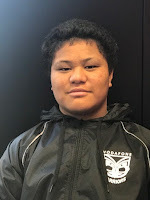
 Siosaia Liu  Mahoney Taula  Po Munu
Candice Fakahau  Maya Griffiths  Tumanako Kern-McLeod  Francesca Pome'e  Anita Folau  Kupid Haenga  Auro Junior Pepe  Mathew Tukuafu

Students Blogging, but what to blog?

Some of the students were already blogging reflections on what they were learning in Technology when they returned to school.

Before the students moved from my specialist subject into the next Technology subject, I specifically wanted the students to blog an overview of some of the tasks that they had completed, relating to Brief Development, as well as the outcome that they had developed; that being, an animated story.

It was easier for me to model to the students, what I wanted them to include in the blog post overview.  This would ensure that students linked and embedded tasks associated with Brief Development and their Animated Stories.  Therefore I broadcast a model blog post for the students to follow, as shown in the image below.

Students had the option of linking their completed tasks from their Google Drive to the text in the bulleted list, or, linking previous blog posts to the text in the bulleted list.


Share
Tweet
Pin
Share
No Comments
Term 2 signifies the launch of the new Subject Sites using the NEW Google Site format.  So essentially, out with the old and in with the new.  My previous Google Site, DigiTech with Ms Anderson, is still searchable on the internet.  However, the NEW Google Site, Digital Technologies with Ms Anderson, is now the main subject site, which is also linked from the main Tamaki College site.

Although the NEW Google Sites have been in place for a little while now, we have been undergoing a transition process from traditional sites to the new site format.  My NEW site still needs some of the work to be embedded.  However, the site is functional and up and running for the students in terms of current projects.


This morning the new rotation of Year 10 students were the first to access learning information via my NEW subject site.  I have set up the NEW site in a similar way to the traditional site, in that the main navigational tab is set up according to year levels.  Students then access learning information from the drop down section of the year level, including navigating to year level calendars, project instructions, workspaces etc.  Other than directing students to the new URL or link (which I've also included on the home page of my old site), navigating to the work was intuitive for the students.  This is reassuring to know and also to see, in that the work flow and information flow is useful and relevant for the learners.


Share
Tweet
Pin
Share
No Comments

Use and Impact of Tool 04 - Student Project Checklists in DigiTech

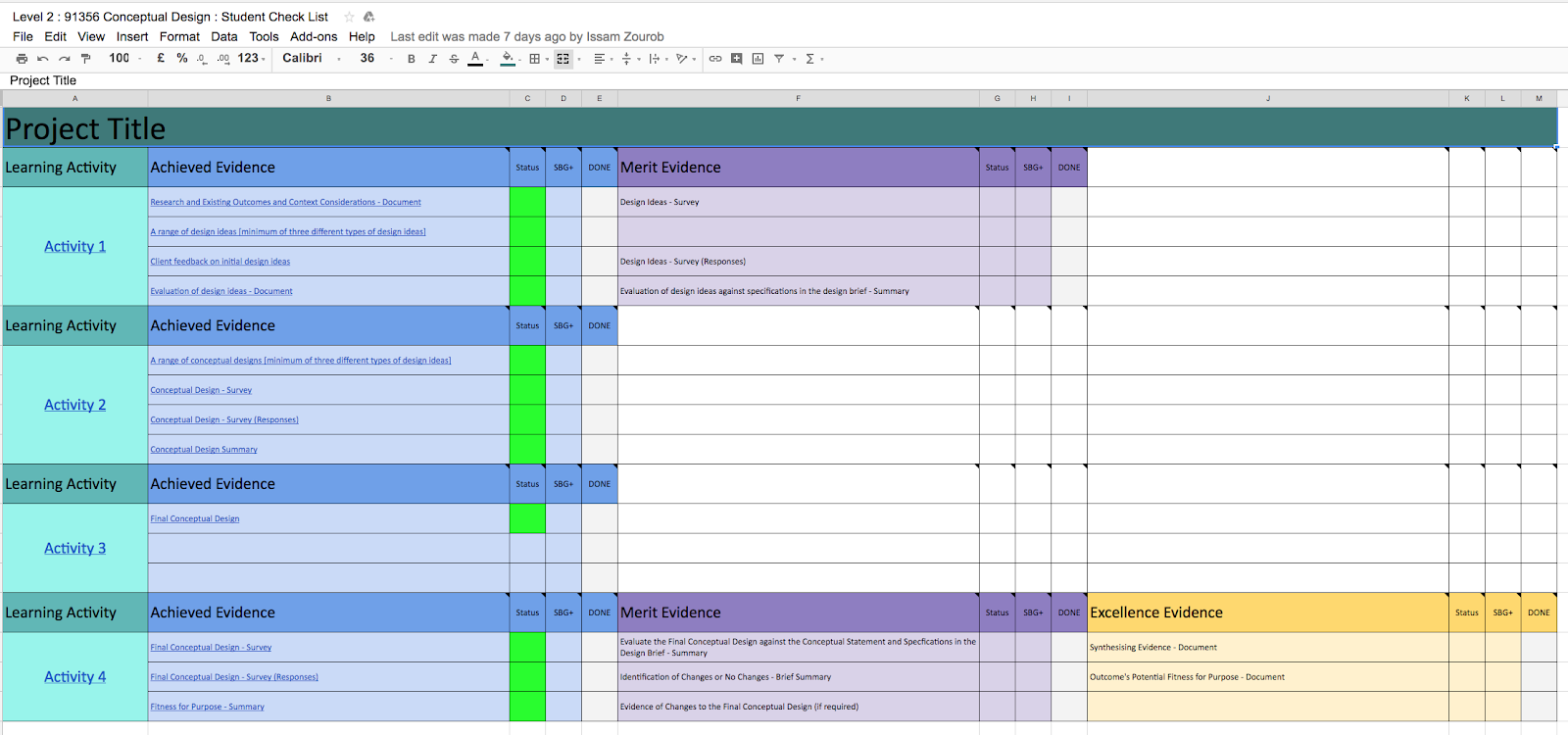
I used Student Project Checklists mostly with my multi-level Senior DigiTech class.  The senior students found it useful and empowering being able to track and monitor their own progress within projects, leading towards the achievement of credits for NCEA standards.  Although I initially trialled the Project Checklists with Junior Classes, time restraints (3 x 50 minute lessons per week, out of a total of 30 lessons per week), as well as junior students seeing their progress within the Class Project Task Lists, meant that the Student Checklists were not as favourable with junior students as they were with senior students, in terms of students monitoring their own progress and achievement in class.


As with the Class Project Task Lists, Student Project Checklists also use the colour code system to track and monitor achievement eg. green (complete), orange (incomplete) and red (not started).  


The following are examples of student feedback or posts about the effectiveness of Student Project Checklists to enable students to track and monitor their achievement:
  • Senior DigiTech Students discuss the benefits of Student Checklists and Google+ on their achievement
  • VTaL - Student Project Checklists to track Student Achievement

Use of Tool 04 - Student Project Checklists across Staff

The following are examples of student and staff feedback across other Learning Areas, about the effectiveness of Class Project Task Lists to track and monitor their achievement:
  • VTaL Tracking Sheets and Class Task Lists in Maths
  • The Benefits of VTaL Class Task Lists and Tracking Sheets - What do Teachers have to say?


In addition to this, many staff directly attributed the use of VTaL Tracking Sheets to Accelerating Shift within their subject areas this year.  This is reflected within the presentation in the following blog post: Visible Learning accelerates shift - Term 4 2017 Tamaki College


The following shows the use of Student Project Checklists by staff from Term 1 to Term 3 this year.


Share
Tweet
Pin
Share
No Comments
I've been experimenting with both the NEW Google Sites and Workspaces within the site for my JumpStart program.  This includes identifying whether the NEW Google Sites, with all of it's updates, has the same functionality as the Classic Google Sites.  This also includes identifying whether the Workspace is VISIBLE within the NEW Google Site, which also needs to be VISIBLE.

At this stage I have been able to set up the NEW Google Site to include pages and subpages.  

  • I've embedded a YouTube clip onto the homepage.  
  • The main pages immediately create a navigation bar at the top of the site.  
  • I have easily embedded a Course Overview (Google drawing), Year Level Calendar (Google Calendar), and separate pages for each Project or Standard.  
  • The Project page includes the Project Instructions (Google document).  
  • There is a subpage within the Project main page, for the Project Workspace (URL link).  

As long as each of the embedded items are VISIBLE, eg. the calendar, documents, drawings, workspace, youtube clip etc, and the site itself is VISIBLE, then all of the work is completely VISIBLE within the NEW Google Site.

The following video shows and explains the information outlined above.


Share
Tweet
Pin
Share
2 Comments

What is the Purpose of a Google Site?

Having looked at several sites recently, enabled me to see what 'visibility' looks like on Subject Sites.   I was motivated by Parent feedback at the recent Student Parent Conferences, in terms of access to teaching and learning.  This post will discuss the following topics around Google Site Development.

A Snapshot of Visible Teaching and Learning

Visible Learning

What works best for visible learning

“Visible Learning means an enhanced role for teachers as they become evaluators of their own teaching. According to John Hattie Visible Learning and Teaching occurs when teachers see learning through the eyes of students and help them become their own teachers.”
What is Visible Learning

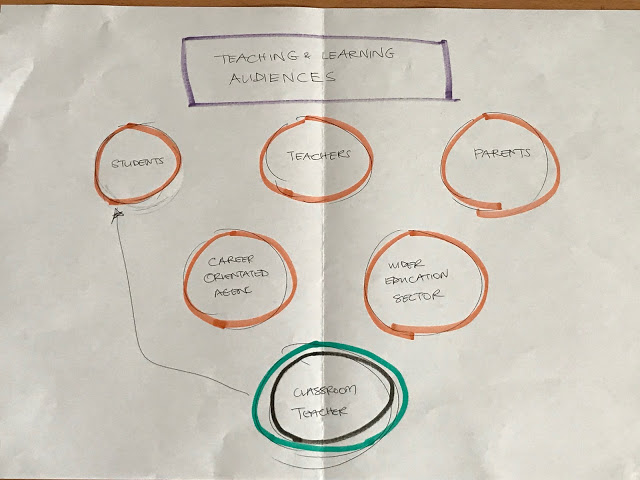
Teaching and Learning Audiences


Parents want access to their child's learning, and they should have access to their child's or children's learning.  However, largely, subject sites are being developed for students, as opposed to multiple audiences eg. parents, other teachers, career-orientated agencies and the wider education sector.  For example, a parent supporting a child to select a course,  may struggle to navigate the site and find relevant information.  


Ways in which easy navigation can be achieved for stakeholders, could be to include the application of simple design principles such as tabs (that follow a ‘basic’ indexing system), calendars, course overall and content, vocational pathways, and interactive learning materials.

Understanding User Flow

Whilst the majority of teachers are not web designers as such, consistency of layout within a website, and across websites is a really big deal in terms of the end user.  In the instance of end users and Subject Google, Sites, the key stakeholders are students and parents.

The following article, A Guide to User Flow in Web Design, provides a brief overview of the relevance and importance of 'User Flow'.

Principles of Design for Websites

The following are a range of resources that relate to the principles of design for websites.

  • Colour Schemes - The following research materials shows the significance, importance or relevance of colour schemes in a website: https://goo.gl/ciuxJG https://goo.gl/ZUCyBc https://goo.gl/WRpTcA
  • Design Features (Background Colours, Shapes, Symbols etc) - The following research materials shows the significance, importance or relevance of design features in a website: https://goo.gl/eKJaa1 https://goo.gl/nvykjv https://goo.gl/pk7t5o
  • Dimensions (Size, Layout etc)  - The following research materials shows the significance, importance or relevance of dimensions in a website: https://goo.gl/tiSLnE https://goo.gl/vEmhhQ https://goo.gl/yQiC8Y
  • Typography (Font Styles etc) - The following research materials shows the significance, importance or relevance of typography in a website: https://goo.gl/PwL2HD  https://goo.gl/jpf5hx https://goo.gl/iH8YEU
  • Digital Features (Links, Buttons, Animations etc) - The following research materials shows the significance, importance or relevance of digital features in a website: https://goo.gl/WoxGcq https://goo.gl/R7RhF1 https://goo.gl/Ym6qAQ

Google Site Development

Visiting sites occurred by going 'incognito' within a web browser, entering the school website, navigating to the class websites, and viewing the subject site for visibility.  The following are a range of issues and variances with Subject Google Sites and across Google Sites identified from recently viewing several sites.

Issues and Variances with Subject Google Sites

  • Sites are not Public and Visible
  • Vertical navigation bar instead of horizontal navigation bar
  • Year levels combined in the Tabs eg. Junior, Intermediates, Senior etc
  • Sites are not identifiable by 'Subject' with 'Teacher Name'
  • Pages with absolutely no content in them
  • Learning Area landing pads with a variety of different link features that navigates to Subject Sites eg. Tabs (with names), Buttons, Photos or Images
  • Navigation tools (tabs, buttons, text) can't actually be read or seen
  • Light text on light backgrounds, and, dark text on dark backgrounds
  • Subject Site Home Page (landing page) that doesn't include Year Level Tabs
  • Embedded Calendars that are not public
  • Embedded Calendars that are public but have no information in the calendar
  • Embedded documents, sheets, drawings etc that are not public
  • Embedded documents, sheets, drawings etc that are public but have no information in them
  • Out of date content eg. 2016, 2015 etc
  • Links that don't actually redirect to the location that the link says that it will link to
  • Sites where the home page is jam packed with so many links, images, buttons, background features etc, that it is actually difficult to know what to click on to navigate anywhere and use the site
  • Links that go nowhere
  • Name variances in navigation links and/or within website titles eg. Mr Ricky Baker, Ricky Baker, Mr Baker etc
  • So many buttons in the navigation bar, that the navigation bar takes up at least half of the home page
  • Classic Google Site Design and New Google Site Design, or, a combination of both Site Designs together
  • No actual teaching and learning resources within the site

Some sites have multiple design, aesthetic and functional issues.  Whilst, other sites have relatively minor issues.  

Future Focus

The following are a range of strategies and suggestions of ways that could enable the development of a Website Structure that is Visible, Effective and User-Friendly.  I'm certain there are more strategies that could evolve out of a consultation process, but at least here are a few to get our heads around.

  • Authentic Feedback of Subject Sites (within learning areas and across learning areas eg. Peer Review, and with other authentic audiences)
  • Consultation with Students and Student Feedback to see which websites are easiest to navigate and use
  • Consultation with Parents to see what they consider to be user-friendly attributes within Subject Sites.  Perhaps forming a 'Think Tank' based on the parent base who provided feedback from the Student Parent Conferences, and offering incentives to these parents for their participation in the consultation process
  • Consult with Staff to gain an understanding of why staff are developing Subject Sites in the way in which they are.  Identify solutions that enables consistent website design to be applied across the entire school, and integrating teaching and learning resources within effective web design guidelines
  • Consult with Expert Web Designers to gain advice on appropriate web design methodology
  • Consultation within Leadership of the desired web design attributes for all Subject Sites.  
  • Subject Site Template to make redevelopment easier for staff who are struggling to meet the Google Site Baseline Expectations
  • Develop a Google Site Framework that is the overarching design of the entire structure of the Subject Sites, starting from the entry point via the school's website, through to the Class/Subject Area Websites home page.
Share
Tweet
Pin
Share
No Comments

2017 Parent Survey

Recently I had discussions with some Tamaki College Parents at the Subject Pathways Evening and Student Parent Conference Days, about accessing their child's learning online.  The following photos are of one of our parents, Melisa Vili, in conversation with me about VTaL Visible Teaching and Learning.


The following shows feedback from parents in terms of access to information about their child or children's teaching and learning. 


Click on the triangle or right arrow (bottom left corner of the presentation) to view each slide.  Click on the square shape to view the 2017 Parent Survey 1 in full screen.


Survey Findings

Twenty six of the twenty eight parents surveyed (93%), have access to and use the internet.  The vast majority of parents are accessing the internet at home the majority of the time.  However, many of using the internet at work and also out and about.

The most popular device that parents are using is their mobile phone, followed by other mobile devices such as netbooks for laptops.

The vast majority of parents are not accessing information about their child's teaching and learning; neither through the school website nor dashboard.  However, the vast majority of parents also indicate that they would love to access information online about their child's teaching and learning.  This includes an overview of what their child is learning over an entire year, what their child is learning on a daily and weekly basis, progress on their child's learning on a regular basis, or all of the information outlined.

Positive Parent Response to the use of VTaL

The following is positive feedback from a parent, Natasha Taylor, viewing information about her son's progress using VTaL Visible Teaching and Learning in my DigiTech subject site: VTaL Parent Voice - Using Tracking Sheets (Class Task Lists) to see my Child's Progress.

Next Steps

The survey data and comments, shows that of the parents who were surveyed, all of the parents have access to the internet, and the vast majority would like to access information on their child's learning.

Currently, parents are not sure 'how' to do this, and so, the opportunity presents itself on how communicating access to student teaching and learning can be refined to enable parents to access the learning.  Once the process of accessing the information is streamlined for parents, what will the parents see when they arrive at the Class Websites?  Will the information be consistent across all websites in terms of the aesthetics and layout of the site, and also how the site functions?  That is not to say that every site should look 'exactly' the same as the next.  However, consistent flow to the layout and function of sites, in order for the site to be easily accessed as parents (and students) would really help.

The technical capability is there in terms of internet access and using a device.  Packaging the information in a transparent and user-friendly way for parents, through the use and VTaL or Visible Teaching and Learning is a way that could make this happen.


Share
Tweet
Pin
Share
No Comments
I had the pleasure of meeting with Natasha Taylor, parent of Lukis Taylor in Year 9, at the Student Parent Conferences.  Natasha wanted to know what Lukis's progress looked like in DigiTech, and so we had the discussion based on information that was available in my DigiTech with Ms Anderson subject site for Year 9 Student Academic Progress.


Natasha was delighted to see what Luki's progress looks like in class so far.  Here are a few comments about what Natasha had to say:

"OMG he's doing work".
"It's nice having good feedback from teachers".
"The colours are so clear.  It's pretty obvious what the colours mean.  Green means he's doing work.  Red means students haven't done anything.  Kind of like how marking is always done in red pen, so you know something isn't right".

As a teacher, it is really enlightening to see how transparent and useful the colour codes are in the tracking sheets and class lists for parents and students.  Natasha was really keen to catch up with Lukis and commend him on the information she'd just learnt about his progress in class.


Share
Tweet
Pin
Share
No Comments


The 2017 Manaiakalani Hui was a great forum to participate in, and share ideas and strategies around teaching and learning for staff and students within our schools.

It goes without saying, that so many of us, who are either directly, or indirectly connected to the learners in our community, want the very best for our students.  The discussions around the 'hows', the 'whys', the backward reflecting and the forward projecting is where a lot of the rich and meaningful conversations come from.  Within our own teaching environments, it is easy to feel overwhelmed somedays when the challenges seem so great.  However, connecting with colleagues within our community of learning on a day such as this, is a timely way of expressing, appreciating and celebrating all of the positive initiatives that are contributing to outcomes for our students.
   

It was wonderful to see the student ambassadors share part of their learning journey from the Manaiakalani schools.  So much enthusiasm and insight shared by all of the students; an absolute delight to watch.  Extremely grateful to take in the knowledge shared by my fellow 2017 SPARK MIT colleagues, Sandy, Dorothy, Angela and Troy, as well as inquiry displays from my fellow CoL teachers.

I appreciated the opportunity to share my vision and latest inquiry updates around VTaL, and what the VTaL framework means to me, in terms of breaking down barriers and access to learning for students in our community, with the potential for the framework to be utilised on a much wider scale.

Some of the 'Impact stories' that I had, included discussions with the following attendees at the Hui:

  • Pat Snedden around the logistics of shifting culture, belief and capability across an entire cohort of people.  Student feedback is what has driven the majority of changes in my own practice, as well as the development of the VTaL framework.  Whilst the student feedback has at times been particularly frank about which subjects utilise digital tools such as sites, calendars etc the most, I have not generally used this feedback to create shift, other than with staff in my own department.  This lead to a particularly interesting conversation around responding to student voice.
  • Maria Krausse from Core Education, about the collective impact and logistics around students commenting within Google+ communities.   In the past I had set up Google+ communities for each class, whereby students within classes would share and comment on work.  However, at the end of that year, the students would move into another class, and so, it made more sense for me to set up Year Level Communities, to promote the longevity and usefulness of the resources that students were uploading and sharing.  As discussed in a previous blog post, I've found that students posting and commenting within a community, enables other students to view the resources from many sources (their peers) on a particular category all at once.  This is especially useful when developing exemplars relating to NCEA levels, as our students do not necessarily connect with the NZQA exemplars online.  What I'd like to investigate is students blogging to their own blogs, and sharing the blog post to the Year Level Google+ Community, to see if that enables ownership of the original post, as well as community sharing according to particular topics.
  • Gina Harduar and Christine Mitchell about the overall purpose and function of the VTaL Visible Teaching and Learning Framework, it's potential and benefits to learners so far.  I was able to show Christine a short video of students from Glenbrae School using VTaL at the end of last year.  The benefit of this is being able to show that although VTaL was set up in a secondary school context, essentially, it is a series of digital tools and components that enables work flow to take place in a range of educational settings; including primary schools.

A big thanks to those who touched base with me throughout the day to talk about VTaL and other challenges within education.  Hugely inspiring discussions and exciting times ahead for us all.


https://sites.google.com/a/manaiakalani.org/annualhui/home


Share
Tweet
Pin
Share
No Comments
Older Posts

About Me

Kia ora! I am the Head of Technology at Tāmaki College and also teach Digital Technologies.


My target group of learners for my Inquiry 2021 will be my Year 12 NCEA Level 2 class. This group of learners were my target group from my 2020 Inquiry. I would like to inquire into whether Academic Writing exemplars specific to Digital Technologies, in conjunction with the 'Explanation Writing' classroom display resources for Digital Technologies, based on SOLO taxonomy, could accelerate achievement in literacy in my subject.


My target group of learners for my Inquiry 2020 were my Year 11 NCEA Level 1 class. I inquired into the process of using the LearnCoach online programs (content) and VTaL Visible Teaching and Learning (workflow) to accelerate student achievement for Tamaki College students undertaking courses in Digital Technologies NCEA Levels 1, 2 and 3.


In 2019, my inquiry is to maximise pedagogical practices (relating to integrated education, and collaborative teaching and learning), to effectively shift student achievement, supported by digital platforms connected to visible teaching and learning.


My Inquiry in 2018, was to develop a VTaL Purpose-Built Innovative Tool, to enable all elements of the VTaL Framework to be accessible to teachers, in order to accelerate student achievement.


In 2017, my inquiry was based on raising student achievement and shifting teacher practice around effective pedagogical practices including Learn, Create and Share. This will be achieved through the development, implementation and monitoring of the Visible Teaching and Learning Framework.

recent posts

Blog Archive

  • ▼  2022 (8)
    • ▼  March (3)
      • Hybrid Teaching and Learning | The impact of Omicron
      • Manaiakalani Toolkit | Well-being - Supporting Our...
      • Technology - Manaiakalani Department Discussions M...
    • ►  February (5)
  • ►  2021 (16)
    • ►  November (1)
    • ►  September (2)
    • ►  August (1)
    • ►  July (2)
    • ►  June (4)
    • ►  May (3)
    • ►  March (2)
    • ►  February (1)
  • ►  2020 (42)
    • ►  November (2)
    • ►  September (2)
    • ►  August (7)
    • ►  July (5)
    • ►  June (4)
    • ►  May (7)
    • ►  April (7)
    • ►  March (3)
    • ►  February (4)
    • ►  January (1)
  • ►  2019 (30)
    • ►  September (2)
    • ►  August (3)
    • ►  July (1)
    • ►  June (2)
    • ►  April (1)
    • ►  March (12)
    • ►  February (9)
  • ►  2018 (41)
    • ►  November (7)
    • ►  October (2)
    • ►  September (1)
    • ►  August (4)
    • ►  July (4)
    • ►  May (7)
    • ►  April (4)
    • ►  March (5)
    • ►  February (7)
  • ►  2017 (65)
    • ►  December (2)
    • ►  November (22)
    • ►  October (6)
    • ►  September (6)
    • ►  August (10)
    • ►  June (4)
    • ►  May (3)
    • ►  April (1)
    • ►  March (4)
    • ►  February (6)
    • ►  January (1)
  • ►  2016 (26)
    • ►  December (1)
    • ►  November (18)
    • ►  September (6)
    • ►  August (1)

VTaL

  • VTaL (104)
  • VTaL 01 Subject Sites (33)
  • VTaL 02 Learning Activities (7)
  • VTaL 03 Tracking Sheets (28)
  • VTaL 04 Student Checklists (12)
  • VTaL 05 Calendars with Links (24)
  • VTaL 06 Workspaces (32)
  • VTaL 07 Student Sites (4)
  • VTaL 08 Year Level Sites (3)
  • VTaL 09 Subject Communities (26)
  • VTaL 10 Student Blogs (11)
  • VTaL and Google Hangouts (15)
  • VTaL and Student Achievement (45)
  • VTaL for Parents (13)
  • VTaL for Students (82)
  • VTaL for Teachers (32)

Presentations

  • GAFE (19)
  • My YouTube Videos (8)
  • Presentations (21)

Inquiry

  • Inquiry (134)
  • Inquiry 2019 (27)
  • Inquiry 2020 (34)
  • Inquiry 2021 (15)

Manaiakalani

  • CoL (167)
  • Inquiry (134)
  • Inquiry 2020 (34)
  • Learn Create Share (11)
  • MIT 2018 (16)
  • Manaiakalani (18)
  • Presentations (21)
  • SPARK MIT (59)

Tamaki College

  • 2018 Department Goals (2)
  • 2018 School Goals (3)
  • 2019 Department Goals (2)
  • CoL (167)
  • Collaborative Learning Environments (32)
  • Covid19 (29)
  • Cultural Responsiveness (10)
  • Differentiation (12)
  • EMR Collaborative Project (21)
  • Goals (2)
  • Human Rights Collaborative Project (5)
  • Integrated Education (24)
  • Kia Eke Panuku (8)
  • LearnCoach (2)
  • Literacy (21)
  • PLD (18)
  • Techies (12)
  • Technological Modelling (4)

Practicing Teacher Criteria

  • PTC01 (31)
  • PTC02 (9)
  • PTC03 (6)
  • PTC04 (61)
  • PTC05 (17)
  • PTC06 (42)
  • PTC07 (32)
  • PTC08 (34)
  • PTC09 (8)
  • PTC10 (7)
  • PTC11 (16)
  • PTC12 (54)

General

  • CoL (167)
  • Collaborative Learning Environments (32)
  • Cultural Responsiveness (10)
  • Differentiation (12)
  • Feedback - Parent Voice (2)
  • Feedback - Staff Voice (6)
  • Feedback - Student Voice (23)
  • GAFE (19)
  • Goals (2)
  • Integrated Education (24)
  • Kia Eke Panuku (8)
  • LearnCoach (2)
  • Literacy (21)
  • My YouTube Videos (8)
  • Review (14)
  • Student Agency (15)

Contact Form

Name

Email *

Message *

Total Pageviews

Created with by BeautyTemplates| Distributed By Gooyaabi Templates