My Space and My Place

    • Home
    • Inquiry 2021
    • Digital Technologies Site
    • VTaL Site
    • VTaL G+

As outlined in today's NZ Herald article, Covid19 Omicron outbreak: 15,540 new community cases, 952 in hospital, 2 deaths, Auckland covid cases are said to be "on a downward trend".  However, also stated in the article, "schools across the country are feeling the impact of the Omicron outbreak".  

What does this look like for "our" students?


Since the beginning of the 2022 school year, I have inquired into various aspects of Hybrid Teaching and Learning, and how this learning approach may be used to enable our learners to achieve.  As outlined from the list below, this has included inquiring into initial takes on Hybrid Teaching and Learning, Student Voice of Hybrid Teaching and Learning, what we've (Techies) learnt from Lockdowns, Understanding the variables to make it work, and the Hybrid Timetable.

  • Hybrid Teaching and Learning | Take 01
  • Hybrid Teaching and Learning | Take 01 - Student Voice from Learners In-Class Onsite
  • Hybrid Learning 2022 | Techies Learning from Lockdowns
  • Hybrid Teaching and Learning | Understanding the variables to make it work
  • Hybrid Teaching and Learning in our Hybrid Timetable

At this stage of the pandemic, with Omicron as the main Covid19 variant, and also at this stage of the year, it is too soon to come to any conclusions about the long term impacts or benefits of Hybrid Teaching and Learning for learners, but also the long term impacts or benefits to educators; particularly educators who are in the classroom.

What is clear is that teaching and learning has evolved, and continues to evolve at a frenetic pace, in response to the Covid19 pandemic.  It will be interesting to see what student achievement looks like as assessment data becomes available.


Share
Tweet
Pin
Share
No Comments


Here's an example of Hybrid Teaching and Learning in our Hybrid Timetable that involves a couple of Year 12 DGT students undertaking tasks onsite in the classroom, while a few of the Year 13 DGT students are undertaking tasks online from home.

A scenario that I've developed for the students is to complete tasks onsite at school within the VS Code - Code editing software on the classroom workstations, and transferring that code into the Neocities online web development application, so that they can continue working on their web development tasks from home.  This requires the students always ensuring that the codes in their Neocities sites is up to date.  However, it also allows the students to develop their technical skills in the more complex, industry standard Code editing software when they are in the classroom.

So, the hybrid teaching and learning methods in these contexts includes:
  • Online learning for students logging in from home and in the classroom (coding in Neocities) - Online learning is learning that is accessed by the learner via the internet, whether remotely or onsite at school
  • Remote learning for students logging in from home (coding in Neocities) - Remote learning is learning that takes place away from school, whether via the internet or paper based
  • Face-to-face learning for students logging in from home in the Google Meet, as well as students in the classroom (coding in Neocities) - Face-to-face learning is learning that takes place with the teacher, whether online or in person
  • Onsite learning for students in the classroom (coding in VS Code and also Neocities) - Onsite learning is learning that happens at school
The importance of setting up this approach for learners, of using complex software onsite in the classroom, and also software that is available online, is that the learning can continue for the learners regardless of whether they are learning from home, or learning onsite at school.  As long as the students have devices and internet access, the learning journey continues.

Share
Tweet
Pin
Share
No Comments

Meeting the needs of learners in different environments amplified by Covid19, and particularly the highly transmissible Omicron variant, in a way that is physically, mentally and emotionally possible for teachers in a practical and sustainable manner, has thrown up a whole range of variables.  Welcome to the concept of Hybrid Learning.  How do we find the balance between what is possible and what is realistically doable?


Covid19 is not new news.  We're now into our third trip around the sun with regards to our global journey with Covid19 and its variants.  This is not our first rodeo, so to speak.

How responsive are we to adapt to the changes to learning needs brought upon us by the highly transmissible variants of Covid19?

Some of the variables in the Hybrid Teaching and Learning space that I've experienced so far includes:
  • Students understanding the value of the hybrid model of learning for themselves and empathy for others.
  • Buy-in from students in the classroom.
  • Engagement from students learning from home.
  • Staff capability to execute and apply online learning (possibly in real-time), and onsite learning both at the same time.
  • Preparation of lesson resources in a digital context eg. lesson structure and flow, exemplars, demonstrations, resources to support content knowledge and understanding, resources to support the practical application of a subject
  • Fluidly transitioning between onsite, offsite, online or a combination of all three, in a way that still allows effective teaching and learning to take place
  • Timetable adaptations  

Varying degrees of hybrid learning to suit the learning situation:

  • are the offsite students working online during the lesson at the same time as students who are onsite?
  • are the offsite students accessing the lesson information outside of the lesson time?
  • are the onsite students accessing the lesson information outside of the lesson time?
  • are recordings happening during the lesson and in real time, to capture the learning outcomes in class?
  • are recordings being made either before or after the lesson to respond to learning outcomes associated with the lesson?
  • are the recordings instructional? eg. The learning intention for the lesson is ... The following is a demonstration on how to .... etc
  • are the recordings responsive? eg. In order to respond to your query on (x, y, z), let's look at/investigate/inquire into ... 
  • are the recordings inclusive of a combination of instructional and responsive approaches to teaching and learning?
  • are recordings being used at all?
  • what combination of hybrid teaching is possible and most effective for classes of younger learners, senior students at the start of their NCEA journey or in their final year of NCEA Level 3?
  • what combination of hybrid teaching is possible and most effective for large class sizes, louder classes etc?
  • are the vast range of learning needs such as literacy, learning and behaviour, high ability etc still getting the same level of focus and depth, and how are these able to be met within the hybrid learning model?

What did our teacher practice look like prior to Covid19?, throughout our journey with Covid19?, and at our current place with Covid19 at the beginning of the 2022 academic year?  What are we already considering with regards to what could happen beyond the now?

Hopefully from the snapshot overview that I've provided in this post just from my insights alone, it is easy to see that none of this is a one-stop-shop scenario that can be applied anywhere and everywhere.  The boundaries of teaching and learning are being constantly challenged.  And so I'm filled with more musings about the 'how'.  How can we best support our learners?  How can we best support our educators?  How can we best support our learning communities?

Reflecting back to my original question about, 'How do we find the balance between what is possible and what is realistically doable?', involves understanding and accepting the breadth and depth of the variables that are changing every lesson, every day, every week and every month.  As overwhelming as this may seem at times, focussing on what is directly in front of me, seems to be the best way of finding the balance required to navigate hybrid teaching and learning on a daily basis.  And so, I leave you with this ... one of my favourite movie quotes ...


Share
Tweet
Pin
Share
No Comments

taken from the Ministry of Education Hybrid Model 2022 pdf download

On our very first Teacher Only Day back at school, in one of our department meetings, I discussed one of the major changes to the teaching approaches needed to address the learning needs of students under the Red Traffic Light System.  That being, the ability to apply a hybrid approach to teaching and learning.  This was based on the experiences that my team underwent in the previous lockdowns for delivering Technology programs online to our contributing partner schools.  This, coupled with the work that we undertook as a department to ensure that the evidence-based learning captured in the end of year junior reports, accurately reflected and reported on the learning that students experienced in Auckland's extensive lockdown in 2021.

The following Ministry of Education Resource Guidance for School Leaders and Staff, refers to the 'flexibility for the learner/family/whānau', by having access to the learning resources eg. video recordings etc, at any time.  

However, the shift for my team into the Hybrid model, has also been influenced by the wider stakeholder needs (Primary Schools - teachers, students, whānau), and the teaching requirements that were needed to deliver our programs outside of our own secondary school environments.  There's nothing quite like a range of different stakeholder needs, numerous discussions negotiating the variables of our stakeholder partners, time restraints that transcend two different sectors (primary and secondary), and limited resources for at-home learning, to motivate the levels of change and adaptation by the Technology team to our teaching programs.  For this reason, the step into Hybrid learning is easily understood by the Technology department.  Not that this makes hybrid learning a piece of cake to execute (although cake would be nice), but more so that the level of understanding has enabled the team to continue making brave steps and brave choices in their teaching approach at the beginning of 2022.

And so, yet again, the Techies are embracing change.  That in itself is half of the battle won 🏆

With Year 7 and 8 Technology starting this week, we are offering a combination of the following to meet the different learning needs of our contributing primary school partners:

  • Face to face learning for primary schools coming onsite
  • Online learning for primary schools undertaking Technology at their own schools; including Steam Punk being delivered by our Hard Materials teacher, MBoT and Microbit Coding being delivered by our Robotics teachers, DVC online and Food Technology practical lessons being offered to primary schools on their school grounds via online teaching from our school

It's been a great start to Year 7 and 8 Technology so far this week.  We look forward to continuing for the rest of this week and beyond.


Share
Tweet
Pin
Share
No Comments


The following is Student Voice that I obtained from students in my 11DGT Class about the Hybrid strategy that I applied recording a series of Google Meet Recordings in the previous lesson, which you can read about in the link below. 

Hybrid Teaching and Learning | Take 01

Whilst the feedback is from the students were In-Class Onsite, it is still useful to learn the value that these students placed on the Hybrid Teaching Strategy using Google Meet Recordings, and also, that the students could see the benefit of the Hybrid Teaching Strategy to their own learning journey.

Also interesting to read how other schools across the globe are approaching the use of Hybrid Teaching Models with their learners Personalizing Learning through a Hybrid Model.


Share
Tweet
Pin
Share
No Comments

I've been thinking of ways to teach my students who are in front of me in the classroom, as well as enabling my learners to access the learning instructions either in real time from home, or as a rewindable resource to refer back to.

In order to ensure that I am engaging with the learners in front of me, while recording snippets of learning in Google Meets throughout the lesson, I changed the angle of my desk to be side on to the students in class.

I recorded four Google Meets during the course of the lesson with my NCEA Level 1 DGT Class.  Each Google Meet addressed a different purpose in the teaching and learning process.

Meet Recording 01 - Instructions at the beginning of the lesson

The first recording is an example of what I had intended prior to the lesson.  That being, that I would record the first 5+ minutes of the lesson instructions, which would then be available to students working offsite and online.  


Meet Recording 02 - Instructions on accessing the learning videos in LearnCoach

The second recording was a refresher of how to access the learning videos in LearnCoach, for students who may not have enrolled into the LearnCoach course yet.


Meet Recording 03 - Responding to a query on capturing evidence of student work

The third recording, was when I decided to record an interaction between myself and one of the students, in order to respond to her query around capturing evidence for her work.  This wasn't initially what I had intended in terms of recording the Google Meets while in class.  However, it made perfect sense to capture the teaching and learning, both for the student who asked the question, as well as other students who may also want to know the answer to the same question.


Meet Recording 04 - Responding to a query on accessing the software application

The last recording for the session, was to assist students on how to access the software application required for this unit of work.


The following are a couple of photos of the setup to enable me to record myself in the Google Meets, and still face my learners sitting in front of me in the classroom.


Next Steps

It would be useful to get student voice and feedback of students in the classroom, as well as students who were absent from school today.  I'm interested to know how the students in the classroom were impacted by what I was doing as a teaching strategy to address the learning needs of those onsite and at home.  I'm also interested to know how the students at home, feel about the Meet recordings, and whether these are sufficient to progress the learning that they missed in class today.


Share
Tweet
Pin
Share
2 Comments

The following is a description of the adaptations that I made to the current project for the NCEA Level 1 students to undertake during Lockdown Level 3 in August 2020. 

This group of learners are my Target Learners for my Inquiry 2020, so I was particularly keen, to come up with strategies that will enable the students to continue with their program of learning.  Having undertaken a similar process for my other senior students, I was fortunate in this instance, that I was able to return the same project and the same standard, but adapt the resources that the students would access, in order to continue with their work in a remote learning environment.

The project is to Develop a Website and includes the following standard:

AS91880 Develop a digital media outcome

This achievement standard involves developing a digital media outcome, in this particular instance, a Website.

Prior to Level 3 Lockdown, students were undertaking tasks in class to work towards completing the project.  This involved the use of Visual Studio Code; a free software download that is used for code editing.  Unfortunately, the application cannot be downloaded to and used on Netbooks or Chrome books, which are the common devices that students would use to learn from home, including during the lockdown period.

Fortunately, I was able to adapt the course materials to use a different application for Remote Learning during lockdown.  This is the Codepen Online Code Editor which I dropped a link to, into the Project Workspace as shown below.


I explained to the learners what they would have to do with their existing work, in order to use the Codepen Online Code Editor, to see what their feedback was.  It would essentially mean that the students would have to re-do some of their existing tasks, to ensure that the Codepen application included all of the work that they had completed up until lockdown, in order for the learners to progress forward with their tasks.  As much as this meant that time would be consumed doing so, the learners seemed to be happy and grateful about a way of them progressing forward with their work.


Signing up to Codepen - Alternative to Visual Studio Code for Remote Learning

Click on the image below to view a short clip of me demonstrating to learners the signup process for Codepen.


Setup of HTML pages in Codepen

The following screenshot is me demonstrating to students how to setup their HTML pages eg. Pens, in Codepen.


Saving Codes to Google Docs

Working in Codepen is just a temporary measure for during Level 3 Lockdown.  When we return onsite and back to the classroom, we will also return to using the original software, Visual Studio Code, that is accessible on the desktop Mac computers.

In order to have a backup of the work that students are completing every lesson online using Codepen, I had the students set up folders and documents into their Google Drive, as shown in the screenshots below.  


Click on the image below to view a short clip of me demonstrating to learners how they are to copy and paste their codes for each webpage from Codepen, into Google documents saved into their Google Drive.   The most latest codes will then be able to be transferred back into Visual Studio Code when we return to school.  


Although Codepen is an online application, I didn't want to take the risk of the learners, getting deeper and deeper into their assessment, and then for reasons outside of anyone's control, then not be able to access their work again when we're back in the classroom.

This may seem like an extreme and super cautious approach, and maybe it is.  But hey, we didn't exactly anticipate being back in Level 3 Lockdown again with little to no warning, so taking extra precautions to help students with their learning seems like a minor step in the equation.
Share
Tweet
Pin
Share
No Comments
The following is a description of the original Program of Learning for students undertaking Digital Technologies NCEA Level 3, and the adaptations that I made to the standards offered to learners during Lockdown Level 3 in August 2020. 

Share
Tweet
Pin
Share
No Comments
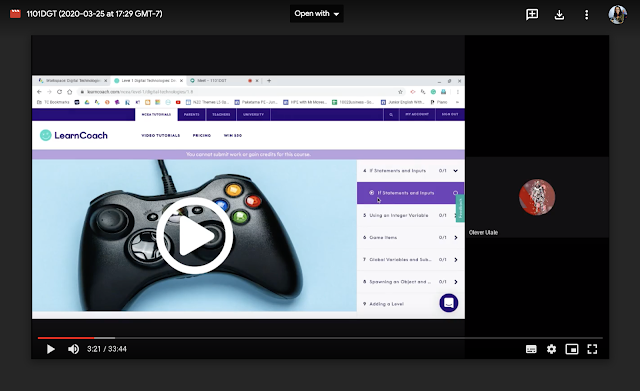
 1101DT Lesson 25 March 2020

Google Hangout Video Link

Lesson Sequence in the Google Hangout

The lesson sequence in the Google Hangout accessible through the video link, includes the following:
  1. Teacher (myself) - Instructing and demonstrating
  2. Learner - Following instructions
  3. Learner - Completing a task
  4. Learner - Capturing evidence of the task
  5. Learner - Submitting the task
  6. Teacher - Checking work and marking
  7. Learner - Sharing work in the Year 11 DigiTech Google+ Community
  8. Teacher - Asking for feedback of the lesson


Teacher Reflection

After undertaking the lesson with this learner, I understood that this particular learner's progress would accelerate (which is excellent for Olever!) and that other learners in the class may not progress at the same stage as Olever in their learning journey.  Therefore, I need to investigate ways to address the staggered progress by looking into Differentiation and seeing how I can adapt that to suit Remote Learning.

Differentiation

The following is a blog post about Differentiation that I came across quite a few years back, which I think will be really useful https://stivodifferentiation.wordpress.com/differentiation-tips/.  

In particular, the section on Differentiation by task would be particularly useful.  I find within the classroom setting that students would complete tasks at a different pace to each other, and therefore achievement would occur at a different pace for different learners.  

My experience of remote teaching in Week 1 of Lockdown, showed that students who joined the hangout for their session, often completed tasks quickly, enabling me to turn over formative feedback quickly for the student, who after making changes would achieve that particular aspect of the task.

Tracking Student Progress

The following is an example of work completed by a student during Week 1 of Lockdown in relation to the other students in their class who were not able to join the hangouts that week.


My students are used to tracking sheets in our classes.  Usually I use a traffic light system of Green to show that aspect of the task meets the criteria, Orange to show that the task is either work in progress, or that I have sent the work back to the student with formative feedback for changes to be made, and Red to show that the task hasn't been started.  In this particular case, the tasks are not directly related to assessment criteria, and therefore I opted to go for a different colour scheme, so as to not confuse the students about the summative feedback that they were being provided with.

Differentiation 

to Address Gaps in Student Progress Across a Class

Group Work and Collaboration: One of the teaching strategies that I am going to trial in the remote learning setting is group work and collaboration.  

Tracking Sheets: I am going to use the tracking sheets, to enable myself and my learners to identify who is working on the same tasks and then I will group the students accordingly.

Year Level Google+ Community: I intend referencing the Year Level Google+ community, so that students can refer to each others (completed and assessed) work, as guidelines of the expectations for completing tasks.  

Chat Function in the Hangout: I think I'll aim to have the students within a particular group, talk to each other via the chat function in the hangout, to share ideas with each other.  The group may be pairs or threes, I'll try to keep this small.  While small groups are working together, I am going to interact with a small group of learners at one time, or that is the intention anyway.

Wish me luck!


Google Hangouts - Tips and Tricks


  • If neither you or your student or students are interacting in the hangout, ask one of the students to go into presentation mode, otherwise the recording will show yourself (as the hangout owner) for long chunks of time in the recording
  • Stay in the hangout and let the students know that you're still there.  That way they can complete the work that you've set for them, but they also know that they can ask you for help.


Share
Tweet
Pin
Share
No Comments


Image result for unit plan


The unit of work that I am delivering for the JumpStart program in Term 4 is 11DGT Create a Web Page US18734.  The unit plan itself shows the extent to which VTaL Visible Teaching and Learning can be integrated into all aspects of learning within the unit of work.  The unit plan template has been developed by Middle Leaders in consultation with the Senior Leadership Team, Curriculum Committee and Teaching Staff, to encapsulate aspects of the Curriculum.

The following are sections of the unit plan that applies various components of VTaL Visible Teaching and Learning:
  • Teaching and Learning - Learning Activities, Resources
  • Assessment - Prior Assessment, Formative Assessment, Summative Assessment
  • RISE Values - Respect, Integrity, Success, Responsibility
  • NZC Key Competencies - Thinking, Relating to Others, Understanding Language, Symbols and Text, Managing Self, Participating and Contributing
  • SAMR - Redefinition
  • NZC Literacy and Numeracy - Literacy
  • SOLO Taxonomy - Unistructural (Identify), Multistructural (Describe), Relational (Apply), Extended Abstract (Evaluate)
  • Differentiation - Process, Learning Environment
  • Kia Eke Panuku - Whanaungatanga, Mahi Tahi Kotahitanga, Wananga
  • Career Management Competencies - Exploring Opportunities, Deciding and Acting

Share
Tweet
Pin
Share
No Comments
My Senior DigiTech class is a multi-level class of Level 1, Level 2 and Level 3 students.  Students are able to select from a range of contexts that suit their interests.  However, with so many different projects happening across all three year levels, and with students working at a different pace to each other, it can be quite cumbersome in terms of keeping a track of where each student is at within their current projects.

So .... I decided to load the students' checklists into a grid, that enables both myself, and the students, to see at a glance, who is working on which standard and within which part of the Technology project at any given time.  This is so that both myself and the students can monitor progress and aim to keep the students on track!


Share
Tweet
Pin
Share
1 Comments
There are four different projects happening in DigiTech at the moment.  With the Senior DigiTech class being a multi-level senior class (Level 1, Level 2 and Level 3), it has been really helpful for the students to know what they're learning (Hyperlinked Calendar posts and SOLO-focused learning activities) and to track their progress (Class Task List).

The projects that the students are working on includes:
Level 1 - Create a Website (continuation from JumpStart)
Level 1 - Use Command Sequences
Level 2 - Create a Website
Level 3 - Brief Development

Link to Academic Achievement

Four of the eight Level 1 students gained 2 x Level 1 unit standard credits for their Website project during JumpStart.  Of these four students, three of them have now gained 2 x Level 1 unit standard credits for Use Command Sequences (awaiting moderation).

Nine out of the eleven Level 2 students are two thirds of the way through their first learning activity for their first project, Create a Website.  The significance of this is (a) only one student took DigiTech at Level 1, and (b) the majority of the work for this project occurs in Activity 1.

One of the two Level 3 students are now halfway through their first achievement standard project, Brief Development.  At the same time last year (while this student was in Level 2) it took an extraordinary amount of time (nearly two terms), for this student to complete the Level 2 standard for Brief Development.

The reason why VTaL is working

The main reasons why VTaL is working in Senior DigiTech at the moment, is as follows:
  • students have access to the learning information (instructions, tasks etc) every lesson they attend.  These are rewindable resources for lessons when they are absent
  • students have ongoing and regular feedback, which at least half of the class feels they are receiving really fast.  This enables the students to identify where they are at in their projects, and what needs to happen next
  • more than half of the students find the Year Level communities useful, for accessing exemplars of existing tasks, to guide their own learning
  • students are not affected by the learning pace of their peers around them eg. they can continue learning regardless of whether those around them are working at a faster or slower pace then they are

It's only Week 5 in Term 1.  I'm keen to monitor student achievement as the term and year progresses.


Share
Tweet
Pin
Share
No Comments
Older Posts

About Me

Kia ora! I am the Head of Technology at Tāmaki College and also teach Digital Technologies.


My target group of learners for my Inquiry 2021 will be my Year 12 NCEA Level 2 class. This group of learners were my target group from my 2020 Inquiry. I would like to inquire into whether Academic Writing exemplars specific to Digital Technologies, in conjunction with the 'Explanation Writing' classroom display resources for Digital Technologies, based on SOLO taxonomy, could accelerate achievement in literacy in my subject.


My target group of learners for my Inquiry 2020 were my Year 11 NCEA Level 1 class. I inquired into the process of using the LearnCoach online programs (content) and VTaL Visible Teaching and Learning (workflow) to accelerate student achievement for Tamaki College students undertaking courses in Digital Technologies NCEA Levels 1, 2 and 3.


In 2019, my inquiry is to maximise pedagogical practices (relating to integrated education, and collaborative teaching and learning), to effectively shift student achievement, supported by digital platforms connected to visible teaching and learning.


My Inquiry in 2018, was to develop a VTaL Purpose-Built Innovative Tool, to enable all elements of the VTaL Framework to be accessible to teachers, in order to accelerate student achievement.


In 2017, my inquiry was based on raising student achievement and shifting teacher practice around effective pedagogical practices including Learn, Create and Share. This will be achieved through the development, implementation and monitoring of the Visible Teaching and Learning Framework.

recent posts

Blog Archive

  • ▼  2022 (8)
    • ▼  March (3)
      • Hybrid Teaching and Learning | The impact of Omicron
      • Manaiakalani Toolkit | Well-being - Supporting Our...
      • Technology - Manaiakalani Department Discussions M...
    • ►  February (5)
  • ►  2021 (16)
    • ►  November (1)
    • ►  September (2)
    • ►  August (1)
    • ►  July (2)
    • ►  June (4)
    • ►  May (3)
    • ►  March (2)
    • ►  February (1)
  • ►  2020 (42)
    • ►  November (2)
    • ►  September (2)
    • ►  August (7)
    • ►  July (5)
    • ►  June (4)
    • ►  May (7)
    • ►  April (7)
    • ►  March (3)
    • ►  February (4)
    • ►  January (1)
  • ►  2019 (30)
    • ►  September (2)
    • ►  August (3)
    • ►  July (1)
    • ►  June (2)
    • ►  April (1)
    • ►  March (12)
    • ►  February (9)
  • ►  2018 (41)
    • ►  November (7)
    • ►  October (2)
    • ►  September (1)
    • ►  August (4)
    • ►  July (4)
    • ►  May (7)
    • ►  April (4)
    • ►  March (5)
    • ►  February (7)
  • ►  2017 (65)
    • ►  December (2)
    • ►  November (22)
    • ►  October (6)
    • ►  September (6)
    • ►  August (10)
    • ►  June (4)
    • ►  May (3)
    • ►  April (1)
    • ►  March (4)
    • ►  February (6)
    • ►  January (1)
  • ►  2016 (26)
    • ►  December (1)
    • ►  November (18)
    • ►  September (6)
    • ►  August (1)

VTaL

  • VTaL (104)
  • VTaL 01 Subject Sites (33)
  • VTaL 02 Learning Activities (7)
  • VTaL 03 Tracking Sheets (28)
  • VTaL 04 Student Checklists (12)
  • VTaL 05 Calendars with Links (24)
  • VTaL 06 Workspaces (32)
  • VTaL 07 Student Sites (4)
  • VTaL 08 Year Level Sites (3)
  • VTaL 09 Subject Communities (26)
  • VTaL 10 Student Blogs (11)
  • VTaL and Google Hangouts (15)
  • VTaL and Student Achievement (45)
  • VTaL for Parents (13)
  • VTaL for Students (82)
  • VTaL for Teachers (32)

Presentations

  • GAFE (19)
  • My YouTube Videos (8)
  • Presentations (21)

Inquiry

  • Inquiry (134)
  • Inquiry 2019 (27)
  • Inquiry 2020 (34)
  • Inquiry 2021 (15)

Manaiakalani

  • CoL (167)
  • Inquiry (134)
  • Inquiry 2020 (34)
  • Learn Create Share (11)
  • MIT 2018 (16)
  • Manaiakalani (18)
  • Presentations (21)
  • SPARK MIT (59)

Tamaki College

  • 2018 Department Goals (2)
  • 2018 School Goals (3)
  • 2019 Department Goals (2)
  • CoL (167)
  • Collaborative Learning Environments (32)
  • Covid19 (29)
  • Cultural Responsiveness (10)
  • Differentiation (12)
  • EMR Collaborative Project (21)
  • Goals (2)
  • Human Rights Collaborative Project (5)
  • Integrated Education (24)
  • Kia Eke Panuku (8)
  • LearnCoach (2)
  • Literacy (21)
  • PLD (18)
  • Techies (12)
  • Technological Modelling (4)

Practicing Teacher Criteria

  • PTC01 (31)
  • PTC02 (9)
  • PTC03 (6)
  • PTC04 (61)
  • PTC05 (17)
  • PTC06 (42)
  • PTC07 (32)
  • PTC08 (34)
  • PTC09 (8)
  • PTC10 (7)
  • PTC11 (16)
  • PTC12 (54)

General

  • CoL (167)
  • Collaborative Learning Environments (32)
  • Cultural Responsiveness (10)
  • Differentiation (12)
  • Feedback - Parent Voice (2)
  • Feedback - Staff Voice (6)
  • Feedback - Student Voice (23)
  • GAFE (19)
  • Goals (2)
  • Integrated Education (24)
  • Kia Eke Panuku (8)
  • LearnCoach (2)
  • Literacy (21)
  • My YouTube Videos (8)
  • Review (14)
  • Student Agency (15)

Contact Form

Name

Email *

Message *

Total Pageviews

Created with by BeautyTemplates| Distributed By Gooyaabi Templates