My Space and My Place

    • Home
    • Inquiry 2021
    • Digital Technologies Site
    • VTaL Site
    • VTaL G+
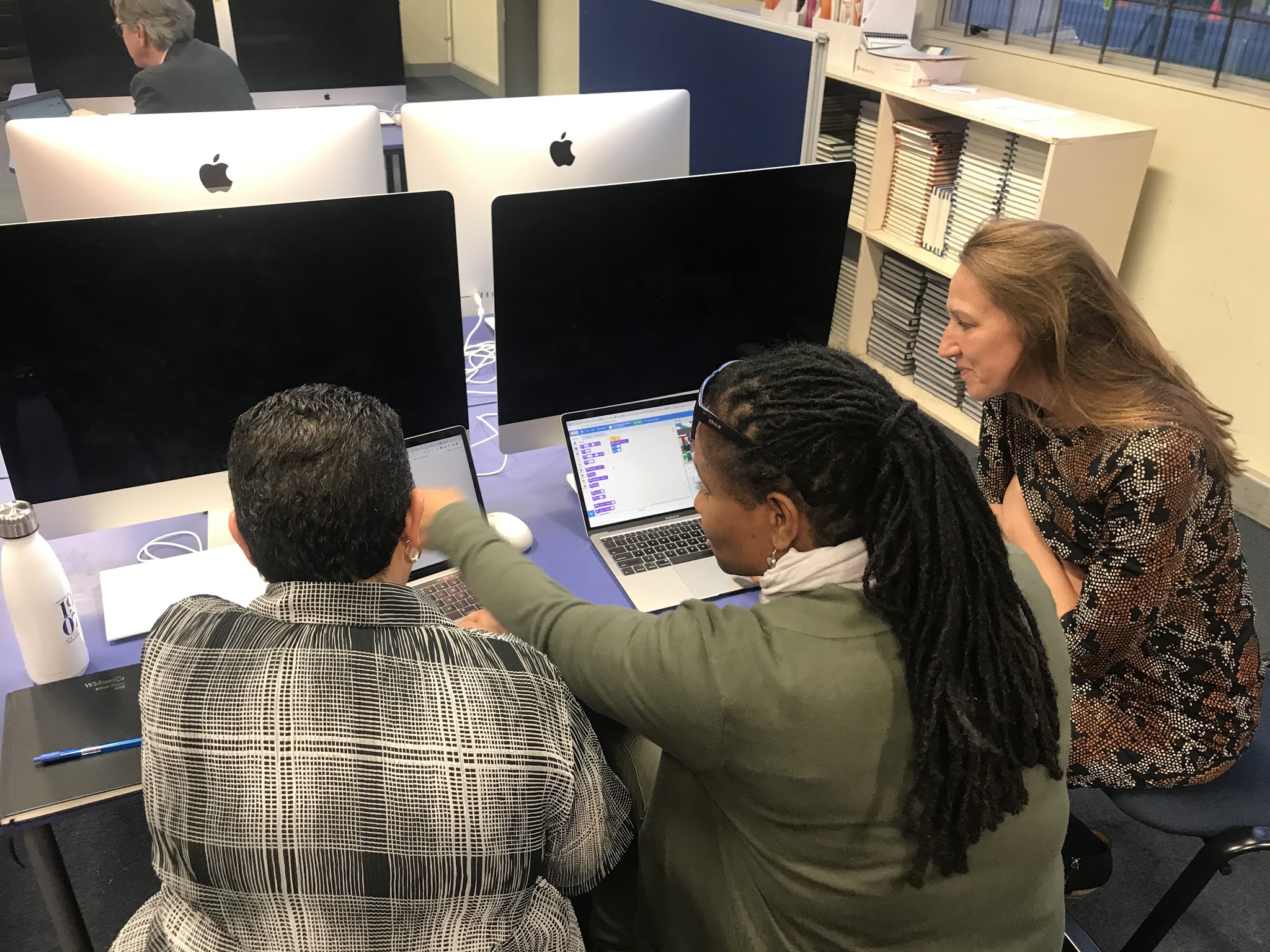
On the 3rd March 2022 the Technology Department had the opportunity to participate in and share various aspects of our teaching and learning in the Technology - Manaiakalani Department Discussions, facilitated by Kerry Boyde-Preece.


As well as sharing an overview of the Technology Department, which you can follow by accessing our presentation Manaiakalani Technology Department Discussion | March 2022 bit.ly/3IDreqp, the Techies also shared in some of the developments within their own Specialist Subject Areas.


Carol spoke about the range of hybrid learning techniques that both herself and Meryl have been applying within their subject area of Food Technology, which has included practical lessons online (students in their home environments and teachers also in their home environments), a combination of onsite and online in two different venues (students in their Primary school environment, and teachers in their Secondary school environment), and also completely onsite at Tāmaki College.


Rob and Andy talking about the different pathways in Building and Construction, and in particular, Rob providing insight as the Tāmaki College Trades Academy, into the pathways and industry connections that the Trades Academy offers to our students.


Ruby spoke about 'Design Thinking' and how she is inquiring into cultural responsiveness as a way of enabling learners to celebrate themselves and share of their identity and who they are as a part of the learning process.

Marc discussed the literacy work that he had been working on relating to the Technology curriculum area, including examples of the literacy strategies, interventions and learning tasks that he had developed in this area.




Share
Tweet
Pin
Share
No Comments

Animation Example

The following is an example of the Animation that has been used in the Create an Animation in Scratch to Share your Learning workshop.


DLO Animation on Scratch - Instructions
The above heading is the link to the Instructions for the Create an Animation in Scratch to Share your Learning workshop.


DLO Animation on Scratch - Example Blog Post
The above heading is an example of a DLO Blog Post that incorporates Animation from the Create an Animation in Scratch to Share your Learning workshop.


Fantastic participation from those who attended the workshop.  Great collaboration too, well done!  Thanks for the feedback Team!


If you would like more support outside of the Create Workshop timeframe to work through this resource, please email me on anderson@tamaki.ac.nz with the 
Subject: Create an Animation in Scratch to Share your Learning Workshop.


Digital Technologies Curriculum
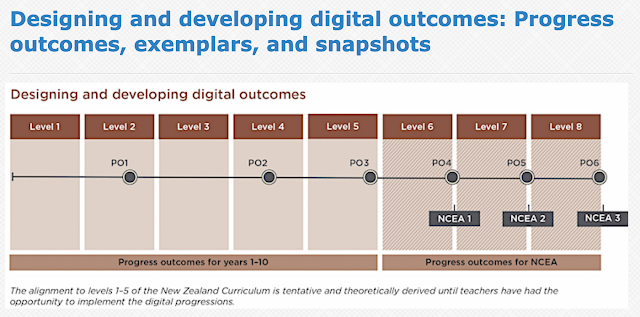
The learning required to produce the Animation in Scratch as a DLO, incorporates various aspects of the Digital Technologies Curriculum from both the Computational Thinking Progress Outcome, and the Designing and developing digital outcomes Progress Outcome.


Share
Tweet
Pin
Share
No Comments


The following is an example of Creating a short, animated presentation in Scratch, and how this way of presenting could be used by students to Share their Learning.

The presentation includes the use of:

  • text (in speech bubbles) to communicate ideas
  • basic animations to give more realistic movements
  • basic animations to capture attention
  • backdrops relevant to the presentation
As you can see, the presentation can be embedded into blog posts, alongside the work that the presentation is describing or referring to.


Game Screencastify 1
Game Screencastify 2
Game Screencastify 3
Game Screencastify 4
Game Screencastify 5

Share
Tweet
Pin
Share
No Comments

It seems timely to have received the following email from Schoolbox <hercules@schoolbox.com.au>
on Tuesday this week.  The email included a really cool poster about Resilience in Uncertain Times, that refers to "supporting your teachers during unprecedented challenges".


Over the years the Techies have always participated in Team Dinners out, and this year was no exception.  It's just one of those out of work things that we do every now and again to touch base on a social basis, no different to how work colleagues socialise in other work environments.  About halfway through the middle of Term 1, we went for our first dinner outing for the year.  Little did we know, that would be a last major social interaction in a face-to-face capacity for Techies with the Covid19 crisis looming.

However ... that didn't stop the Techies ....

During Alert Level 4 and Alert Level 3, the Techies participated in a range of social gatherings online.  This included the Techie Masterchef Challenge, Isolation Egg Hunt, and May the 4th be with the Techies.  The invitation was shared out to staff, and whoever wanted to participate, could.  There were no expectations.

On the first day back to school, Monday 18th May, the Techies met in Lemoncello during Department meeting time after Staff Briefing, to celebrate coming back together again, and also to reflect back on and have a laugh at some of our online shenanigans during the Lockdown period.  These can be viewed in the slide deck that follows.


It has been great seeing the Techies support each other through these crazy times.  Having a laugh doesn't change that we're all experiencing incredible changes in our home environments as well as our work environments, both online and offline due to the Covid19 pandemic.  But having a really good laugh together has really helped!
Share
Tweet
Pin
Share
6 Comments


https://youtu.be/m5e3cDP85OU


This video is about my journey of developing the VTaL Visible Teaching and Learning Site. The VTaL Visible Teaching and Learning Site enables teachers to understand the purpose of how visible teaching and learning can be used effectively to accelerate learning. VTaL Visible Teaching and Learning is a series of tools that supports Learn, Create and Share in the secondary school environment.


Share
Tweet
Pin
Share
No Comments


My Inquiry Focus for CoL 2018, has been "Integrating VTaL Visible Teaching and Learning with cultural visibility and responsive practices to raise Māori student achievement in NCEA years 11-13" in alignment with Achievement Challenge 1.  The focus group for my inquiry this year was students who I taught DigiTech NCEA Level 2.

In order to appreciate what is meant by cultural visibility and responsive practices, it is important to understand the intent of Culturally responsive and relational pedagogy as outlined in the following image sourced from the Kia Eke Panuku site.


Throughout the year, I integrated various pedagogical practices relating to Cultural responsiveness into my teaching practice.  This included, but was not confined to, the following:
  • Whanaungatanga 
  • Mahi Tahi
  • Manaakitanga 
  • Wānanga 

In a previous post, entitled Connecting VTaL to Culturally Responsive and Relational Pedagogy, I outlined ways in which VTaL Visible Teaching and Learning could be incorporated within teaching and learning, to enable Culturally Responsive and Relational Pedagogy to be applied.

In order to give context to what happened throughout the year, in terms of the intent of my teaching practices, and the learning outcomes for students, I will give a brief description of how VTaL could be used with the following aspects of Culturally Responsive practices.  I will then outline what actually happened in terms of learning outcomes for students, and describe other variables that impacted on the teaching and learning process.  After which, I will outline 'What happened for the Learners?', "What evidence do I have for this?', 'What did I do to make this happen?' and 'Wonderings about what next'.


Whanaungatanga - Google+ Communities

The following is a description of how VTaL Visible Teaching and Learning can be integrated with Whanaungatanga - Where relationships of care and connectedness are fundamental.
Collaborative Learning Opportunities are provided for students:
  • Class discussions about context ideas
  • Sharing completed tasks in Google+ as a tool to guide the learning of others
  • +1 and Commenting on tasks shared in Google+
  • Peer feedback in Evaluations

The following blog post describes how Whanaungatanga was applied with the focus group this year:
  • Whanaungatanga - VTaL in Senior DigiTech StartUp and Deconstructing the Year Ahead


Mahi Tahi, Manaakitanga - Google+ Communities and Workspaces

The following is a description of how VTaL Visible Teaching and Learning can be integrated with Mahi Tahi Kotahitanga - Where power is shared and learners have the right to self-determination. Empowerment for students:
  • Students can use Student Check Lists to track their own progress within this unit of work
  • Wananga between kaiako-tauira to select standards according to their interest in IT and DigiTech.  The standards available in DigiTech can be located within the DigiTech site under each NCEA Level (Assessment Information, and, Overview and Calendar)

The following blog post describes how Mahi Tahi Kotahitanga was applied with the focus group this year:
  • Mahi Tahi and Manaakitanga - VTaL in DigiTech and Collaborative Learning
  • VTaL - Mahi Tahi and Manaakitanga : Tuakana-Teina

Wānanga - Tracking Sheets

The following is a description of how VTaL Visible Teaching and Learning can be integrated with Wānanga - Decision-making and practice in response to relevant evidence. Kaiako-Tauira Wananga are provided for students:
  • Use Class Task Lists and Student Check Lists to have discussions around progress and support for developing learning
  • Wananga between kaiako-tauira to select standards according to their interest in IT and DigiTech.  The standards available in DigiTech can be located within the DigiTech site under each NCEA Level (Assessment Information, and, Overview and Calendar)

The following blog post describes how Wānanga was applied with the focus group this year:
  • VTaL - Reflecting on School Goal 3 in Term 1 for NCEA Level 2 DigiTech Students

Understanding the Variables

In April this year, I delivered a presentation at the EdTech GAFE Conference in Auckland about how VTaL Visible Teaching and Learning Tracking Sheets were being used to Track Student Progress.  As part of the presentation, I gave a description of the background of who the learners were.  This is shown in the following slide from the presentation.


The description of the Multi-level Senior DigiTech Class outlines a range of variables that needed to be taken in consideration, when planning to teach and prepare learning activities for the students within the class.


What happened for the Learners?

Learners achieved when they had my full attention.  When I was with other learners from Level 1 and/or Level 3 during a lesson, the Level 2 learners often didn't focus consistently on completing tasks.  I found this quite odd that all of the Level 2 students who were consistently present in lessons, all functioned in this same way.  This was not the case with Level 3 students.  There was often a range of focus and work output shown from the Level 3 students.  Some worked well to complete tasks, while others did not.  However, all of the Level 2 students worked at a particularly slow pace, which was not conducive to keeping up with assessment deadlines.  This meant that the Level 2 students did not achieve in all standards across the entire year, even after having achieved the credits for the first standard.  Culturally responsive and relational pedagogy was not enough on it's own to enable student achievement to continue.

After having discussions with an external provider, who through another program at school, was familiar with this same set of learners, we looked at ways of identifying the way in which students learn by using Gregorc Learning Styles.  For the students who were present, I was able to have them undertake exercises and determine the their learning styles:
  1. Learner 1 - Abstract Random
  2. Learner 2 - Abstract Sequential/Abstract Random
  3. Learner 3 - Concrete Sequential/Abstract Random
  4. Learner 4 - Abstract Random
As shown above, each of the learners demonstrated a close affinity to being Abstract Random in their preferred learning styles.  The following is a description of the characteristics of learners who identify as Abstract Random:

"Abstract – Random (AR)
Abstract – Random (AR) learners prefer an unstructured environment and learn holistically. They show strong visual preferences for taking in information and toward instruction. They prefer physically pleasing, personalized, flexible environments; emotional sensitivity and strong relationships with others; and flexibility in time, activity and demands. They may need repeated coaching to focus their time and activity on learning tasks, vs. on interpersonal relationships in learning or in teamwork environments. Can’t say “no” even when they should, and need incubation time before responding! (They aren’t “slow,” they’re just pondering – and instructors need to recognize this publicly.) Abstract-Randoms ask “If?”. Nickname: People Person, Absent-Minded Professor, or Crazy Artist (musician, etc.). Key words: Imaginative/Perceptive/Social."

Unfortunately, these characteristics are not conducive to independent learning strategies, that I had implemented using VTaL, in order to address the broad range of learning needs of three NCEA levels of learners in my Senior DigiTech class.


What evidence do I have for this?

The types of evidence that I had acquired throughout the year to identify formative feedback of their progress was tracking sheets for the different standards.  I also asked students to share back to me, what they had identified as their preferred learning style.

Tracking Student Progress
  • Create a Website Tracking Sheet
  • Planning for Practice Tracking Sheet
  • Conceptual Design Tracking Sheet

Learning Styles
  • Learner 1 - Abstract Random
  • Learner 2 - Abstract Sequential/Abstract Random
  • Learner 3 - Concrete Sequential/Abstract Random
  • Learner 4 - Abstract Random


What did I do to make this happen?

The following are a range of strategies and interventions that I applied throughout the year to enable students to achieve:
  • Tuakana-Teina Learning Approach - This worked well with the NCEA Level 2 Students in terms of enabling the students to engage in learning, with the support of NCEA Level 3 Students to guide them as to how to complete the work.
  • Wānanga - Conferencing with Students - This worked well to inform the NCEA Level 2 Students (as well as the other two NCEA Levels) of where they were at within the standard that they were focussing on at any given time throughout the year.  However, the overall impact of the conferencing had two different effects, depending on whether students exhibited high levels of motivation and effort to achieve, or whether they didn't.  Whilst I was able to conduct conferences with the NCEA Level 2 students regarding their current level of achievement, this did not motivate the students to work any faster, or to work independently to complete work.   
  • Group Learning Tasks - After identifying the student's preferred learning styles, I stacked some of the learning activities to be group focussed.  This worked particularly well.  However, once students had to progress beyond the group activity to conduct individual analysis of their previous work, students defaulted back to their previous learning approach of slow work output.
  • Whānau Contact - Discussions with Parents and Caregivers - I made contact with parents and caregivers to discuss their child's progress or lack of progress within their projects.  Irrespective of having constructive conversations with parents, this did not translate into an improved work output or faster work output by students.
  • Catchup Sessions - Wednesdays After School from 3pm - 5pm, Labour Day - I ran after school catchup sessions as well as a full day catch up session on Labour Day for students to complete their projects.  This was to address the issue of timelines and time required for students to complete work.  However, it was always the students from the other NCEA Levels, who exhibited a highly productive work ethic and high intrinsic motivation, who attended these sessions.  The NCEA Level students would have attended 10-20% of the catchup sessions that I had offered.


Wonderings about what next

The blog posts and photographs relevant to Culturally Responsive teaching and learning interventions, indicates that these strategies were highly effective in engaging the learners to participate in the learning process.  However, the evidence shows that the Culturally Responsive teaching and learning interventions, in isolation, were not effective in enabling this particular focus group of learners to achieve.  Regardless of this, I will continue to incorporate Culturally Responsive teaching and learning interventions in future units of work, if this continues to engage learners.

Some wonderings that I have about what next, includes teaching students how to effectively self manage, and well as investigating strategies to improve intrinsic motivation and effort, so that students can still progress through tasks and achieve, without requiring my full and absolute attention during lessons if I am tending to other learners.

I intend exploring more ideas around workflow for students, that further breaks down task criteria.  This would entail connecting learning outcomes, learning instructions, evidence expectations and task criteria within Workspaces.  Hopefully this will address the issue of students waiting to be verbally told what they need to do next within a project in order to proceed forward with work.  I have begun experimenting with this approach in both my Year 10 and NCEA Level 1 JumpStart units of work, and intend continuing to investigate whether this is more or less effective in units of work that I will deliver next year.  These can be viewed in my DigiTech with Ms Anderson subject site as follows:

  • 10PSd Tools and Techniques Workspace
  • 1101DGT JumpStart 2018


Share
Tweet
Pin
Share
No Comments
The following is the presentation that I recently delivered at the 2018 Manaiakalani Outreach Wananga. The VTaL Visible Teaching and Learning Site can be accessed by clicking on the VTaL Site link in the horizontal navigation of my blog.


Share
Tweet
Pin
Share
No Comments


Today, myself and the other Tamaki College CoL Teachers presented alongside Lenva to the staff about bringing together Learn Create and Share.  The example that I presented about focussed on a NCEA Level 3 unit of work relating to the Conceptual Design standard.  The Learn aspect included the learning activities that students undertake throughout the unit.  The Create section shows the types of tasks and evidence that students use to demonstrate their learning.  The example of Share includes a link to the Google+ Community that the students post their work into under various categories, that they all access to guide their learning.  The following image demonstrates what I delivered in the LCS presentation.


Share
Tweet
Pin
Share
No Comments


Today I had the opportunity, alongside my fellow MIT Colleagues, to share what I have been inquiring into with regards to my MIT project.  The audience was primarily made up of Senior and Middle Leaders from various Manaiakalani and Outreach schools, as well as other Manaiakalani partners.

The reason that it was so important to me to able to share my MIT 2018 Inquiry, is because my intention is that the VTaL Site that I have been developing, would and could be useful to any educationalists who can see the vision that I have shared with regards to Visible Teaching and Learning, with regards to impacting positively on learners in both our local and global communities.

As outlined in my presentation to those who attended the wananga, the VTaL Site is at the point of being a functional prototype.  In order to improve both the look and function of the VTaL Site, I'm interested in acquiring feedback from a range of stakeholders, including Senior Leaders, Middle Leaders, Experienced Teachers and New Teachers from a range of schools.  All comments and feedback is encouraged and welcome.  Here is a link to a post requesting feedback on the VTaL Site.

The following is the slide deck of the presentation from the wananga.


Share
Tweet
Pin
Share
No Comments

Workspace PD Overview

I recently ran a Workspaces PD session for some of the staff involved in the Integrated Unit 'Parakuihi Hauora'.  The purpose of the workshop was not to show staff how to use Workspaces.  The purpose of the workshop was to show staff how to use Workspaces to integrate a unit of work across multiple learning areas.


The way in which I started the workshop was to demonstrate to staff, a process in the form of a Workspace flowchart, that would enable staff to identify from a unit of work, the types of information that could be used to populate an integrated Workspace.

Integrating Tasks from Multiple Learning Areas

The next stage was to encourage staff to determine the order and sequence in which tasks would take place that would enable the learning outcomes to be achieved by students across the entire unit of work.  I did this by demonstrated an example template of a Workspace to give staff a visual idea of the cards and sections.


I then asked staff to work through a row of Workspace cards for one learning outcome, using A4 paper and sticky notes.  The row of sticky notes was to represent the following:

  • Task Learning Outcome
  • Task Instructions
  • Task Evidence
  • Task Criteria

This was to model the same structure as an actual Workspace itself.  The purpose of using A4 paper was that each piece of A4 was to represent one learning outcome, and associated instructions, evidence and criteria.  The purpose of the sticky notes, was so that staff could move or change the sticky notes around as desired.  The A4 pages could be moved around the table, to represent the order or sequence of learning outcomes and tasks from the multiple learning areas.  It was a relatively uncomplicated way of allowing staff to experiment with the order of tasks, before starting an actual Workspace.


The image below shows how Carol Heka, our Specialist Food Technologist, has used the A4 paper and sticky notes after the Workspaces PD session to structure her learning activities for the Parakuihi - Hauora : Technology and Maths Workspace.


The Parakuihi - Hauora : Technology and Maths Workspace developed by Carol Heka in collaboration with Sheila Singh, is visible within the Rise Above: Parakuihi & Hauora Google Site.  The Google site enables the work to be visible to anyone who would like to view the unit of work including students, teachers, parents or any other stakeholders.  Students access the learning activities through the specific Workspaces that have shared with the students via the Student Dashboard.


Share
Tweet
Pin
Share
No Comments
I had the pleasure of attending the Sydney EdTech Conference with fellow MIT 2018 colleagues.  In addition to attending the conference and hearing from various presenters and participating in different workshops, it was also an opportunity to share some of my own practice with a completely new audience.


The focus of my workshop was VTaL Visible Teaching and Learning Tracking Sheets.  This was the same workshop that I had delivered at the Auckland EdTech Conference earlier in the year.  However, I expected that I would have a different audience and was interested to see how receptive the workshop participants would be.


As well as sharing the use of VTaL Tracking Sheets through my Digital Technologies Google Site, I was also interested to know how visible, my teaching and learning resources were to a new audience.  Fourteen of the workshop attendees participated in a Kahoot exercise at the conclusion of the workshop with the following responses to the Kahoot questions about VTaL during my session, after spending time navigating through my Digital Technologies Subject Google Site.

Q - What is the purpose of the Course Overview in the Digital Technologies site?
A - To have an overview of the learning over the year. 13/14 = 93%

Q - What is the purpose of the Year Level Calendars in the Digital Technologies site?
A - To share learning instructions for a particular day and time.  4/14 = 29%

Q - What is the purpose of the Communities in the Digital Technologies site?
A - Students sharing their work as exemplars for their peers.  13/14 = 93%

Q - What is the purpose of linking the Tracking Sheet or Grade Sheets in the Calendar posts?
A - Students can check their progress against current tasks.  12/14 = 86%

Q - What is the purpose of the embedding VTaL resources into sites, such as the DigiTech site?
A - To enable access to learning and to accelerate achievement. 10/14 = 71%

It was reassuring to learn that many of the workshop participants were able to navigate to various sections of my subject site, and also understood the purpose of many of the VTaL tools that are embedded in my site.  I also learnt and gained an appreciation for the similarities and differences of different tools that are used by many of our Australian colleagues.  One of those is the extensive use of Google Classroom, which is a tool that I am not currently using myself.

The EdTech Presentation feedback was generally pretty constructive, as shown below.


Share
Tweet
Pin
Share
No Comments

I had the privilege of presenting at the EdTech Team Auckland GAFE Summit held at Aorere College.  The focus of my session was VTaL - Tracking Student Progress.    In 2017, I delivered a session entitled VTaL Visible Teaching and Learning in a Secondary School Context.  This year's session was an opportunity to focus in on one of the VTaL tools, Tool 03 : Class Project Task Lists, and provide examples of how I have used the tracking sheets to inform my practice, and accelerate student achievement.

I always find it greatly satisfying having the opportunity to share my experiences, the trials, tribulations and everything in between, with fellow teaching practitioners, if it is going to enable them to learn from both my success moments as well as my mistakes.


Tracking sheets and monitoring systems are certainly not a new concept.  They've been around as far back as assessment has ever existed.  However, tracking sheets, marking sheets, checklists etc are completely pointless if they are not going to be used to Inform Teacher Practice, and, Accelerate Student Achievement.  It doesn't matter how many bells, whistles, colours, links, gifs or emojis can be dropped into tracking sheets.  If the tracking sheet isn't used to Inform Teacher Practice, and Accelerate Student Achievement, then as a tool, the tracking sheet is pointless.

EdTech Akld 2018 : VTaL - Tracking Student Progress


Was the presentation useful?

Of the many people who attended the presentation, the following is a snapshot of feedback from some of the attendees:

Share
Tweet
Pin
Share
2 Comments


The Tamaki College CoL Teachers, Dorothy, Karen, Nicola, Noelene and myself, presented with Lenva to staff about Teaching as Inquiry.  

The section that I presented on what 'Setting up your Inquiry for 2018' as outlined in the link below.

The link navigates to practical instructions for staff to set up their 2018 inquiry within their professional blogs, that aligns with one of the Manaiakalani Achievement Challenges.


Where to start
Setting up your Inquiry for 2018


Share
Tweet
Pin
Share
No Comments

The following is a 3-minute 'Impact Burst' presentation that I delivered on VTaL Visible Teaching and Learning, and the impact on student achievement at our final Community of Learning (CoL) meeting for 2017.

The key focus of the presentation included the following:
  1. What evidence do I have for this
  2. What happened for the learners
  3. What did I do to make this happen?
  4. Wonderings about what next

My recent blog post VTaL : Impact Burst 2017!, gives a complete breakdown of the information delivered during the Impact Burst presentation.


Share
Tweet
Pin
Share
No Comments
Older Posts

About Me

Kia ora! I am the Head of Technology at Tāmaki College and also teach Digital Technologies.


My target group of learners for my Inquiry 2021 will be my Year 12 NCEA Level 2 class. This group of learners were my target group from my 2020 Inquiry. I would like to inquire into whether Academic Writing exemplars specific to Digital Technologies, in conjunction with the 'Explanation Writing' classroom display resources for Digital Technologies, based on SOLO taxonomy, could accelerate achievement in literacy in my subject.


My target group of learners for my Inquiry 2020 were my Year 11 NCEA Level 1 class. I inquired into the process of using the LearnCoach online programs (content) and VTaL Visible Teaching and Learning (workflow) to accelerate student achievement for Tamaki College students undertaking courses in Digital Technologies NCEA Levels 1, 2 and 3.


In 2019, my inquiry is to maximise pedagogical practices (relating to integrated education, and collaborative teaching and learning), to effectively shift student achievement, supported by digital platforms connected to visible teaching and learning.


My Inquiry in 2018, was to develop a VTaL Purpose-Built Innovative Tool, to enable all elements of the VTaL Framework to be accessible to teachers, in order to accelerate student achievement.


In 2017, my inquiry was based on raising student achievement and shifting teacher practice around effective pedagogical practices including Learn, Create and Share. This will be achieved through the development, implementation and monitoring of the Visible Teaching and Learning Framework.

recent posts

Blog Archive

  • ▼  2022 (8)
    • ▼  March (3)
      • Hybrid Teaching and Learning | The impact of Omicron
      • Manaiakalani Toolkit | Well-being - Supporting Our...
      • Technology - Manaiakalani Department Discussions M...
    • ►  February (5)
  • ►  2021 (16)
    • ►  November (1)
    • ►  September (2)
    • ►  August (1)
    • ►  July (2)
    • ►  June (4)
    • ►  May (3)
    • ►  March (2)
    • ►  February (1)
  • ►  2020 (42)
    • ►  November (2)
    • ►  September (2)
    • ►  August (7)
    • ►  July (5)
    • ►  June (4)
    • ►  May (7)
    • ►  April (7)
    • ►  March (3)
    • ►  February (4)
    • ►  January (1)
  • ►  2019 (30)
    • ►  September (2)
    • ►  August (3)
    • ►  July (1)
    • ►  June (2)
    • ►  April (1)
    • ►  March (12)
    • ►  February (9)
  • ►  2018 (41)
    • ►  November (7)
    • ►  October (2)
    • ►  September (1)
    • ►  August (4)
    • ►  July (4)
    • ►  May (7)
    • ►  April (4)
    • ►  March (5)
    • ►  February (7)
  • ►  2017 (65)
    • ►  December (2)
    • ►  November (22)
    • ►  October (6)
    • ►  September (6)
    • ►  August (10)
    • ►  June (4)
    • ►  May (3)
    • ►  April (1)
    • ►  March (4)
    • ►  February (6)
    • ►  January (1)
  • ►  2016 (26)
    • ►  December (1)
    • ►  November (18)
    • ►  September (6)
    • ►  August (1)

VTaL

  • VTaL (104)
  • VTaL 01 Subject Sites (33)
  • VTaL 02 Learning Activities (7)
  • VTaL 03 Tracking Sheets (28)
  • VTaL 04 Student Checklists (12)
  • VTaL 05 Calendars with Links (24)
  • VTaL 06 Workspaces (32)
  • VTaL 07 Student Sites (4)
  • VTaL 08 Year Level Sites (3)
  • VTaL 09 Subject Communities (26)
  • VTaL 10 Student Blogs (11)
  • VTaL and Google Hangouts (15)
  • VTaL and Student Achievement (45)
  • VTaL for Parents (13)
  • VTaL for Students (82)
  • VTaL for Teachers (32)

Presentations

  • GAFE (19)
  • My YouTube Videos (8)
  • Presentations (21)

Inquiry

  • Inquiry (134)
  • Inquiry 2019 (27)
  • Inquiry 2020 (34)
  • Inquiry 2021 (15)

Manaiakalani

  • CoL (167)
  • Inquiry (134)
  • Inquiry 2020 (34)
  • Learn Create Share (11)
  • MIT 2018 (16)
  • Manaiakalani (18)
  • Presentations (21)
  • SPARK MIT (59)

Tamaki College

  • 2018 Department Goals (2)
  • 2018 School Goals (3)
  • 2019 Department Goals (2)
  • CoL (167)
  • Collaborative Learning Environments (32)
  • Covid19 (29)
  • Cultural Responsiveness (10)
  • Differentiation (12)
  • EMR Collaborative Project (21)
  • Goals (2)
  • Human Rights Collaborative Project (5)
  • Integrated Education (24)
  • Kia Eke Panuku (8)
  • LearnCoach (2)
  • Literacy (21)
  • PLD (18)
  • Techies (12)
  • Technological Modelling (4)

Practicing Teacher Criteria

  • PTC01 (31)
  • PTC02 (9)
  • PTC03 (6)
  • PTC04 (61)
  • PTC05 (17)
  • PTC06 (42)
  • PTC07 (32)
  • PTC08 (34)
  • PTC09 (8)
  • PTC10 (7)
  • PTC11 (16)
  • PTC12 (54)

General

  • CoL (167)
  • Collaborative Learning Environments (32)
  • Cultural Responsiveness (10)
  • Differentiation (12)
  • Feedback - Parent Voice (2)
  • Feedback - Staff Voice (6)
  • Feedback - Student Voice (23)
  • GAFE (19)
  • Goals (2)
  • Integrated Education (24)
  • Kia Eke Panuku (8)
  • LearnCoach (2)
  • Literacy (21)
  • My YouTube Videos (8)
  • Review (14)
  • Student Agency (15)

Contact Form

Name

Email *

Message *

Total Pageviews

Created with by BeautyTemplates| Distributed By Gooyaabi Templates