My Space and My Place

    • Home
    • Inquiry 2021
    • Digital Technologies Site
    • VTaL Site
    • VTaL G+


Last night I had the pleasure of presenting and sharing in the Manaiakalani Toolkit Session about Well-being - Supporting Our Educators through the Covid19 Pandemic.


Following our icebreaker activity, I proceeded to share a snapshot of the journey that I have taken the Technology Department through, to address our well-being throughout the Covid19 pandemic.

Knowing Your Team

Knowing Your Team - Connecting on the morning that our first lockdown was announced


Reflective Questions for Myself at this stage of the pandemic

  1. How do my staff feel about what’s happening around us (at the time), and how are we engaging with each other about ourselves and our households?
  2. How are we sharing this information in our team?
  3. How am I acknowledging and supporting the staff through this process?

Developing Staff Capabilities

Developing Staff Capabilities - Actively helping staff build skills to transition into remote teaching

As the Head of Technology I recognised the need, and invested time developing staff capability and technical know-how to support staff to be able to teach remotely.

Reflective Questions for Myself at this stage of the pandemic
  1. How do my staff feel about the need to upskill in order to teach remotely?
  2. How are we sharing this information in our team?
  3. How am I acknowledging and supporting the challenges they have experienced and overcome?

Growth Mindset

Growth Mindset - Encourage and normalise “mistake-making”

At the very beginning of the pandemic I encouraged my staff often, to get comfortable making mistakes.  Being in a pandemic at the beginning of the pandemic, meant that we were not planning for this scenario, it wasn’t a situation that we were dealing with hypothetically, we were in it, and we were in it now.  Because of this, we didn’t have the luxury to have a hui about every minor detail.  We had to trial things, help each other, use it or lose, and move onto the next thing.  And repeat this constantly.

Reflective Questions for Myself at this stage of the pandemic
  1. How do my staff feel about mistake making and normalising this as positive teacher practice?
  2. How are we sharing this information in our team?
  3. How am I acknowledging and supporting my staff to feel comfortable with this process?

Whanaungatanga

Whanaungatanga - Providing ways to connect; Offsite (Tech dinners) Onsite (at TC) Online (Meets) and also via Instant Messaging (Viber Chat)

Reflective Questions for Myself at this stage of the pandemic
  1. How do my staff feel about connecting socially, onsite, offsite, online and through IM?
  2. How are we sharing this information in our team?
  3. How am I acknowledging and supporting my staff to feel comfortable with this process?

Well-being and Celebrating Success

Well-being - Promoting positive mental health during lockdown

Celebrating Success - Acknowledging and celebrating the Journey

A really important aspect of coping with ‘change in a crisis’ was the support for staff in the Technology Department, and staff wellbeing.  This was crucial; not only in terms of enabling staff to do their best with the changes that we were all faced with, but just connecting with the team as people, as parents, grandparents, brothers, sisters, aunties, uncles, and reassuring the team that, irrespective of dealing with the unknown, as long as we have each other, we’ll be okay.
It was also extremely important for us to celebrate our successes in terms of how we were overcoming obstacles, showing resilience, engaging our learners, and retaining our sanity levels.

Reflective Questions for Myself at this stage of the pandemic
  1. How do my staff feel about the challenges they have experienced and overcome?
  2. How are we sharing this information in our team?
  3. How am I acknowledging and supporting the challenges they have experienced and overcome?

Adapting to Covid19

Adapting to Covid19 - Onsite and Online

The Techies have been experimenting with all forms of teaching in the past two years to enable our students to learn.  We’ve adapted our teaching environments, and run with the situation as best as possible to keep our learning spaces safe, engaging and functional; whether that be onsite, online or otherwise.

Reflective Questions for Myself at this stage of the pandemic
  1. How do my staff feel about the changes to our work environments?
  2. How are we sharing this information in our team?
  3. How am I acknowledging and supporting the changes and adaptations that my team is experiencing?

Hybrid Learning

Hybrid Learning - Online, Remote, Face-to-Face, Onsite

Hybrid Learning is the vehicle for approaching Teaching and Learning in our current climate, and it is a term that educators are becoming more and more familiar with as the pandemic unfolds.  For the Techies, we may not know all of the answers, but we’re in a really good space to move forward with Hybrid Learning to Elevate Student Engagement, and Accelerate Student Achievement.

Reflective Questions for Myself at this stage of the pandemic
  1. How do my staff feel about the changes to hybrid learning?
  2. How are we sharing this information in our team?
  3. How am I acknowledging and supporting the trials and tribulations that my team is experiencing with hybrid learning?

Nurturing Relationships

Nurturing Relationships - Valuing Staff, Impact on Self, Staff and Students


Reflective Questions for Myself at this stage of the pandemic
  1. How do my staff feel about their own teaching and learning practices?
  2. How are we sharing this information in our team?
  3. How am I acknowledging and supporting my team to share their teaching and learning practices?

Key takeouts from the Journey that I’ve shared

  1. Constantly and consistently being aware of my staff, how they are feeling and also anticipating what their emotional, their mental and their professional needs might be, at different points of the pandemic.  Don’t get me wrong, I don’t get this right all of the time, but I try
  2. Providing my team with various platforms and means, to share in our team
  3. Self awareness as a leader for my part in every step of the journey, and me making and taking deliberate actions to support my team.  
  4. Something that I feel is essential for my leadership style, is that I am leading from the front, and walking side by side with my team, both at the same time.

Conclusion

There may be elements of our Well-being journey that are relatable and worth trying out.  
It doesn’t matter where we are in the pandemic, or where we are in our own journeys of supporting the well-being of our teams and our staff, the main thing is that we’re doing something 🦄

Share
Tweet
Pin
Share
No Comments
On the 3rd March 2022 the Technology Department had the opportunity to participate in and share various aspects of our teaching and learning in the Technology - Manaiakalani Department Discussions, facilitated by Kerry Boyde-Preece.


As well as sharing an overview of the Technology Department, which you can follow by accessing our presentation Manaiakalani Technology Department Discussion | March 2022 bit.ly/3IDreqp, the Techies also shared in some of the developments within their own Specialist Subject Areas.


Carol spoke about the range of hybrid learning techniques that both herself and Meryl have been applying within their subject area of Food Technology, which has included practical lessons online (students in their home environments and teachers also in their home environments), a combination of onsite and online in two different venues (students in their Primary school environment, and teachers in their Secondary school environment), and also completely onsite at Tāmaki College.


Rob and Andy talking about the different pathways in Building and Construction, and in particular, Rob providing insight as the Tāmaki College Trades Academy, into the pathways and industry connections that the Trades Academy offers to our students.


Ruby spoke about 'Design Thinking' and how she is inquiring into cultural responsiveness as a way of enabling learners to celebrate themselves and share of their identity and who they are as a part of the learning process.

Marc discussed the literacy work that he had been working on relating to the Technology curriculum area, including examples of the literacy strategies, interventions and learning tasks that he had developed in this area.


Share
Tweet
Pin
Share
No Comments

Animation Example

The following is an example of the Animation that has been used in the Create an Animation in Scratch to Share your Learning workshop.


DLO Animation on Scratch - Instructions
The above heading is the link to the Instructions for the Create an Animation in Scratch to Share your Learning workshop.


DLO Animation on Scratch - Example Blog Post
The above heading is an example of a DLO Blog Post that incorporates Animation from the Create an Animation in Scratch to Share your Learning workshop.


Fantastic participation from those who attended the workshop.  Great collaboration too, well done!  Thanks for the feedback Team!


If you would like more support outside of the Create Workshop timeframe to work through this resource, please email me on anderson@tamaki.ac.nz with the 
Subject: Create an Animation in Scratch to Share your Learning Workshop.


Digital Technologies Curriculum
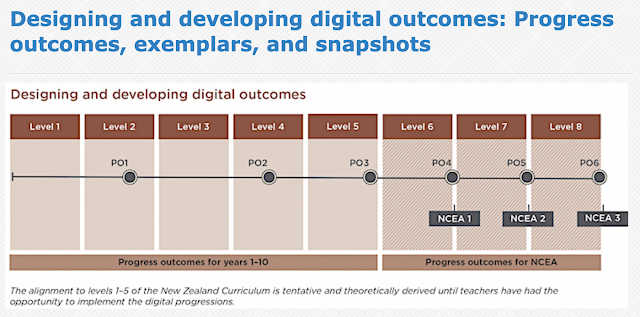
The learning required to produce the Animation in Scratch as a DLO, incorporates various aspects of the Digital Technologies Curriculum from both the Computational Thinking Progress Outcome, and the Designing and developing digital outcomes Progress Outcome.


Share
Tweet
Pin
Share
No Comments


The following is an example of Creating a short, animated presentation in Scratch, and how this way of presenting could be used by students to Share their Learning.

The presentation includes the use of:

  • text (in speech bubbles) to communicate ideas
  • basic animations to give more realistic movements
  • basic animations to capture attention
  • backdrops relevant to the presentation
As you can see, the presentation can be embedded into blog posts, alongside the work that the presentation is describing or referring to.


Game Screencastify 1
Game Screencastify 2
Game Screencastify 3
Game Screencastify 4
Game Screencastify 5

Share
Tweet
Pin
Share
No Comments

Workspace Task - Blogging

I have been trialling structuring blogging into Workspace Tasks, as shown in the image below.  The blogging task is added to the Workspace as an Activity in the Evidence column.


Workspace Task - Evidence Card

In the example provided, students would start the Level 1 - Game Blog Post evidence card, which looks as follows:


Student Blog Posts and Comments

The following are links to some of the students blog posts, which they have quad blogged and commented on within the class.  The blogging, commenting, and response to comments was incorporated into teaching and learning time during a couple of lessons.

  • Level 1 - Game Blog Post - Amethyst Hohaia Scanlan Game Blog Post Link
  • Level 1 - Game Blog Post - Faamanatu Tiumalu Game Blog Post Link
  • Level 1 - Game Blog Post - Isaac Lam Sam Game Blog Post Link
  • Level 1 - Game Blog Post - Leni Lakieto Game Blog Post Link
  • Level 1 - Game Blog Post - Angel Temu Game Blog Post Link
  • Level 1 - Game Blog Post - Ngatuaine Puri Game Blog Post Link


Share
Tweet
Pin
Share
1 Comments
The following is the presentation that I recently delivered at the 2018 Manaiakalani Outreach Wananga. The VTaL Visible Teaching and Learning Site can be accessed by clicking on the VTaL Site link in the horizontal navigation of my blog.


Share
Tweet
Pin
Share
No Comments


Today, myself and the other Tamaki College CoL Teachers presented alongside Lenva to the staff about bringing together Learn Create and Share.  The example that I presented about focussed on a NCEA Level 3 unit of work relating to the Conceptual Design standard.  The Learn aspect included the learning activities that students undertake throughout the unit.  The Create section shows the types of tasks and evidence that students use to demonstrate their learning.  The example of Share includes a link to the Google+ Community that the students post their work into under various categories, that they all access to guide their learning.  The following image demonstrates what I delivered in the LCS presentation.


Share
Tweet
Pin
Share
No Comments


Today I had the opportunity, alongside my fellow MIT Colleagues, to share what I have been inquiring into with regards to my MIT project.  The audience was primarily made up of Senior and Middle Leaders from various Manaiakalani and Outreach schools, as well as other Manaiakalani partners.

The reason that it was so important to me to able to share my MIT 2018 Inquiry, is because my intention is that the VTaL Site that I have been developing, would and could be useful to any educationalists who can see the vision that I have shared with regards to Visible Teaching and Learning, with regards to impacting positively on learners in both our local and global communities.

As outlined in my presentation to those who attended the wananga, the VTaL Site is at the point of being a functional prototype.  In order to improve both the look and function of the VTaL Site, I'm interested in acquiring feedback from a range of stakeholders, including Senior Leaders, Middle Leaders, Experienced Teachers and New Teachers from a range of schools.  All comments and feedback is encouraged and welcome.  Here is a link to a post requesting feedback on the VTaL Site.

The following is the slide deck of the presentation from the wananga.


Share
Tweet
Pin
Share
No Comments

The following are a few workshop highlights from the Sydney EdTech Conference that I recently attended.

Scratching the surface of capabilities


One of the workshops that I attended was run by Conny Mattimore, Deputy Principal of Rooty Hill School where the EdTech Conference was being held.  The workshop was about 'Scratching the surface of capabilities'.  We were shown examples of how digital tools were being used by students to demonstrate to their teachers various capabilities acquired through various learning tasks.  

I had the pleasure of working alongside one of the students, Vinuji Gallage, who worked through some Scratch activities with me.  The great thing about interacting with Vinuji, was watching how intuitively she was using the digital tools to demonstrate her ICT capabilities. The main motivator for Vinuji was the fact that she could see how what she was doing, was contributing to her overall grade scores.


Cultivating Growth Mindset

One of the sessions that really stretched my thinking, was the session run by Lindsay Wesner, Deep Dive : The Power of Possibility - Cultivating Growth Mindset in Your Classroom.

As well as Lindsay sharing her experiences as a classroom teacher, and her extensive range of resources with those of us who attended who session, the activity that had a lasting impact for me, was the bingo activity.  This activity required attendees to work in small groups of 2-3, to identify various tasks that we undertake as teaching practitioners, to enable our learners to develop a growth mindset.

Getting Creative with Google Sheets

The most constructive workshop that I attended that impacts directly on some of my current practices, was the workshop run by one of my colleagues Gerhard Vermeulen entitled Getting Creative with Google Sheets.  There are so many different functions within Google Sheets that I was unaware of.  One of those functions is the formula that allows the colours of individual cells within a worksheet to change, depending on the entry within the cell.  This is particularly useful with the VTaL Tracking Sheets that I use to enable students to track their own progress.  I am unsure whether the formula can be integrated into Hapara Gradesheets, which I'm also using as VTaL Tracking Sheets within Workspaces; however, it will just be a case of experimenting to see what works.


Share
Tweet
Pin
Share
No Comments
I had the pleasure of attending the Sydney EdTech Conference with fellow MIT 2018 colleagues.  In addition to attending the conference and hearing from various presenters and participating in different workshops, it was also an opportunity to share some of my own practice with a completely new audience.


The focus of my workshop was VTaL Visible Teaching and Learning Tracking Sheets.  This was the same workshop that I had delivered at the Auckland EdTech Conference earlier in the year.  However, I expected that I would have a different audience and was interested to see how receptive the workshop participants would be.


As well as sharing the use of VTaL Tracking Sheets through my Digital Technologies Google Site, I was also interested to know how visible, my teaching and learning resources were to a new audience.  Fourteen of the workshop attendees participated in a Kahoot exercise at the conclusion of the workshop with the following responses to the Kahoot questions about VTaL during my session, after spending time navigating through my Digital Technologies Subject Google Site.

Q - What is the purpose of the Course Overview in the Digital Technologies site?
A - To have an overview of the learning over the year. 13/14 = 93%

Q - What is the purpose of the Year Level Calendars in the Digital Technologies site?
A - To share learning instructions for a particular day and time.  4/14 = 29%

Q - What is the purpose of the Communities in the Digital Technologies site?
A - Students sharing their work as exemplars for their peers.  13/14 = 93%

Q - What is the purpose of linking the Tracking Sheet or Grade Sheets in the Calendar posts?
A - Students can check their progress against current tasks.  12/14 = 86%

Q - What is the purpose of the embedding VTaL resources into sites, such as the DigiTech site?
A - To enable access to learning and to accelerate achievement. 10/14 = 71%

It was reassuring to learn that many of the workshop participants were able to navigate to various sections of my subject site, and also understood the purpose of many of the VTaL tools that are embedded in my site.  I also learnt and gained an appreciation for the similarities and differences of different tools that are used by many of our Australian colleagues.  One of those is the extensive use of Google Classroom, which is a tool that I am not currently using myself.

The EdTech Presentation feedback was generally pretty constructive, as shown below.


Share
Tweet
Pin
Share
No Comments

Animated Stories and Brief Development

In Semester 1 this year, the first class that I had was a mix of Year 7 students from Glenbrae School.  The focus of this Semester was to teach code sequences to develop Animated Stories in Scratch, and for students to undertake Brief Development associated with their DigiTech projects.

Student Blogs

If you click on the student photos below, you will be able to navigate to the student blog posts that students wrote which includes links and embedded animations for some of the work that they undertook in DigiTech this semester.

 Siosaia Liu  Mahoney Taula  Po Munu
Candice Fakahau  Maya Griffiths  Tumanako Kern-McLeod  Francesca Pome'e  Anita Folau  Kupid Haenga  Auro Junior Pepe  Mathew Tukuafu

Students Blogging, but what to blog?

Some of the students were already blogging reflections on what they were learning in Technology when they returned to school.

Before the students moved from my specialist subject into the next Technology subject, I specifically wanted the students to blog an overview of some of the tasks that they had completed, relating to Brief Development, as well as the outcome that they had developed; that being, an animated story.

It was easier for me to model to the students, what I wanted them to include in the blog post overview.  This would ensure that students linked and embedded tasks associated with Brief Development and their Animated Stories.  Therefore I broadcast a model blog post for the students to follow, as shown in the image below.

Students had the option of linking their completed tasks from their Google Drive to the text in the bulleted list, or, linking previous blog posts to the text in the bulleted list.


Share
Tweet
Pin
Share
No Comments


Technology Literacy Resources

The following is School Goal 2 focussing on Literacy and Numeracy

School Goal 2 Literacy and Numeracy
That 80% of Year 9 & 10 students are reading at or above the expected Curriculum Level.
That 70% of Year 9 & 10 students are writing at or above the expected Curriculum Level.
That 70% of Year 9 & 10 students are achieving in Mathematics at or above the expected Curriculum Level.

That 90% of Year 11 students will achieve NCEA Literacy.

That 80% of Year 11 students will achieve NCEA Numeracy.

Technology Literacy Resources

The following are literacy resources that were used in a session with Marc Milford to implement literacy strategies in Technology around 'Language Writing Skills' and 'Language Features'.

The PD Tech resource that Marc focussed on for the Technology Department was 91044 Brief Development.  The reason I asked Marc to focus on Brief Development at NCEA Level 1, is because all Technology teachers from Year 7 through to Year 13 teach the Brief Development achievement objective, and three staff deliver the Brief Development NCEA standard to Level 1, Level 2 or Level 3.

PD Tech

Readings

AS91044 Exemplar - Low Excellence

91044-EXP-student1-001
91044-EXP-student1-002


Take Outs from our PD Session with Marc

The following are some take outs that I have from the PD Session with Marc:

  1. I need time to process the strategies that Marc has supplied us with in the Writing plan 2018 for Techies
  2. I would benefit from one on one time to identify specific literacy strategies to help with both my senior students as well as my junior students
  3. I'd like some more department time for us to collaborate on, and gain a shared understanding on some useful strategies for literacy issues within Technology
Share
Tweet
Pin
Share
3 Comments

I had the privilege of presenting at the EdTech Team Auckland GAFE Summit held at Aorere College.  The focus of my session was VTaL - Tracking Student Progress.    In 2017, I delivered a session entitled VTaL Visible Teaching and Learning in a Secondary School Context.  This year's session was an opportunity to focus in on one of the VTaL tools, Tool 03 : Class Project Task Lists, and provide examples of how I have used the tracking sheets to inform my practice, and accelerate student achievement.

I always find it greatly satisfying having the opportunity to share my experiences, the trials, tribulations and everything in between, with fellow teaching practitioners, if it is going to enable them to learn from both my success moments as well as my mistakes.


Tracking sheets and monitoring systems are certainly not a new concept.  They've been around as far back as assessment has ever existed.  However, tracking sheets, marking sheets, checklists etc are completely pointless if they are not going to be used to Inform Teacher Practice, and, Accelerate Student Achievement.  It doesn't matter how many bells, whistles, colours, links, gifs or emojis can be dropped into tracking sheets.  If the tracking sheet isn't used to Inform Teacher Practice, and Accelerate Student Achievement, then as a tool, the tracking sheet is pointless.

EdTech Akld 2018 : VTaL - Tracking Student Progress


Was the presentation useful?

Of the many people who attended the presentation, the following is a snapshot of feedback from some of the attendees:

Share
Tweet
Pin
Share
2 Comments
Older Posts

About Me

Kia ora! I am the Head of Technology at Tāmaki College and also teach Digital Technologies.


My target group of learners for my Inquiry 2021 will be my Year 12 NCEA Level 2 class. This group of learners were my target group from my 2020 Inquiry. I would like to inquire into whether Academic Writing exemplars specific to Digital Technologies, in conjunction with the 'Explanation Writing' classroom display resources for Digital Technologies, based on SOLO taxonomy, could accelerate achievement in literacy in my subject.


My target group of learners for my Inquiry 2020 were my Year 11 NCEA Level 1 class. I inquired into the process of using the LearnCoach online programs (content) and VTaL Visible Teaching and Learning (workflow) to accelerate student achievement for Tamaki College students undertaking courses in Digital Technologies NCEA Levels 1, 2 and 3.


In 2019, my inquiry is to maximise pedagogical practices (relating to integrated education, and collaborative teaching and learning), to effectively shift student achievement, supported by digital platforms connected to visible teaching and learning.


My Inquiry in 2018, was to develop a VTaL Purpose-Built Innovative Tool, to enable all elements of the VTaL Framework to be accessible to teachers, in order to accelerate student achievement.


In 2017, my inquiry was based on raising student achievement and shifting teacher practice around effective pedagogical practices including Learn, Create and Share. This will be achieved through the development, implementation and monitoring of the Visible Teaching and Learning Framework.

recent posts

Blog Archive

  • ▼  2022 (8)
    • ▼  March (3)
      • Hybrid Teaching and Learning | The impact of Omicron
      • Manaiakalani Toolkit | Well-being - Supporting Our...
      • Technology - Manaiakalani Department Discussions M...
    • ►  February (5)
  • ►  2021 (16)
    • ►  November (1)
    • ►  September (2)
    • ►  August (1)
    • ►  July (2)
    • ►  June (4)
    • ►  May (3)
    • ►  March (2)
    • ►  February (1)
  • ►  2020 (42)
    • ►  November (2)
    • ►  September (2)
    • ►  August (7)
    • ►  July (5)
    • ►  June (4)
    • ►  May (7)
    • ►  April (7)
    • ►  March (3)
    • ►  February (4)
    • ►  January (1)
  • ►  2019 (30)
    • ►  September (2)
    • ►  August (3)
    • ►  July (1)
    • ►  June (2)
    • ►  April (1)
    • ►  March (12)
    • ►  February (9)
  • ►  2018 (41)
    • ►  November (7)
    • ►  October (2)
    • ►  September (1)
    • ►  August (4)
    • ►  July (4)
    • ►  May (7)
    • ►  April (4)
    • ►  March (5)
    • ►  February (7)
  • ►  2017 (65)
    • ►  December (2)
    • ►  November (22)
    • ►  October (6)
    • ►  September (6)
    • ►  August (10)
    • ►  June (4)
    • ►  May (3)
    • ►  April (1)
    • ►  March (4)
    • ►  February (6)
    • ►  January (1)
  • ►  2016 (26)
    • ►  December (1)
    • ►  November (18)
    • ►  September (6)
    • ►  August (1)

VTaL

  • VTaL (104)
  • VTaL 01 Subject Sites (33)
  • VTaL 02 Learning Activities (7)
  • VTaL 03 Tracking Sheets (28)
  • VTaL 04 Student Checklists (12)
  • VTaL 05 Calendars with Links (24)
  • VTaL 06 Workspaces (32)
  • VTaL 07 Student Sites (4)
  • VTaL 08 Year Level Sites (3)
  • VTaL 09 Subject Communities (26)
  • VTaL 10 Student Blogs (11)
  • VTaL and Google Hangouts (15)
  • VTaL and Student Achievement (45)
  • VTaL for Parents (13)
  • VTaL for Students (82)
  • VTaL for Teachers (32)

Presentations

  • GAFE (19)
  • My YouTube Videos (8)
  • Presentations (21)

Inquiry

  • Inquiry (134)
  • Inquiry 2019 (27)
  • Inquiry 2020 (34)
  • Inquiry 2021 (15)

Manaiakalani

  • CoL (167)
  • Inquiry (134)
  • Inquiry 2020 (34)
  • Learn Create Share (11)
  • MIT 2018 (16)
  • Manaiakalani (18)
  • Presentations (21)
  • SPARK MIT (59)

Tamaki College

  • 2018 Department Goals (2)
  • 2018 School Goals (3)
  • 2019 Department Goals (2)
  • CoL (167)
  • Collaborative Learning Environments (32)
  • Covid19 (29)
  • Cultural Responsiveness (10)
  • Differentiation (12)
  • EMR Collaborative Project (21)
  • Goals (2)
  • Human Rights Collaborative Project (5)
  • Integrated Education (24)
  • Kia Eke Panuku (8)
  • LearnCoach (2)
  • Literacy (21)
  • PLD (18)
  • Techies (12)
  • Technological Modelling (4)

Practicing Teacher Criteria

  • PTC01 (31)
  • PTC02 (9)
  • PTC03 (6)
  • PTC04 (61)
  • PTC05 (17)
  • PTC06 (42)
  • PTC07 (32)
  • PTC08 (34)
  • PTC09 (8)
  • PTC10 (7)
  • PTC11 (16)
  • PTC12 (54)

General

  • CoL (167)
  • Collaborative Learning Environments (32)
  • Cultural Responsiveness (10)
  • Differentiation (12)
  • Feedback - Parent Voice (2)
  • Feedback - Staff Voice (6)
  • Feedback - Student Voice (23)
  • GAFE (19)
  • Goals (2)
  • Integrated Education (24)
  • Kia Eke Panuku (8)
  • LearnCoach (2)
  • Literacy (21)
  • My YouTube Videos (8)
  • Review (14)
  • Student Agency (15)

Contact Form

Name

Email *

Message *

Total Pageviews

Created with by BeautyTemplates| Distributed By Gooyaabi Templates