My Space and My Place

    • Home
    • Inquiry 2021
    • Digital Technologies Site
    • VTaL Site
    • VTaL G+

Plan and conduct detailed inquiry into specific aspects of your current teaching that are relevant to the hypothesis you identified in the literature.

My target group of learners for my Inquiry 2021 will be my Year 12 NCEA Level 2 class. This group of learners were my target group from my 2020 Inquiry.


One of the main tasks for the current Level 2 project, is to undertake Planning that involves:

  • explaining the purpose of the outcome
  • identifying the end users
  • explaining a range (at least three) relevant implications to the outcome, and how these implications would be addressed
Term 2 has been a particularly strange term for my Level 2 students.  All of the class attend Techtorium on Thursdays, which means that I don't see them for a double lesson on that day.  During Term 2, seven of the students also attended a YooBee course of Tuesdays, which meant that I didn't see those students for a double lesson on that day.  Therefore, I saw more than half of my class for 2 x single periods per week, and four students for 2 x single periods and 1 x double period.  This has created a challenging start to the beginning of Term 3.

Reflecting on Student Work


Reflecting on the Planning task for the Level 2 project, I encountered the following main issues when providing students with formative feedback on their work:

  • Students were loosely describing the outcome, and what they wanted to include into the outcome, rather than explaining the purpose of the outcome.  Also, in doing so, they were not actually describing the outcome in any great depth.
  • Students were identifying a set of end users, but were not connecting the end users to the outcome.
  • Students were describing the relevant implications, but were not explaining why the implications, were in fact, relevant to the outcome.  Further more, the students were not explaining how they intended to address the implications in the development of their outcome. 
Student example:


Use of Teaching Strategies from Academic Writing


The following are aspects from two of the three pieces of academic or professional readings that are relevant to the issues around the Planning task with my Level 2 learners:


Visualisation of Key Concepts - the use of a bullseye chart to identify and prioritise stakeholders, including end-users


Summarising - the use of sentence starters, key words and phrases, and main ideas to construct the summary for the Purpose of the Outcome 

  • Sentence Starters - the use of sentence starters to direct the students to write a summary that covers all relevant aspects of explaining the purpose of the outcome 
  • Student Exemplars (of Tamaki College student work) from previous years - used to help students to identify key words and phrases from the exemplars, to better understand how these would apply when writing their own summaries

The following are a range of teaching strategies that I used that are relevant to addressing the learning needs and issues outlined in the previous paragraphs:


Student Outcomes based on Teaching Strategies

The following is a breakdown of student outcomes based on the introduction of the Sentence Starters (Summarising), Student Exemplars (Summarising) and Bullseye Chart (Visualisation) to support student learning.

  • Sentence Starters (Summarising) - Students were not using the sentence starters to explain the various aspects of the Purpose of the Outcome to the depth that would be expected at Level 2.  The students were using the sentence starters more like a writing frame, and trying to fill in the blank spaces, with very little information, to explain what they were talking about.
  • Student Exemplars (Summarising) - The use of student exemplars from previous years to help students to understand key ideas and concepts, became more of a distraction and hindrance to their own writing, than it was as a useful learning tool.  The reason for this is because students were trying to replicate the concepts written from the exemplars and apply it to their own work; but in doing so, completing going off track from what the purpose of their (actual) outcome was all about.
  • Bullseye Chart (Visualisation) - Students who attempted using the bullseye chart, struggled to identify and differentiate their various stakeholders, if their Summary for the Purpose of the Outcome was not written properly, and the 'purpose' was not appropriately communicated in their writing.


Exploring the Teaching Strategies in more depth

The main issue that I found from introducing the Teaching Strategies (mentioned above) is that learners were trying to replicate the exemplars, which didn't work in another context, or, they were filling in the gaps (of the sentence starters), rather than identifying and explaining their own work.

Explanation of Sentence Starters

In order to broaden the student understanding around the information that they needed to explain in their Summary for the Purpose of the Outcome, I explained the purpose of each sentence starter, so that they could and would make the connection to what they needed to write.


Exemplar of a Written paragraph

I used the Explanation of Sentence Starters to write an example for students, based on a completely different context and a completely different outcome.  I stepped students through the 'experience' or process, that they were taking the reader through, by writing the summary in this format, in the hope that the 'experience' would resonate with them in terms of needing to connect with the reader, and that this would hopefully come through in their own writing.

The first paragraph was about describing the outcome, and providing enough detail so that the reader, can visualise what the outcome might be about (without explaining every little detail that is intended to be included in the outcome).  This is particularly important if the reader might not know or understand what the outcome is, or how the outcome could be useful.

The second paragraph was about describing the intended target audience for the outcome.  In doing so, connecting the audience to the outcome so that the outcome becomes meaningful to the target audience and end users.  By now, the reader should be painting a picture in their mind, as to what the outcome is, and why the outcome would be useful to the target audience.

The third paragraph was explaining the reason for creating the outcome, and the possible need or opportunity that would be met, by creating the outcome.  This is the section of the summary that defines the purpose.  However, I was trying to convey (in the example) the importance of the first two paragraphs to build (paint) the picture first.

The final paragraph was a description of the inputs and outputs for both the developer, as well as the inputs and outputs for the end-user, so that end-users might gain some insight into the intent of how the outcome could and would be used.  This also makes the students think about what they are developing and how they would develop the outcome, so that they would hopefully consider the user-friendliness and accessibility of the fully developed outcome.


Peer Feedback of Written Summary

In order to encourage students to reflect on their own writing, and decipher whether they were connecting with the reader, I asked students to share their work with a peer.  The peer needed to provide feedback on whether they understood what the outcome would be, who the target audience is, what the purpose of the outcome is, and how the outcome will be developed (hardware and software), as well as where the outcome would or could be used. 

Students found this process to be particularly useful, in that they learnt that by providing specific feedback about a segment of work to another student, meant that they had to articulate what was required to write the paragraph properly; in turn, improving their own writing.


Changes to my Teacher Practice

In trying to support my learners with more learning support materials to complete the task, the greater the volume of learning support resources, that the students were needing to navigate (within Workspaces) ... it was getting hard for them.   Every time I found a useful link, or an example, a different strategy etc, I was adding these resources into the Workspace for the students.  Irrespective of the value and usefulness of the resource, the sheer volume of learning resources was becoming overwhelming for the students.  So, I decided to trial a Flowchart of the tasks to enable the students to complete the Purpose of the Outcome Summary.

The information and the links within the flowchart were no different to the information and the links within the Workspace.  However, the flowchart effect, meant that I could scale down the number of resources added into the Workspace; thus, making the Workspace easier to navigate.

Students Feedback about Flowcharts

The feedback from the majority of the students in the class is that they preferred following the design process in flowchart form.  They liked that the layout of the flowchart, and the way in which the flowchart was intended to be used, with directional arrows that follow a process of YES or No, and looped back into the main body of the flowchart.

Based on this feedback, and asking whether they'd like another flowchart (to which they replied with a resounding "Yes please"), I decided to develop another Flowchart for the Relevant Implications.

Peer Feedback from Google Site - Colleagues

The issues that I encountered in terms of access to student learning resources, made me reflect on other feedback that I'd received on the visibility and access to learning resources of Year 9 and Year 10 in my Subject Site, from my colleagues in the Technology Department.

The process that we undertook within our department to capture feedback about the Visibility and Accessibility of Teaching and Learning, was by completing a survey that focussed on the following:

  1. Where are the Teaching and Learning ACTIVITIES for your Year 9 and 10 program located?
  2. Where are the Teaching and Learning ASSESSMENT TASKS for your 9 and 10 program located?
  3. Where are the Teaching and Learning ASSESSMENT CRITERIA for your 9 and 10 located?
  4. How are your Learners SUBMITTING EVIDENCE for ASSESSMENT of your Year 9 and 10 program?
  5. Do the Teaching and Learning Activities > Assessment Tasks > Assessment Criteria, ALL align with the Achievement Objectives or Progress Outcomes that students are being assessed against, that are entered into Kamar Markbooks for REPORTING for Year 9 and 10?

We completed the survey ourselves, explaining where the resources were located.  I shared the Responses to the Technology staff so that we could view the responses, and also comment on each others responses.

We viewed each others' Subject Sites, and followed the information within the survey, to see if we could actually navigate to the teaching and learning resources that staff had entered into the survey.

Then we provided each other with feedback (comments) as to whether the teaching and learning resources were easy to access and visible.


The key findings that I've learnt so far from the teaching and processes that I've undertaken that I've outlined in this blogpost about my teaching practice includes:

  • being mindful about how students may (or may not) use learning resources that I've shared with them, and therefore anticipating how students might respond to learning resources that I share with them
  • being mindful about how I share learning resources with students, that enables them to access the utilise the learning resources appropriately; especially when I add more learning resources into the existing bank of resources
  • being mindful that the learning resources are visible and accessible.  Just because I can find them, doesn't mean that others can find them too!


Share
Tweet
Pin
Share
2 Comments

The following is a screencastify on a quick task that I've set with my learners, so that I know, that 'they' know, how to access their learning on my site.

This was a timely reminder for learners to know how to access their learning, while they are in the classroom, as well as when they are offsite including during lockdowns.  It is also an extremely useful for students who are new to my subject and are completely new to Tamaki College.


Accessing work in DigiTech


Share
Tweet
Pin
Share
No Comments

Describe how you will collect information about the implementation of your changed practices/intervention (so it is clear what you doing differently)

My target group of learners for my Inquiry 2020 will be my Year 11 NCEA Level 1 class. I intend inquiring into the process of using the LearnCoach online programs (content) and VTaL Visible Teaching and Learning (workflow) to accelerate student achievement for Tamaki College students undertaking courses in Digital Technologies NCEA Levels 1, 2 and 3.


The following is a short video showing an intervention that I applying with my target group, which uses multiple lessons in Google Calendars and Google Video Recordings.


The following is a screenshot to show how I am collecting information about the implementation of my changed practice.  The screenshot shows student feedback in the [Current] DigiTech Level 1 Community.  The student feedback is a short comment "Very Helpful" that shows how the student feels about the video explanation to undertake the work.


Share
Tweet
Pin
Share
No Comments
Tuesday the 5th May was the first lesson that I was going to meet my NEW Year 9 class for the next Technology rotation for Semester 2.  Due to the learners being in Year 9 and me not having taught them before meant that I was going to be meeting the learners for the first time online.

The following post will focus on Access to the Google Hangout Classroom and Cultural Responsiveness (Ako, Vā, Manaakitanga, Name Pronunciation).

As mentioned in a previous blog post, "I have designed a basic Introductory Calendar Invitation which I have sent out to learners.  This is essentially the same as directing students to my classroom door, so that I may be able to talk to the learners face to face (via the hangout), and undertake an Introductory lesson with the learners."

The learning instructions in the lesson looked as follows:


Year 9 DigiTech Project 9TKh and 9TBSM2

Welcome to DigiTech with Ms Anderson.  
My name is Ms Anderson and I will be your DigiTech teacher for this Technology Rotation.

Navigate to the Workspace Year 9 DigiTech Project - Tools and Techniques

  1. Navigate to the section titled Student Introduction
  2. Complete the task Introducing Myself Presentation
  3. Complete the task entitled Level 1 - HTML Basics : Website Setup


There are two main examples of effective pedagogy from the New Zealand Ministry of Education Curriculum Guides that I am going to discuss from this particular lesson, that relates to Cultural Responsiveness.  These include Ako and Manaakitanga.

Ako

Ako involves reciprocal shared learning in the classroom and beyond.

When the Learners first arrived at class for the first time, they all had their cameras switched off and their Avatars were showing.  I explained to the students that at the beginning of the lesson, learners had to have their cameras turned on (unless there were either privacy or technical issues preventing them from doing so).    When I knew as their teacher, that everyone understood the instructions, I would be fine about learners turning off their cameras.  The other time that I insist on learners having their cameras on is when the learner and I are interacting with each other one on one.  This just gives us a sense of who we are both talking with, as a regular discussion when occur.

It still took a long time before learners would turn their cameras on at the beginning of the lesson.  I kept reassuring the learners that once we were all on task, that it would be fine for them to turn off their cameras while they were completing the work.

Video Link

The following is the timeline that it takes from the start of the lesson for Learners to turn their cameras on.
  • 0.40 min - Student 1 enters the classroom NO camera on
  • 1.00 min - Student 2 and 3 enter the classroom NO camera on
  • 1.20 min - Student 4 enters the class NO camera on
  • 2.00 min - Student 5 enters the class NO camera on
  • 2.20 min - Student 6 enters the class NO camera on
  • 2.40 min - I congratulate the Students for attending their first DigiTech lesson
  • 3.15 min - Student 7 enters the class NO camera on
  • 3.35 min - I refer to the Hangout link in the Calendar post being similar to the Door to the Classroom
  • 3.50 min - This is my first request to Students to 'Turn their cameras on'
  • 4.30 min - [waiting] I offer to help students to explain how to turn their cameras on
  • 4.45 min - I explain to Students how I run my Hangout Meet classes, and my expectation that learners turn their cameras on at the start of the lesson, when I am talking 1-to-1 with students, and acknowledge that the exception to this is if their cameras on not working
  • 5.10 min - I'm still staring at Icons, and ask my second request to turn cameras on; Three learners respond by turning on their cameras one after the other
  • 5.50 min - Another learner turns their camera on
  • 6.00 min - Another learner turns their camera on
  • 6.15 min - This is my third request for learners to turn their cameras on
  • 6.50 min - I start saying students names to acknowledge their presence in the lesson.  I ask one of the learners if I have pronounced their name properly and ask them to correct me if I mispronounce their name.  I also ask the student to remind me if I mispronounce their name.
  • 7.00 min - There are eight learners in the class, ALL with their cameras on.  I introduce myself, and proceed to start the lesson.
  • 7.40 min - I ask the learners how they knew how to get to this hangout?  I explained that they could respond in the chat feature of the hangout if they wished.  The student responses are shown in the image below, which all refers to the Calendar invitation that was shared to the learners to their emails.
  • 8.15 min - Student 8 enters the class NO camera on.  I ask that they turn their camera on, and they do.


So from the time that the class first started, it took approximately 8-8.30 minutes before all of the learners that were present in the classroom, actually had their cameras turned on.  Although this is not an ideal scenario, I am mindful of the myriad of variables that all learners, not just those in my classroom, are navigating in this new online way of learning, which essentially has shifted the classroom into their living environments.

I was recently shared an article from newsroom.co.nz from fellow CoL Teacher, Dorothy Apelu, entitled 'The vā that binds: a Pasifika education story during Covid-19' written by Jacoba Matapo,  Associate Dean Pasifika at the Faculty of Education and Social Work, University of Auckland.  

“When we’re invited to join Zoom, we open our homes to you, the viewer. Our home is our vā, our sacred space.”

The article goes into detail explaining the meaning of Vā and the implications of this in education, including education that is currently happening online.

I guess the references that I am making in this post, to learners into a Google hangout classroom, and their perceived reluctance to turn their cameras on, cannot be assumed as being a sign of disrespect or defiance.  This is a classic example of delving deeper into the why in terms of Cultural Responsiveness to understand what else is impacting the decisions that learners are making about the way that they are learning, or the way that they are willing to learn.  As educators, we have a duty to demonstrate complete mindfulness for the whole learner, and all of the variables impacting the learner, if we are to connect with learners in a way that shows reciprocal shared learning, as outlined in the pedagogical practice of Ako.

Manaakitanga

Manaakitanga is about values of integrity, trust, sincerity and equity. Through manaakitanga, the teacher and fellow students recognise and affirm the identity of each student in open and trusting relationships.

In order for learners to understand how to complete the task, I explained and demonstrated the task for them.  The task was designed to share information about myself, and for the learners to also share information about themselves.  The slide deck was designed for the learners to share information about their whānau, where they live, culture ethnicity and religion, schooling, and sports, hobbies and interests.  The other reason that I demonstrated an example of how to complete the task, was so that learners could share information without oversharing information eg. practicing Cybersmart ways to ensure that their privacy, and the privacy of their families and friends would not be compromised.

Video Link

The following is the timeline of a Learn Create Share segment in the lesson of me sharing information about myself as a way of demonstrating and explaining the task for the lesson.

The following link is the Introduction Example - Ms Anderson
  • 20.45 min - I refer learners to the Purple Section of the Workspace that shows the Introduction - Example
  • 27.15 min - While I am describing and explaining the example that I have created, I make references to being Cypersmart and explain how I have applied that to my presentation about myself.
  • 27.30 min - I explain to students that now that I have demonstrated the task to them, that they should now have a better understanding of who I am as their teacher
  • 27.50 min - At this stage I invite the learners to ask me one question each about something else that they would like to learn about me, that wasn't included in the example slide deck.
  • 39.30 min - Q+A Session : The students typed their questions into the chat function or asked me in the hangout, and I responded in the hangout.
The learners responded extremely positively to this activity.  In particular, they enjoyed asking me questions that were not covered in the presentation example.  Sometimes, the questions were quite detailed and deep, asking about my personal goals for 2020, and also about my fears.  I feel as though the Q and A session really allowed the learners to connect with me as their teacher.  This was particularly positive.  Even though I let the learners know several times, that they were able to turn off their camera while they were working on their own slide decks, many of them chose to keep their cameras switched on.  I saw this as being a huge sign of connectedness in the initial stages of developing positive relationships with my learners.  Not forgetting, that this entire interaction had taken place online, and that this was the first time that I had met the students.  This showed values of integrity, trust, sincerity and equity, as outlined in the pedagogical practice of Manaakitanga.

The following are the questions that learners asked and typed into the chat function, which I responded to in the hangout:

Q and A Session - About Ms Anderson
Student 1: Miss what is your favourite sport?
Student 2 : What's your favourite colour??
Student 3 : miss what is your favourite food?????
Student 4 : Whats your favourite animal?
Student 1 : Nice Miss
Student 5 : What's your goals for 2020?
Student 1 : hes playing game
Student 6 : whats your what's your favourite song?
Student 6 : no
Student 1 : Hahahahaha
Student 5 : oof
Student 1 : Nice one Miss
Student 5 : yes
Student 3 : in the air


Share
Tweet
Pin
Share
14 Comments

Begin to collect evidence and data  and come to the next session ready to share your preliminary findings about the nature and extent of the student challenge i.e. using your baseline student data and evidence

My target group of learners for my Inquiry 2020 will be my Year 11 NCEA Level 1 class. I intend inquiring into the process of using the LearnCoach online programs (content) and VTaL Visible Teaching and Learning (workflow) to accelerate student achievement for Tamaki College students undertaking courses in Digital Technologies NCEA Levels 1, 2 and 3.


Evidence from Teaching Strategies

The following is a slide deck of teaching strategies that I applied with those in my target who attended class online in a particular lesson last week.  I have gained feedback in a hangout session with Technology teachers about the strategies that I applied to that session.  I need to reflect back on the feedback, and that particular teaching segment, to help identify preliminary findings about the nature and extent of the student challenge.


Evidence from Kamar


In order to track the formative feedback of where each of our learners is tracking 'within' standards, I have established a DGT - Student Standard Data Update 2020 Sheet.  The sheet includes information about the learner including gender, ethnicity etc.  It often enables me to conduct discussions with students relating to career interests and pathways, as well as where they have come from if they are new to the school.  The sheet shows the standards that a student is entered into.  The main difference being that colour codes can be applied to the sheet to indicate which standard is being work on, and where about in the standard that the student is at.


EDIT: During the lockdown period, I had planned an activity for my Year 11 students, to comment on how they felt about me inquiring into their learning.  The activity involved the students reading through the above blog post, and answering the following question, and publish the response as a blog comment.

How do you feel, as a learner, that I am inquiring into your class, to help you and your class to achieve?

Share
Tweet
Pin
Share
2 Comments
Describe the tools/measures/approaches you plan to use to get a more detailed and accurate profile of students’ learning in relation to that challenge. Justify why you chose these approaches and tools.

My target group of learners for my Inquiry 2020 will be my Year 11 NCEA Level 1 class. I intend inquiring into the process of using the LearnCoach online programs (content) and VTaL Visible Teaching and Learning (workflow) to accelerate student achievement for Tamaki College students undertaking courses in Digital Technologies NCEA Levels 1, 2 and 3.


The following are tools, measures and approaches I plan to use to get a more detailed and accurate profile of students' learning in relation to the challenge:

Student Voice - I've already undertaken one survey specifically to do with workflow using VTaL Sites, Calendars, Workspaces, Google+, and how easy/hard it is for the students to access learning in my subject.  I also sat and asked the students to drop emojis onto a doc, to demonstrate how they felt about the work they will be undertaking, that specifically relates to this challenge.  I will look at obtaining other forms of student voice throughout the inquiry process to gain feedback from the learners.


Hangout Recordings - Conversations with students help to demonstrate their understanding of what is required to progress forward with learning and task completion.  I will be, and have already started, reflecting back on some of the hangout recordings to understand what has worked for the learners and what hasn't.  The Hangout Recordings, also enables me to see how effective or ineffective some of the strategies and learning tools have been that I've integrated into the learning process relating to my Inquiry.

Screencastify - I often ask students to create short screencastify recordings to demonstrate to me their understanding of segments of tasks that they have to complete.  In particular, I ask the students to do this, so that they can (a) use it as a rewindable resource for skills that they've learnt, and also (b) to demonstrate to themselves as well as me, that they can actually undertake a particular skill.  The screencastify can be used for me to see how effective or ineffective some of the strategies and learning tools have been that I've integrated into the learning process relating to my Inquiry.

Evidence of Student Work - NCEA requires that students have to provide evidence of their work to demonstrate understanding and that they have also met the required standard.  I can also use this to see how effective or ineffective some of the strategies and learning tools have been that I've integrated into the learning process relating to my Inquiry.

Tracking Sheets - I've used the tracking sheets in the format that I do (green, orange, red) for many, many years.  The tracking sheets are purely used to demonstrate completion of a particular task.  However, that in itself will enable me and the learners to see how effective or ineffective some of the strategies and learning tools have been that I've integrated into the learning process relating to my Inquiry.


Share
Tweet
Pin
Share
2 Comments
I've just created a Screen Recording, using Google Hangouts Meet, to show how to check your Subject Site Incognito, that all of the work in your site is Visible, and also that your lessons are set up to run Google Hangout Meets with your learners.

The purpose of this Screen Recording, using Google Hangouts Meet, is to model the following:
  1. what your calendar would look like for the week, in terms of including the work, instructions and links for all lessons
  2. ensuring that your calendar events are set up to run Google hangout meets
  3. inviting guests to your Google hangout meets, including both your students and any other guests
  4. viewing your site Incognito, and navigating to each of the lessons for the week for each year level to ensure that the instructions and the work is visible


Share
Tweet
Pin
Share
No Comments
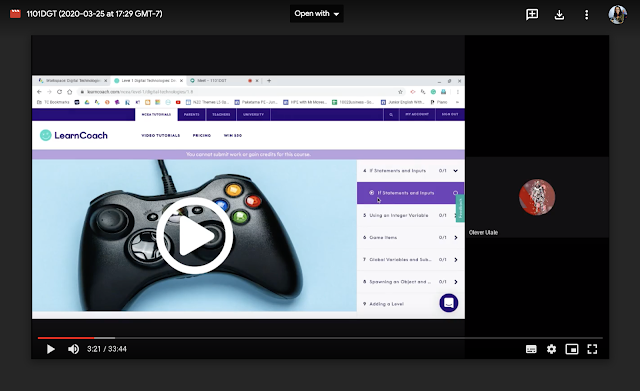
 1101DT Lesson 25 March 2020

Google Hangout Video Link

Lesson Sequence in the Google Hangout

The lesson sequence in the Google Hangout accessible through the video link, includes the following:
  1. Teacher (myself) - Instructing and demonstrating
  2. Learner - Following instructions
  3. Learner - Completing a task
  4. Learner - Capturing evidence of the task
  5. Learner - Submitting the task
  6. Teacher - Checking work and marking
  7. Learner - Sharing work in the Year 11 DigiTech Google+ Community
  8. Teacher - Asking for feedback of the lesson


Teacher Reflection

After undertaking the lesson with this learner, I understood that this particular learner's progress would accelerate (which is excellent for Olever!) and that other learners in the class may not progress at the same stage as Olever in their learning journey.  Therefore, I need to investigate ways to address the staggered progress by looking into Differentiation and seeing how I can adapt that to suit Remote Learning.

Differentiation

The following is a blog post about Differentiation that I came across quite a few years back, which I think will be really useful https://stivodifferentiation.wordpress.com/differentiation-tips/.  

In particular, the section on Differentiation by task would be particularly useful.  I find within the classroom setting that students would complete tasks at a different pace to each other, and therefore achievement would occur at a different pace for different learners.  

My experience of remote teaching in Week 1 of Lockdown, showed that students who joined the hangout for their session, often completed tasks quickly, enabling me to turn over formative feedback quickly for the student, who after making changes would achieve that particular aspect of the task.

Tracking Student Progress

The following is an example of work completed by a student during Week 1 of Lockdown in relation to the other students in their class who were not able to join the hangouts that week.


My students are used to tracking sheets in our classes.  Usually I use a traffic light system of Green to show that aspect of the task meets the criteria, Orange to show that the task is either work in progress, or that I have sent the work back to the student with formative feedback for changes to be made, and Red to show that the task hasn't been started.  In this particular case, the tasks are not directly related to assessment criteria, and therefore I opted to go for a different colour scheme, so as to not confuse the students about the summative feedback that they were being provided with.

Differentiation 

to Address Gaps in Student Progress Across a Class

Group Work and Collaboration: One of the teaching strategies that I am going to trial in the remote learning setting is group work and collaboration.  

Tracking Sheets: I am going to use the tracking sheets, to enable myself and my learners to identify who is working on the same tasks and then I will group the students accordingly.

Year Level Google+ Community: I intend referencing the Year Level Google+ community, so that students can refer to each others (completed and assessed) work, as guidelines of the expectations for completing tasks.  

Chat Function in the Hangout: I think I'll aim to have the students within a particular group, talk to each other via the chat function in the hangout, to share ideas with each other.  The group may be pairs or threes, I'll try to keep this small.  While small groups are working together, I am going to interact with a small group of learners at one time, or that is the intention anyway.

Wish me luck!


Google Hangouts - Tips and Tricks


  • If neither you or your student or students are interacting in the hangout, ask one of the students to go into presentation mode, otherwise the recording will show yourself (as the hangout owner) for long chunks of time in the recording
  • Stay in the hangout and let the students know that you're still there.  That way they can complete the work that you've set for them, but they also know that they can ask you for help.


Share
Tweet
Pin
Share
No Comments
The following is an activity that the Techies participated in relating to Teaching and Learning in Google Hangouts on Monday 6 April 2020.
The activity includes the Session Instructions, a video of the Activity (as Learners), and Reflections within the video (as Learners and Teachers).
It’s got a little bit of everything:
  • Learners who are absent
  • Learners who arrive late
  • Learners who leave class early
  • Learners who need help following or understanding instructions
  • Learners who play up
  • Learners experiencing technical issues
  • And also … Learners cyber bullying classmates in the hangout
  • The Teacher who talks too fast
  • The Teacher who doesn’t give learners all of the instructions
  • And also … the Teacher who doesn’t have all of the resources ready for the lesson
__________________________________________________
Session One [30 minutes] - Sending Love outside of your Bubble 
PLEASE DON'T START SESSION ONE UNTIL OUR MEETING
This is a fun activity for us to do using Google Hangouts.  Please make sure that you have a square piece of paper or card for this session.
I'm going to run this session as a Google Hangout Meet lesson.  At the conclusion, we will reflect on and discuss the session
  1. Log into the DigiTech with Ms Anderson Google Site http://bit.ly/2TMuF3V
  2. Navigate to the Techies tab
  3. Navigate to the Calendar for Techies
  4. Click on the Class Hyperlink for today's date (Monday 6 April 2020 when the session took place)
  5. Click on More details
  6. Locate the work for today's Learning Activities


__________________________________________________

Google Hangouts Tips and Tricks

If anyone is feeling nervous about using hangouts to teach your lessons, or if you haven’t run a hangout before, consider running a hangout with someone outside of your bubble, and teach them how to make breakfast, or something relatively simple.  Hopefully that will give you a bit of confidence before using hangouts to teach your students.
Video Link

Teaching and Learning in Google Hangouts

Share
Tweet
Pin
Share
No Comments
Older Posts

About Me

Kia ora! I am the Head of Technology at Tāmaki College and also teach Digital Technologies.


My target group of learners for my Inquiry 2021 will be my Year 12 NCEA Level 2 class. This group of learners were my target group from my 2020 Inquiry. I would like to inquire into whether Academic Writing exemplars specific to Digital Technologies, in conjunction with the 'Explanation Writing' classroom display resources for Digital Technologies, based on SOLO taxonomy, could accelerate achievement in literacy in my subject.


My target group of learners for my Inquiry 2020 were my Year 11 NCEA Level 1 class. I inquired into the process of using the LearnCoach online programs (content) and VTaL Visible Teaching and Learning (workflow) to accelerate student achievement for Tamaki College students undertaking courses in Digital Technologies NCEA Levels 1, 2 and 3.


In 2019, my inquiry is to maximise pedagogical practices (relating to integrated education, and collaborative teaching and learning), to effectively shift student achievement, supported by digital platforms connected to visible teaching and learning.


My Inquiry in 2018, was to develop a VTaL Purpose-Built Innovative Tool, to enable all elements of the VTaL Framework to be accessible to teachers, in order to accelerate student achievement.


In 2017, my inquiry was based on raising student achievement and shifting teacher practice around effective pedagogical practices including Learn, Create and Share. This will be achieved through the development, implementation and monitoring of the Visible Teaching and Learning Framework.

recent posts

Blog Archive

  • ▼  2022 (8)
    • ▼  March (3)
      • Hybrid Teaching and Learning | The impact of Omicron
      • Manaiakalani Toolkit | Well-being - Supporting Our...
      • Technology - Manaiakalani Department Discussions M...
    • ►  February (5)
  • ►  2021 (16)
    • ►  November (1)
    • ►  September (2)
    • ►  August (1)
    • ►  July (2)
    • ►  June (4)
    • ►  May (3)
    • ►  March (2)
    • ►  February (1)
  • ►  2020 (42)
    • ►  November (2)
    • ►  September (2)
    • ►  August (7)
    • ►  July (5)
    • ►  June (4)
    • ►  May (7)
    • ►  April (7)
    • ►  March (3)
    • ►  February (4)
    • ►  January (1)
  • ►  2019 (30)
    • ►  September (2)
    • ►  August (3)
    • ►  July (1)
    • ►  June (2)
    • ►  April (1)
    • ►  March (12)
    • ►  February (9)
  • ►  2018 (41)
    • ►  November (7)
    • ►  October (2)
    • ►  September (1)
    • ►  August (4)
    • ►  July (4)
    • ►  May (7)
    • ►  April (4)
    • ►  March (5)
    • ►  February (7)
  • ►  2017 (65)
    • ►  December (2)
    • ►  November (22)
    • ►  October (6)
    • ►  September (6)
    • ►  August (10)
    • ►  June (4)
    • ►  May (3)
    • ►  April (1)
    • ►  March (4)
    • ►  February (6)
    • ►  January (1)
  • ►  2016 (26)
    • ►  December (1)
    • ►  November (18)
    • ►  September (6)
    • ►  August (1)

VTaL

  • VTaL (104)
  • VTaL 01 Subject Sites (33)
  • VTaL 02 Learning Activities (7)
  • VTaL 03 Tracking Sheets (28)
  • VTaL 04 Student Checklists (12)
  • VTaL 05 Calendars with Links (24)
  • VTaL 06 Workspaces (32)
  • VTaL 07 Student Sites (4)
  • VTaL 08 Year Level Sites (3)
  • VTaL 09 Subject Communities (26)
  • VTaL 10 Student Blogs (11)
  • VTaL and Google Hangouts (15)
  • VTaL and Student Achievement (45)
  • VTaL for Parents (13)
  • VTaL for Students (82)
  • VTaL for Teachers (32)

Presentations

  • GAFE (19)
  • My YouTube Videos (8)
  • Presentations (21)

Inquiry

  • Inquiry (134)
  • Inquiry 2019 (27)
  • Inquiry 2020 (34)
  • Inquiry 2021 (15)

Manaiakalani

  • CoL (167)
  • Inquiry (134)
  • Inquiry 2020 (34)
  • Learn Create Share (11)
  • MIT 2018 (16)
  • Manaiakalani (18)
  • Presentations (21)
  • SPARK MIT (59)

Tamaki College

  • 2018 Department Goals (2)
  • 2018 School Goals (3)
  • 2019 Department Goals (2)
  • CoL (167)
  • Collaborative Learning Environments (32)
  • Covid19 (29)
  • Cultural Responsiveness (10)
  • Differentiation (12)
  • EMR Collaborative Project (21)
  • Goals (2)
  • Human Rights Collaborative Project (5)
  • Integrated Education (24)
  • Kia Eke Panuku (8)
  • LearnCoach (2)
  • Literacy (21)
  • PLD (18)
  • Techies (12)
  • Technological Modelling (4)

Practicing Teacher Criteria

  • PTC01 (31)
  • PTC02 (9)
  • PTC03 (6)
  • PTC04 (61)
  • PTC05 (17)
  • PTC06 (42)
  • PTC07 (32)
  • PTC08 (34)
  • PTC09 (8)
  • PTC10 (7)
  • PTC11 (16)
  • PTC12 (54)

General

  • CoL (167)
  • Collaborative Learning Environments (32)
  • Cultural Responsiveness (10)
  • Differentiation (12)
  • Feedback - Parent Voice (2)
  • Feedback - Staff Voice (6)
  • Feedback - Student Voice (23)
  • GAFE (19)
  • Goals (2)
  • Integrated Education (24)
  • Kia Eke Panuku (8)
  • LearnCoach (2)
  • Literacy (21)
  • My YouTube Videos (8)
  • Review (14)
  • Student Agency (15)

Contact Form

Name

Email *

Message *

Total Pageviews

Created with by BeautyTemplates| Distributed By Gooyaabi Templates