My Space and My Place

    • Home
    • Inquiry 2021
    • Digital Technologies Site
    • VTaL Site
    • VTaL G+
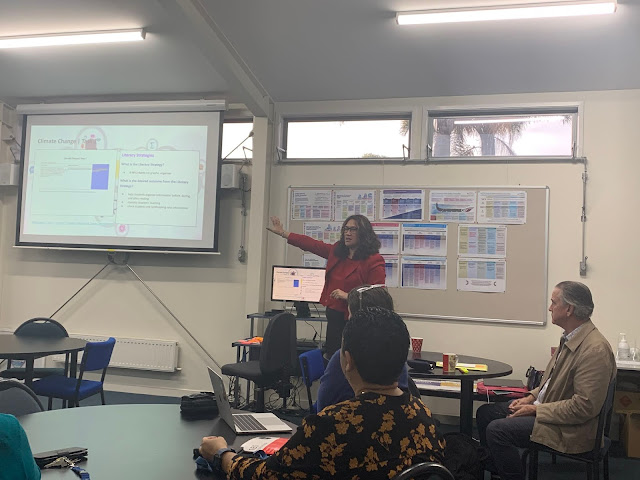
On the 3rd March 2022 the Technology Department had the opportunity to participate in and share various aspects of our teaching and learning in the Technology - Manaiakalani Department Discussions, facilitated by Kerry Boyde-Preece.


As well as sharing an overview of the Technology Department, which you can follow by accessing our presentation Manaiakalani Technology Department Discussion | March 2022 bit.ly/3IDreqp, the Techies also shared in some of the developments within their own Specialist Subject Areas.


Carol spoke about the range of hybrid learning techniques that both herself and Meryl have been applying within their subject area of Food Technology, which has included practical lessons online (students in their home environments and teachers also in their home environments), a combination of onsite and online in two different venues (students in their Primary school environment, and teachers in their Secondary school environment), and also completely onsite at Tāmaki College.


Rob and Andy talking about the different pathways in Building and Construction, and in particular, Rob providing insight as the Tāmaki College Trades Academy, into the pathways and industry connections that the Trades Academy offers to our students.


Ruby spoke about 'Design Thinking' and how she is inquiring into cultural responsiveness as a way of enabling learners to celebrate themselves and share of their identity and who they are as a part of the learning process.

Marc discussed the literacy work that he had been working on relating to the Technology curriculum area, including examples of the literacy strategies, interventions and learning tasks that he had developed in this area.


Share
Tweet
Pin
Share
No Comments

How another lockdown period may impact the learners in your focus group?
Will you need to make any changes to your Inquiry?

How might your intervention look different if you continue through this period?

  • Do any of your intervention plans work via distance learning?
  • Is there any information about implementation of your changed practices/interventions you could collect during this time?

My target group of learners for my Inquiry 2021 will be my Year 12 NCEA Level 2 class. This group of learners were my target group from my 2020 Inquiry.


One of the resources I developed for my target group of learners in the first week of lockdown, is a Develop a Website | Index of Table of Contents.  This resource is basically a series of Table of Contents that relates to the LearnCoach online tutorials for Website Development, to prepare learners to complete the Level 2 Develop a Website Assessment.


The way that the resource works is as follows:

  1. Students open the document Develop a Website | Index of Table of Contents
  2. Then they use the Find function to locate the aspect of 'web development' that they trying to locate.  In the image outlined above, the student wanted to know about the Navigation Bar
  3. The student clicks on one of the selections that is returned in the search using the Find tool, as each line of the table of contents links to a separate document.  So, in the example above, the sets of text highlighted in green, when clicked on, will redirect to the document that includes information about Navigation Bars.
  4. The student toggles through the document that they've clicked on to locate the information that they're interested in.  This could include an explanation of the website feature, aspects of the website feature, or how to use the correct and relevant codes in order to apply the website feature into their own website.
  5. The document name (that the student has navigated to) aligns with the name of the LearnCoach tutorial, which means that the student can then open the relevant LearnCoach tutorial to help them with the aspect of web development that they are working on
This resource cuts down a lot of time for the student, by enabling the student to focus on the web development feature, skill or codes that they specifically need.  Otherwise, the alternative was that students were having to watch, and re-watch entire videos just to get to the section that they needed, in the hope that they were in the correct video.  Quite a huge job!

As I was demonstrating this resource to students online in our Google Meet, they could see the benefit of the Develop a Website | Index of Table of Contents and how this would cut down a lot of time for them, which I was pleased to see.


Share
Tweet
Pin
Share
No Comments

Plan and conduct detailed inquiry into specific aspects of your current teaching that are relevant to the hypothesis you identified in the literature.

My target group of learners for my Inquiry 2021 will be my Year 12 NCEA Level 2 class. This group of learners were my target group from my 2020 Inquiry.


One of the main tasks for the current Level 2 project, is to undertake Planning that involves:

  • explaining the purpose of the outcome
  • identifying the end users
  • explaining a range (at least three) relevant implications to the outcome, and how these implications would be addressed
Term 2 has been a particularly strange term for my Level 2 students.  All of the class attend Techtorium on Thursdays, which means that I don't see them for a double lesson on that day.  During Term 2, seven of the students also attended a YooBee course of Tuesdays, which meant that I didn't see those students for a double lesson on that day.  Therefore, I saw more than half of my class for 2 x single periods per week, and four students for 2 x single periods and 1 x double period.  This has created a challenging start to the beginning of Term 3.

Reflecting on Student Work


Reflecting on the Planning task for the Level 2 project, I encountered the following main issues when providing students with formative feedback on their work:

  • Students were loosely describing the outcome, and what they wanted to include into the outcome, rather than explaining the purpose of the outcome.  Also, in doing so, they were not actually describing the outcome in any great depth.
  • Students were identifying a set of end users, but were not connecting the end users to the outcome.
  • Students were describing the relevant implications, but were not explaining why the implications, were in fact, relevant to the outcome.  Further more, the students were not explaining how they intended to address the implications in the development of their outcome. 
Student example:


Use of Teaching Strategies from Academic Writing


The following are aspects from two of the three pieces of academic or professional readings that are relevant to the issues around the Planning task with my Level 2 learners:


Visualisation of Key Concepts - the use of a bullseye chart to identify and prioritise stakeholders, including end-users


Summarising - the use of sentence starters, key words and phrases, and main ideas to construct the summary for the Purpose of the Outcome 

  • Sentence Starters - the use of sentence starters to direct the students to write a summary that covers all relevant aspects of explaining the purpose of the outcome 
  • Student Exemplars (of Tamaki College student work) from previous years - used to help students to identify key words and phrases from the exemplars, to better understand how these would apply when writing their own summaries

The following are a range of teaching strategies that I used that are relevant to addressing the learning needs and issues outlined in the previous paragraphs:


Student Outcomes based on Teaching Strategies

The following is a breakdown of student outcomes based on the introduction of the Sentence Starters (Summarising), Student Exemplars (Summarising) and Bullseye Chart (Visualisation) to support student learning.

  • Sentence Starters (Summarising) - Students were not using the sentence starters to explain the various aspects of the Purpose of the Outcome to the depth that would be expected at Level 2.  The students were using the sentence starters more like a writing frame, and trying to fill in the blank spaces, with very little information, to explain what they were talking about.
  • Student Exemplars (Summarising) - The use of student exemplars from previous years to help students to understand key ideas and concepts, became more of a distraction and hindrance to their own writing, than it was as a useful learning tool.  The reason for this is because students were trying to replicate the concepts written from the exemplars and apply it to their own work; but in doing so, completing going off track from what the purpose of their (actual) outcome was all about.
  • Bullseye Chart (Visualisation) - Students who attempted using the bullseye chart, struggled to identify and differentiate their various stakeholders, if their Summary for the Purpose of the Outcome was not written properly, and the 'purpose' was not appropriately communicated in their writing.


Exploring the Teaching Strategies in more depth

The main issue that I found from introducing the Teaching Strategies (mentioned above) is that learners were trying to replicate the exemplars, which didn't work in another context, or, they were filling in the gaps (of the sentence starters), rather than identifying and explaining their own work.

Explanation of Sentence Starters

In order to broaden the student understanding around the information that they needed to explain in their Summary for the Purpose of the Outcome, I explained the purpose of each sentence starter, so that they could and would make the connection to what they needed to write.


Exemplar of a Written paragraph

I used the Explanation of Sentence Starters to write an example for students, based on a completely different context and a completely different outcome.  I stepped students through the 'experience' or process, that they were taking the reader through, by writing the summary in this format, in the hope that the 'experience' would resonate with them in terms of needing to connect with the reader, and that this would hopefully come through in their own writing.

The first paragraph was about describing the outcome, and providing enough detail so that the reader, can visualise what the outcome might be about (without explaining every little detail that is intended to be included in the outcome).  This is particularly important if the reader might not know or understand what the outcome is, or how the outcome could be useful.

The second paragraph was about describing the intended target audience for the outcome.  In doing so, connecting the audience to the outcome so that the outcome becomes meaningful to the target audience and end users.  By now, the reader should be painting a picture in their mind, as to what the outcome is, and why the outcome would be useful to the target audience.

The third paragraph was explaining the reason for creating the outcome, and the possible need or opportunity that would be met, by creating the outcome.  This is the section of the summary that defines the purpose.  However, I was trying to convey (in the example) the importance of the first two paragraphs to build (paint) the picture first.

The final paragraph was a description of the inputs and outputs for both the developer, as well as the inputs and outputs for the end-user, so that end-users might gain some insight into the intent of how the outcome could and would be used.  This also makes the students think about what they are developing and how they would develop the outcome, so that they would hopefully consider the user-friendliness and accessibility of the fully developed outcome.


Peer Feedback of Written Summary

In order to encourage students to reflect on their own writing, and decipher whether they were connecting with the reader, I asked students to share their work with a peer.  The peer needed to provide feedback on whether they understood what the outcome would be, who the target audience is, what the purpose of the outcome is, and how the outcome will be developed (hardware and software), as well as where the outcome would or could be used. 

Students found this process to be particularly useful, in that they learnt that by providing specific feedback about a segment of work to another student, meant that they had to articulate what was required to write the paragraph properly; in turn, improving their own writing.


Changes to my Teacher Practice

In trying to support my learners with more learning support materials to complete the task, the greater the volume of learning support resources, that the students were needing to navigate (within Workspaces) ... it was getting hard for them.   Every time I found a useful link, or an example, a different strategy etc, I was adding these resources into the Workspace for the students.  Irrespective of the value and usefulness of the resource, the sheer volume of learning resources was becoming overwhelming for the students.  So, I decided to trial a Flowchart of the tasks to enable the students to complete the Purpose of the Outcome Summary.

The information and the links within the flowchart were no different to the information and the links within the Workspace.  However, the flowchart effect, meant that I could scale down the number of resources added into the Workspace; thus, making the Workspace easier to navigate.

Students Feedback about Flowcharts

The feedback from the majority of the students in the class is that they preferred following the design process in flowchart form.  They liked that the layout of the flowchart, and the way in which the flowchart was intended to be used, with directional arrows that follow a process of YES or No, and looped back into the main body of the flowchart.

Based on this feedback, and asking whether they'd like another flowchart (to which they replied with a resounding "Yes please"), I decided to develop another Flowchart for the Relevant Implications.

Peer Feedback from Google Site - Colleagues

The issues that I encountered in terms of access to student learning resources, made me reflect on other feedback that I'd received on the visibility and access to learning resources of Year 9 and Year 10 in my Subject Site, from my colleagues in the Technology Department.

The process that we undertook within our department to capture feedback about the Visibility and Accessibility of Teaching and Learning, was by completing a survey that focussed on the following:

  1. Where are the Teaching and Learning ACTIVITIES for your Year 9 and 10 program located?
  2. Where are the Teaching and Learning ASSESSMENT TASKS for your 9 and 10 program located?
  3. Where are the Teaching and Learning ASSESSMENT CRITERIA for your 9 and 10 located?
  4. How are your Learners SUBMITTING EVIDENCE for ASSESSMENT of your Year 9 and 10 program?
  5. Do the Teaching and Learning Activities > Assessment Tasks > Assessment Criteria, ALL align with the Achievement Objectives or Progress Outcomes that students are being assessed against, that are entered into Kamar Markbooks for REPORTING for Year 9 and 10?

We completed the survey ourselves, explaining where the resources were located.  I shared the Responses to the Technology staff so that we could view the responses, and also comment on each others responses.

We viewed each others' Subject Sites, and followed the information within the survey, to see if we could actually navigate to the teaching and learning resources that staff had entered into the survey.

Then we provided each other with feedback (comments) as to whether the teaching and learning resources were easy to access and visible.


The key findings that I've learnt so far from the teaching and processes that I've undertaken that I've outlined in this blogpost about my teaching practice includes:

  • being mindful about how students may (or may not) use learning resources that I've shared with them, and therefore anticipating how students might respond to learning resources that I share with them
  • being mindful about how I share learning resources with students, that enables them to access the utilise the learning resources appropriately; especially when I add more learning resources into the existing bank of resources
  • being mindful that the learning resources are visible and accessible.  Just because I can find them, doesn't mean that others can find them too!


Share
Tweet
Pin
Share
2 Comments

The following video (which you can access by clicking on the image), briefly explains the Literacy Strategies that I developed and applied with my Year 9 DigiTech class with the context of Matariki.  They are the similar literacy strategies which I used and implemented with my Year 10 DigiTech class with the context of Climate Change.  I am also using a range of these literacy strategies with my 2021 Inquiry group.


Literacy Learning Strategies | Year 9 DigiTech - Matariki


Share
Tweet
Pin
Share
No Comments

Literacy Learning Strategies


I applied the following Writing Learning Outcomes from the Literacy Learning Matrix to teach content relating to Matariki, using the Literacy Strategies outlined in the section entitled Year 9 DigiTech - Matariki

Literacy Learning Strategies | Year 9 DigiTech - Matariki


Share
Tweet
Pin
Share
No Comments

Share three pieces of academic or professional reading and explain how they and other sources helped you form hypotheses about aspects of teaching that might contribute to current patterns of learning.

My target group of learners for my Inquiry 2021 will be my Year 12 NCEA Level 2 class. This group of learners were my target group from my 2020 Inquiry.


The following are the pieces of academic or professional readings that I used to help form my hypothesis about aspects of teaching that might contribute to current patterns of learning:
  1. Literacy Learning Matrix
  2. Visualisation of Key Concepts
  3. Summarising

Literacy Learning Matrix
The key findings that I gained from this reading, was seeing and understanding a concise breakdown of what students are likely to learn through the various concepts, or "Big Ideas", outlined in the matrix.  This is particularly useful, when trying to enable learners who are new to the subject at NCEA Level 2, to digest terms and concepts that are completely foreign to them.  This has definitely been the case with my 'newbies', but is also useful to my returning students, who may be struggling with NCEA Level 2 concepts, which is a huge jump from NCEA Level 1.

Visualisation of Key Concepts
Whilst this reading focussed on what learners gain from visualisation techniques as readers, I was also able to draw on this strategy of students using visualisation to develop deeper understanding of concepts.  This technique I gained from work that I had undertaken with Marc Milford, with my Year 10 DGT Class, focusing on Climate Change, as well as my Year 9 DGT Class, focussing on Matariki.  I know that my senior DGT learners still struggle with concepts such as the identification and prioritisation of Stakeholders, so this strategy could be useful in progressing learning student learning and understanding.

Summarising
The simplicity by which this resource has been put together, is a great snapshot on what to focus on when supporting learners to articulate and summarise their key thoughts and ideas.  Learners often get caught up in the notion that volume, and great levels of descriptions, will 'cover' everything that needs to be communicated in a written summary.  My Senior DGT students are no different.  Text/lesson summary exercises, are another strategy that I learnt in the work that I have done with Marc Milford this year.  This is an extremely useful strategy to help my learners to articulate their key findings, without waffling on, but by also meeting the assessment criteria in the achievement standard.


Share
Tweet
Pin
Share
No Comments

Share your findings about the nature and extent of the student challenge. Make sure it is clear what evidence from your inquiry supports each finding


My target group of learners for my Inquiry 2021 will be my Year 12 NCEA Level 2 class. This group of learners were my target group from my 2020 Inquiry.


Initially my target group of learners fro my Inquiry for this year, was the Year 12 NCEA Level 2 class that I had taught in 2020 as Year 11 students, and who were also a part of my 2020 target group of learners.  The idea was to build and extend on what I had inquired into from the previous year.

As Year 11 students, 2/11 of the target group had gained ten achievement standard credits, and 5/11 of the target group had gained thirteen achievement standard credits; this was in addition to DGT credits that they had gained from external providers.  Of this target group of learners from 2020, 6 out of the 11 students have returned to undertake DGT Level 2 in 2021, as well as an additional six new students who are taking DGT Level 2 for the first time and not having taken the subject at NCEA Level 1.

The student challenge that I identified at the beginning of the year, was for learners to be able to write and achieve at Merit and Excellence levels for NCEA Level 2 achievement standards.  This is still the challenge.  However, the main challenge impacting student learning for my 2021 target group at the moment is actually time in class.  One of the original learners from the beginning of the year has now left.  The remaining students in my class in involved in either one or two external courses per week.  What that means for those students, is that they are offsite, all day, completing courses with external providers and gaining great success with those courses.


So, literacy is still one of the main barriers to learning.  However, there are a range of other barriers to learning, or student challenges, that have and are superseding the original challenge.  As opposed to inquiring solely into the use of Academic Writing exemplars specific to Digital Technologies to accelerate student achievement at Merit and Excellence levels, I need to adapt the inquiry and the use of Academic Writing exemplars specific to Digital Technologies to accelerate student achievement at all levels.


Share
Tweet
Pin
Share
No Comments

Marc Milford and I delivered a SLAM this morning during morning briefing, about the Literacy Strategies that we had collaborated on for my Semester/Rotation 1 Year 10 class around the context of Climate Change.

Usually I would focus a lot of class time on technical skills and techniques, in teaching the students the coding skills required for game development.  In terms of content, I would not usually allocate much learning time towards this aspect of the project.  However, for this particular project, I took some reading material and articles to Marc about Climate Change, and he helped me to break the tasks down, in order to develop the reading, discussion and writing skills with my learners, so that I could connect the students more closely to the content which they would use to develop their games.


The following is the presentation slide deck that we used in the SLAM session.

Literacy Strategies - Year 10 Project | Climate Change and Game Development

It is important to note that in the process of breaking the tasks down for the learners, it wasn't a case of distributing the tasks like handouts and leaving them to navigate their way through the learning.  The students required feedback and/or feedforward so that the learning activities were useful for them, and equipped the learners to be able to write a final summary.  I used a Workspace to communicate the tasks with the learners and so that they could submit their work.  I used a tracking sheet to give students immediate feedback of the task, and used comments in their individual documents for students who needed feedforward to complete the work.

I am likely to integrate these same approaches with my target group for my 2021 CoL Inquiry this year.  Staff from other departments have shown interest in wanting to collaborate, with a particular interest in the Climate Change project, which Marc and I both welcome!


Share
Tweet
Pin
Share
No Comments

Begin to collect evidence and data  and come to the next session ready to share your preliminary findings about the nature and extent of the student challenge i.e. using your baseline student data and evidence

My target group of learners for my Inquiry 2021 will be my Year 12 NCEA Level 2 class. This group of learners were my target group from my 2020 Inquiry.


The following are two examples of evidence that I am in the process collecting to demonstrate my preliminary findings about the nature and extent of the student challenge.

Academic Writing using SOLO Taxonomy - Online Game

I asked the student to highlight and comment on various aspects of the example tasks within the slide deck, to highlight the various features of that particular aspect of SOLO Taxonomy.  The purpose of this exercise was to see whether or not the student understood the exemplars that were provided, and connect these to future work.

Whilst the student found the exercise to be useful.  It was also extremely time consuming.  So, in terms of this approach being meaningful for the student to use in future tasks or assessments, the timeliness of the task detracted away from the purpose or which the task was intended.  That is, very little work and essentially assessment work, would get completed if we focussed so much time on deconstructing and understanding the Academic Writing model, by following the approach that I'd set out for the student.  A classic example of 'Expectation' v 'Reality'!


Explanation Writing Poster for Digital Technologies

I asked the students to use the Explanation Writing Poster for Digital Technologies, and highlight to text within their current Assessment Task using the same colour codes from the poster, as a means of gaining a better understanding of the assessment instructions.

The students are still in the middle of undertaking this process.  However, initial discussions that I have had with the students of terms of improving understanding of the assessment, is that this process has really useful.  I am hoping to see what their understanding of the assessment task actually is, through inquiry questions, once this approach has been completed.


Share
Tweet
Pin
Share
No Comments

Describe the tools/measures/approaches you plan to use to get a more detailed and accurate profile of students’ learning in relation to that challenge. Justify why you chose these approaches and tools.

My target group of learners for my Inquiry 2021 will be my Year 12 NCEA Level 2 class. This group of learners were my target group from my 2020 Inquiry.


The tools that I plan to use to get a more detailed and accurate profile of students' learning in relation to the challenge, includes both the Explanation Writing Poster for Digital Technologies, as well as the Academic Writing Slidedeck; both resources that I produced in collaboration with Marc Milford.


The reason that I would like to use the Explanation Writing Poster for Digital Technologies, is because it includes colour coded examples within the poster of various types of Writing Features, which students could potentially use and follow within their own writing tasks.  The students can also use this tool, to improve their understanding of reading materials that include a lot of new and technical vocabulary, such as Assessment Tasks.


The reason that I would like to use the Academic Writing Slidedeck, is because it also includes colour coded examples within the slides, and explanations of different levels of SOLO Taxonomy, that relates to a Digital Technologies outcome, which students should be able to relate to in this subject.  The examples of the different of SOLO Taxonomy, should enable students to develop their literacy and writing skills in alignment with the exemplars that have been provided.


Share
Tweet
Pin
Share
No Comments

From what you know already about your classes and your school’s profile and leadership goals for the year, share a possible inquiry focus.

Frame your focus as a desired change in student learning NOT a change in teaching (as yet!)

My target group of learners for my Inquiry 2021 will be my Year 12 NCEA Level 2 class. This group of learners were my target group from my 2020 Inquiry.


I would like to inquire into whether Academic Writing exemplars specific to Digital Technologies, in conjunction with the 'Explanation Writing' classroom display resources for Digital Technologies, based on SOLO taxonomy, could accelerate achievement in literacy in my subject.  

The desired change in student learning is that students will be able to write and achieve at Merit and Excellence levels for NCEA Level 2 achievement standards.


Share
Tweet
Pin
Share
No Comments

One of the Technology Department Goals for 2020 was based on Literacy, in alignment with the School Goal 2 for Literacy and Numeracy.  

The Technology Department Literacy Goal for 2020 is:

To develop ‘Explanation Writing’ classroom display resources for each specialist technology subject, based on SOLO taxonomy


I have been developing a slide deck of Academic Writing that relates to Game Development. The academic writing exemplar follows SOLO taxonomy, and I intend using this as an exemplar with my students, to support them to gain Merit and Excellence. I am seeking feedback and support from Marc Milford, after which, I will further develop the exemplar to follow the Explanation Writing model demonstrated in the poster.

This will enable a Visual Representation to be used on my classroom wall, Working Exemplars that the students can follow, and hopefully the consistency of the design, both within my own practice, and also across the department, will reinforce the key literacy features that we are wanting our learners to apply in their own work.

Academic Writing - Online Game 


The following is the first version of the slide deck that I have developed, which Marc is providing feedback for.  The slide deck follows the same format that Karen Ferguson developed for Design Writing for her learners.  I really like the SOLO Taxonomy images that Karen created, and the layout of her slides, which I feel will make the information easy to follow.


In addition, Marc has provided me with links to readings that support the Literacy process that I am working through for my learners.

I would like this to form the basis of my Inquiry for 2021, and so, will explore this in more detail.
Share
Tweet
Pin
Share
No Comments


One of the Technology Department Goals for 2020 was based on Literacy, in alignment with the School Goal 2 for Literacy and Numeracy.  

The Technology Department Literacy Goal for 2020 is:

To develop ‘Explanation Writing’ classroom display resources for each specialist technology subject, based on SOLO taxonomy


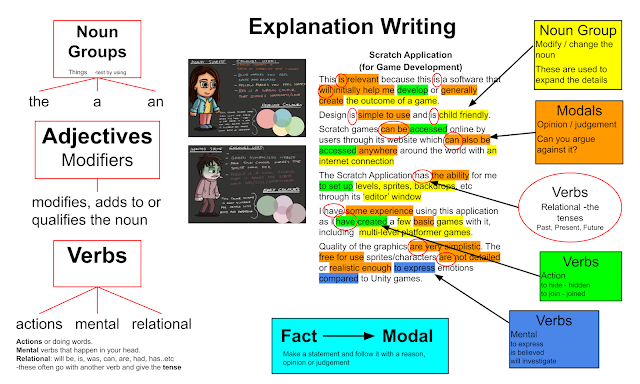
After the department literacy session on understanding the Explanation Writing process, I developed an 'Explanation Writing' template for Digital Technologies. I shared this with Marc Milford, who provided feedback and changes as shown below.

Discussion Points about the Explanation Writing Digital Technologies poster

In order for teachers to assist learners with fluent writing, beyond the use of sentence starters, it is important to master three types of functional verbs used in writing.  These are:

  • relational verbs (small auxiliary verbs that express tense)
  • mental verbs (what you do in your head)
  • action verbs


Final Writing Explanation Poster for Digital Technologies

The Final Writing Explanation Poster for Digital Technologies looks as follows. This will be colour printed, laminated, and displayed on my classroom wall.


Next Steps

I have been developing a slide deck of Academic Writing that relates to Game Development. The academic writing exemplar follows SOLO taxonomy, and I intend using this as an exemplar with my students, to support them to gain Merit and Excellence. I am seeking feedback and support from Marc Milford, after which, I will be further developing the exemplar to follow the Explanation Writing model demonstrated in the poster. This will enable a Visual Representation to be used on my classroom wall, Working Exemplars that the students can follow, and hopefully the consistency of the design, both within my own practice, and also across the department, will reinforce the key literacy features that we are wanting our learners to apply in their own work.

As a department, Marc Milford has been providing feedback to Technology staff on their Explanation Writing Posters, such as the Digital Technologies poster shown in this post. Marc is going to attend our department meeting, and give an overview and explanation of the feedback that he has provided, and changes that he may have made to our posters. From there, we will be looking at literacy strategies that we will address in the future with our learners.


Share
Tweet
Pin
Share
No Comments


The following is one of our Department Goals for 2020:

To develop ‘Explanation Writing’ classroom display resources for each specialist technology subject, based on SOLO taxonomy


Discussion Points about Literacy Issues

  • Staff have been trialing a range of different Literacy Strategies with their learners within our different learning environments.  
  • Students struggle with the physical act of writing.  Blogging is inconsistent, and time constraints is an issue.
  • Students are struggling to read and understand instructions, including identifying and understanding key words.

And so, as a department we decided to prioritize this goal as a Dept Goal focus for 2020.

We are extremely fortunate that Karen has been working closely with Marc Milford to develop an Explanation Writing frame for her students in DVC. Karen lead us through the initial process that she has undertaken to break down a piece of text relating to our specialist subjects areas. The workshop was great, and everyone enjoyed the activities that Karen had organised for us.

The following is a general outline of the process that are following:

  1. Each member of the Tech Dept developed our own Visual Board relevant to a piece of text specific to our subject area
  2. Karen shared a digital template for each of us to digitise our 'Explanation Writing'. We will complete this by the next department meeting
  3. We are going to share our digitised 'Explanation Writing' with Marc Milford for feedback
  4. Our 'Explanation Writing' posters will be colour printed to display in our classrooms.
  5. As a department, we will decide through the development of the Explanation Writing display poster, how the resource would and could be used to measure literacy progress for the students. 

I'm really looking forward to experimenting with this literacy strategy with an upcoming assessment I have with my DigiTech Level 2 students.

A huge thanks to Karen for leading this session with the Tech Team, and also for modelling the process that she has applying in her subject area.  Thanks Karen!


Share
Tweet
Pin
Share
No Comments

Literacy Strategies - Stakeholder Feedback on Conceptual Designs 


Students in Level 2 and Level 3 DigiTech completed a series of activities, that would enable them to gain deeper levels of Stakeholder Feedback, in order to effectively develop the Conceptual Designs of the outcomes that students were working on.

The activities were developed with the support and guidance of the school's SCT Special Classroom Teacher, Cheryl Harvey, who I had spent numerous planning sessions with at the end of 2018, to address the learning needs of students taking DigiTech for the first time in 2019.

The activities included class discussions about the types of questions based on SOLO taxonomy, that would enable the students to inquire into stakeholder needs relating to design development.  The theory being that the more comprehensive and detailed that the questions are, the more comprehensive the responses would be in terms of gaining meaningful Stakeholder Feedback on the ongoing development of the Conceptual Designs.

However! the questions that students produced needed to be trialled in order to test how robust and useful the questions actually were.  So, students participated in a role play exercise with their peers, to test their questions.

The following are the activities that students completed to develop their Questions for Stakeholder Feedback, as well as a range of videos that shows students participating in a Role Play exercise to trial their questions with their peers.


Role Play of Questions for Stakeholder Feedback

Click on the images to view the videos


 .   


Share
Tweet
Pin
Share
2 Comments


One of the recent learning activities that some of my students had to do was explain whether the outcome that they'd developed was 'fit for purpose'.  In essence, whether the outcome met the client's needs, and adhered to the specifications in the design brief throughout the students' entire practice.  

The various stages throughout their practice that enabled students to either relate their design investigations to the design brief, or, acquire client feedback or stakeholder feedback, includes: 


  • the initial brainstorm of outcome ideas, 
  • research of existing outcomes and design principles, 
  • client discussions, 
  • feedback on design ideas, 
  • feedback on conceptual designs, 
  • and feedback on the final conceptual design.

Students were able to execute the various stages of technological practice.  Students were also very familiar with the specifications in the design brief.  However, an area where students struggled, was by explaining how the various stages of technological practice adhered to one or more of the specifications, and how this meant that the clients needs were being met.  It's not that the students weren't doing the work.  It's more a case of explaining how the clients needs were being met, and the evidence that the students had acquired to back up their statements.  Students were describing the practice eg. the brainstorm, then describing the specifications, but struggling to explain the link between the brainstorm and the specifications, as how the clients' needs were being met.

This lead to discussions between myself and three of the students, breaking down the task as outlined in the image.  The approach is very similar to the SEXY writing structure for paragraphs.  Students had to:

  1. State and/or describe the type of practice
  2. Explain how the practice linked to either the design specifications and/or client feedback
  3. Provide an example or evidence of the practice
  4. Explain why or how the clients needs had been taken into consideration, contributing towards the final outcome being fit for purpose.
The discussions entailed to-ing and fro-ing amongst myself and the students to clarify that they understood how to approach the task.  The students then undertook the fitness for purpose task, whereby I was able to comment into their documents, as well as follow up with further discussions with the students to clarify that they had completed the task as needed and required.


Share
Tweet
Pin
Share
No Comments
Older Posts

About Me

Kia ora! I am the Head of Technology at Tāmaki College and also teach Digital Technologies.


My target group of learners for my Inquiry 2021 will be my Year 12 NCEA Level 2 class. This group of learners were my target group from my 2020 Inquiry. I would like to inquire into whether Academic Writing exemplars specific to Digital Technologies, in conjunction with the 'Explanation Writing' classroom display resources for Digital Technologies, based on SOLO taxonomy, could accelerate achievement in literacy in my subject.


My target group of learners for my Inquiry 2020 were my Year 11 NCEA Level 1 class. I inquired into the process of using the LearnCoach online programs (content) and VTaL Visible Teaching and Learning (workflow) to accelerate student achievement for Tamaki College students undertaking courses in Digital Technologies NCEA Levels 1, 2 and 3.


In 2019, my inquiry is to maximise pedagogical practices (relating to integrated education, and collaborative teaching and learning), to effectively shift student achievement, supported by digital platforms connected to visible teaching and learning.


My Inquiry in 2018, was to develop a VTaL Purpose-Built Innovative Tool, to enable all elements of the VTaL Framework to be accessible to teachers, in order to accelerate student achievement.


In 2017, my inquiry was based on raising student achievement and shifting teacher practice around effective pedagogical practices including Learn, Create and Share. This will be achieved through the development, implementation and monitoring of the Visible Teaching and Learning Framework.

recent posts

Blog Archive

  • ▼  2022 (8)
    • ▼  March (3)
      • Hybrid Teaching and Learning | The impact of Omicron
      • Manaiakalani Toolkit | Well-being - Supporting Our...
      • Technology - Manaiakalani Department Discussions M...
    • ►  February (5)
  • ►  2021 (16)
    • ►  November (1)
    • ►  September (2)
    • ►  August (1)
    • ►  July (2)
    • ►  June (4)
    • ►  May (3)
    • ►  March (2)
    • ►  February (1)
  • ►  2020 (42)
    • ►  November (2)
    • ►  September (2)
    • ►  August (7)
    • ►  July (5)
    • ►  June (4)
    • ►  May (7)
    • ►  April (7)
    • ►  March (3)
    • ►  February (4)
    • ►  January (1)
  • ►  2019 (30)
    • ►  September (2)
    • ►  August (3)
    • ►  July (1)
    • ►  June (2)
    • ►  April (1)
    • ►  March (12)
    • ►  February (9)
  • ►  2018 (41)
    • ►  November (7)
    • ►  October (2)
    • ►  September (1)
    • ►  August (4)
    • ►  July (4)
    • ►  May (7)
    • ►  April (4)
    • ►  March (5)
    • ►  February (7)
  • ►  2017 (65)
    • ►  December (2)
    • ►  November (22)
    • ►  October (6)
    • ►  September (6)
    • ►  August (10)
    • ►  June (4)
    • ►  May (3)
    • ►  April (1)
    • ►  March (4)
    • ►  February (6)
    • ►  January (1)
  • ►  2016 (26)
    • ►  December (1)
    • ►  November (18)
    • ►  September (6)
    • ►  August (1)

VTaL

  • VTaL (104)
  • VTaL 01 Subject Sites (33)
  • VTaL 02 Learning Activities (7)
  • VTaL 03 Tracking Sheets (28)
  • VTaL 04 Student Checklists (12)
  • VTaL 05 Calendars with Links (24)
  • VTaL 06 Workspaces (32)
  • VTaL 07 Student Sites (4)
  • VTaL 08 Year Level Sites (3)
  • VTaL 09 Subject Communities (26)
  • VTaL 10 Student Blogs (11)
  • VTaL and Google Hangouts (15)
  • VTaL and Student Achievement (45)
  • VTaL for Parents (13)
  • VTaL for Students (82)
  • VTaL for Teachers (32)

Presentations

  • GAFE (19)
  • My YouTube Videos (8)
  • Presentations (21)

Inquiry

  • Inquiry (134)
  • Inquiry 2019 (27)
  • Inquiry 2020 (34)
  • Inquiry 2021 (15)

Manaiakalani

  • CoL (167)
  • Inquiry (134)
  • Inquiry 2020 (34)
  • Learn Create Share (11)
  • MIT 2018 (16)
  • Manaiakalani (18)
  • Presentations (21)
  • SPARK MIT (59)

Tamaki College

  • 2018 Department Goals (2)
  • 2018 School Goals (3)
  • 2019 Department Goals (2)
  • CoL (167)
  • Collaborative Learning Environments (32)
  • Covid19 (29)
  • Cultural Responsiveness (10)
  • Differentiation (12)
  • EMR Collaborative Project (21)
  • Goals (2)
  • Human Rights Collaborative Project (5)
  • Integrated Education (24)
  • Kia Eke Panuku (8)
  • LearnCoach (2)
  • Literacy (21)
  • PLD (18)
  • Techies (12)
  • Technological Modelling (4)

Practicing Teacher Criteria

  • PTC01 (31)
  • PTC02 (9)
  • PTC03 (6)
  • PTC04 (61)
  • PTC05 (17)
  • PTC06 (42)
  • PTC07 (32)
  • PTC08 (34)
  • PTC09 (8)
  • PTC10 (7)
  • PTC11 (16)
  • PTC12 (54)

General

  • CoL (167)
  • Collaborative Learning Environments (32)
  • Cultural Responsiveness (10)
  • Differentiation (12)
  • Feedback - Parent Voice (2)
  • Feedback - Staff Voice (6)
  • Feedback - Student Voice (23)
  • GAFE (19)
  • Goals (2)
  • Integrated Education (24)
  • Kia Eke Panuku (8)
  • LearnCoach (2)
  • Literacy (21)
  • My YouTube Videos (8)
  • Review (14)
  • Student Agency (15)

Contact Form

Name

Email *

Message *

Total Pageviews

Created with by BeautyTemplates| Distributed By Gooyaabi Templates