My Space and My Place

    • Home
    • Inquiry 2021
    • Digital Technologies Site
    • VTaL Site
    • VTaL G+

Literacy Strategies - Stakeholder Feedback on Conceptual Designs 


Students in Level 2 and Level 3 DigiTech completed a series of activities, that would enable them to gain deeper levels of Stakeholder Feedback, in order to effectively develop the Conceptual Designs of the outcomes that students were working on.

The activities were developed with the support and guidance of the school's SCT Special Classroom Teacher, Cheryl Harvey, who I had spent numerous planning sessions with at the end of 2018, to address the learning needs of students taking DigiTech for the first time in 2019.

The activities included class discussions about the types of questions based on SOLO taxonomy, that would enable the students to inquire into stakeholder needs relating to design development.  The theory being that the more comprehensive and detailed that the questions are, the more comprehensive the responses would be in terms of gaining meaningful Stakeholder Feedback on the ongoing development of the Conceptual Designs.

However! the questions that students produced needed to be trialled in order to test how robust and useful the questions actually were.  So, students participated in a role play exercise with their peers, to test their questions.

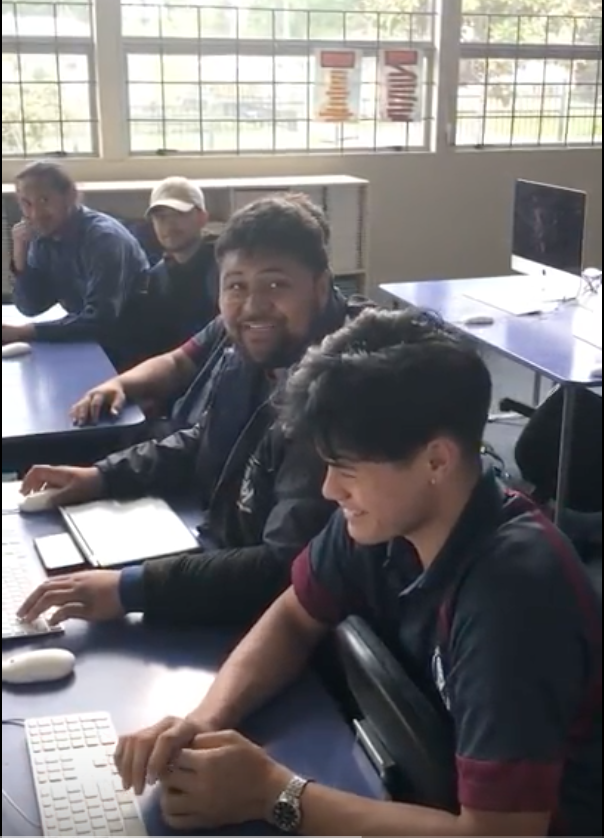
The following are the activities that students completed to develop their Questions for Stakeholder Feedback, as well as a range of videos that shows students participating in a Role Play exercise to trial their questions with their peers.


Role Play of Questions for Stakeholder Feedback

Click on the images to view the videos


 .   


Share
Tweet
Pin
Share
2 Comments


Today's MIT @ KPMG session involved a lot of reflection about what I've inquired into so far, what the current state of the national looks like with regards to the tool that I am developing, and where to from here ...

Who does this Moonshot project involve?

Purpose: to identify my tribe/team/collaborators

  • Who am I collaborating with on this project?
  • Who are my team?
  • Who has a voice in this project?

Who are the Who?


  • Learners: exactly who
  • Colleagues: co-designers, collaborators, sounding boards etc
  • Experts: who is being invited to add expert opinion

Original Stakeholders


The original stakeholders (previously blogged) are outlined below:

  • Ann/Dorothy - Meet with at PD, gained feedback about tool design
  • App Developers - Meet with Dave/Korene Letele, and gained feedback about tool design
  • Financiers - No longer relevant as I don't need financial backing to develop the tool
  • Sue/Fusion - Not directly relevant to the development of this particular VTaL tool which is targeted towards Teachers and Teaching Practitioners
  • CORE Middle Leaders - Need to consult
  • SLT - Yet to have discussions
  • Teachers - Yet to have specific discussions
  • Families - Not directly relevant to the development of this particular VTaL took which is targeted towards Teachers and Teaching Practitioners

NEW Stakeholders


  • NEW stakeholders to the mix include:
  • NEW - Jim Sill, EdTech, referred me to Kimberley who has shown interest in attending my Sydney GAFE session
  • NEW - Wayne Poncia, Hapara
  • NEW - Andrew Corney SCT Tauranga Boys College
  • NEW - Kalisha Paketama, Frances Kolo, Tamaki College First Year Teachers

Content for the Tool - Stakeholder Feedback

What are the right questions to ask in order to determine appropriate content for the tool?  
How do I ask the questions, in a way that will get me the answers?

I think the scope for identifying appropriate questions can and will be determined from a number of sources.  I gained feedback from a Toolkit Session I ran on VTaL at the beginning of 2017 with staff either new to Tamaki College, or staff who were generally interested in VTaL.  It also makes sense to me to touch base with our newer staff, to find out from them what would be useful as beginning teachers.  Not to say that the feedback should be limited to these sources, but would hopefully help focus the next tier of stakeholder conversations.

Tool Design

Developing the tool itself isn't that difficult for me.  What I do need to consider carefully though is design features (colour schemes, functionality, aesthetics, layout etc).  There is no point in having robust content within the tool, if the way the tool functions and looks is terrible for the end users.  Ironically, this is a conversation I constantly have with my students as a Technology teacher.

There's also the fact that I quickly threw together an original prototype of the tool eg. an original VTaL Google site, when I first launched the VTaL Google+ community.  It dawned on me that the Google+ community was intended to enable users to share and communicate, which is vastly different to a site (even though there may be similar features).  Stakeholder feedback on the design of the original site would also be invaluable, in order to move forward.

Next Steps

It is clear to me that my team of collaborators and original stakeholders has evolved from the beginning of the this year, or even last year when I first started promoting VTaL.  Stakeholder feedback from my current and new stakeholder base on content for the tool, and tool design are what I need to focus on next.  This is likely to include not just the content of the tool eg. the site, but the templates of various VTaL components that I am likely to embed into the site.  A timely process, but also an important and necessary process, if the tool is to be effective for users!


Share
Tweet
Pin
Share
No Comments

Connecting

Sharing progress in our thinking. As we have faced the reality of the cohort of learners (and teachers) we are spending 2018 with, how has the thinking you developed at Kuaotunu gelled when ‘the rubber hit the road’?

Sharing the progress in my thinking with my fellow MIT peers since our first MIT weekend together, meant focusing on the 'problem' as well as the 'opportunity', as outlined in the image below.

The shifts in the usage of various VTaL tools from early in 2017 through to later in the year, showed that the Tracking Sheets was the tool that resonated most clearly with in terms of accelerating and shifting student achievement.  Therefore, I have decided to focus on this particular tool as the main driver of the entire VTaL framework ... well, at least for the time being anyway.  Connecting the focus to the problem, meant that every class (or class site) should have the tracking sheets visible and embedded into their sites for students, teachers and parents to view.

Design Thinking- Experimentation

Session 6: Design Thinking- Experimentation. The one we didn’t get to at Kuaotunu. Prototyping the solution we have arrived at.

This session involved prototyping and sharing our ideas in small groups to gain feedback.  This was a particularly useful exercise which has in actual fact, lead to a re-design of my initial outcome idea, as well as my inquiry.

Pitching the idea gave some clarity on how I envisaged the digital tool could work and would work, in relation to (based on peer feedback) how the digital tool should work, and therefore be developed.  The idea of needing to produce a mobile app wouldn't necessarily meet the needs of the intended user of the app, being teachers.  Feedback suggested that a site would allow for more scope and depth of VTaL as an overall resource.

When I discussed the motivation and intent behind the idea of the app in more detail, it became clear that the responsive design of Google Sites, would enable the VTaL framework to sit nicely in a NEW Google Site for desktop-friendly use, as well as mobile-friendly use.  So, the outcome design has essentially changed.  This in turn, has huge implications on the development process, as there is no longer the need to focus on app development.  This is a game-changer!


The first three images show what a NEW Google Site looks like on a desktop as well as on a mobile device.  The last image shows the existing VTaL website, which I don't believe is particularly effective in it's current form.


Ed Tech Summit

https://events.edtechteam.com/sydney2018
Time to get our proposals in for the workshops we want to present in Sydney
We will help you!! A geeky, toolkit type of session OR Unpacking aspects of your classroom practice

The session about preparing for the Ed Tech Summit in Sydney later this year, provides a great platform to present and gain feedback from an audience who I am unlikely to have spoken to or with about VTaL.  Hence, they will be a set of fresh eyes and ears with new perspectives and views on the tool.  A great resource for stakeholder feedback.

As I am also presenting at the Auckland Ed Tech Summit in the April School Holidays, this will give me an opportunity to trial the resources and presentation that I intend delivering in Sydney.  The presentation details are as follows:

Name : Hinerau Anderson

Kia ora! I am the Head of Technology at a high school in Auckland, New Zealand, Tāmaki College, where I also teach Digital Technologies to 12-18 year olds.  I have developed a Visible Teaching and Learning Framework, aptly named VTaL, based on the pedagogical practices of Learn, Create and Share.


Title : VTaL - Visible Teaching and Learning : Tracking Student Progress in a High School


Outline : Knowledge is key!  Imagine how empowered learners become when they have a very clear idea of what they are learning, the goal or outcome relevant to the learning, information relating to the learning, and the ability to track their own progress towards the goal and outcome.  That is exactly what the VTaL Framework enables students to do.

This session will look at VTaL Tool 03 : Class Project Task Lists, or Tracking Sheets, which have been developed using Google Sheets, and enables students to monitor their progress throughout their projects.

Connecting with Inquiry Frameworks

We have been very clear that the MIT group are participating in a Design Thinking process in 2018. However, the reality is that as teachers we also carry out teaching as inquiry. In this session we want to ensure that people are working smarter not harder. We want to make the connection with your inquiries.

The changes in the development process, have also meant that I will be tweaking my original inquiry idea.  This is what it looks like now ...

"My Proposed Area of Inquiry in 2018, is to develop a VTaL Purpose-Built Innovative Tool, to enable all elements of the VTaL framework to be accessible to teachers, in order to accelerate student achievement."


With the changes and adaptations to my inquiry and design thinking, I feel that I have a clearer idea of the pathway from here.  Thanks to Zac and Dorothy for the feedback during the prototype session, and again to Dorothy and Anne for your ongoing critiques and support of my inquiry which is greatly appreciated.  

Huge thanks to Justine Todd and KPMG for the amazing work space and hospitality today!


Share
Tweet
Pin
Share
No Comments


The Tamaki College CoL Teachers, Dorothy, Karen, Nicola, Noelene and myself, presented with Lenva to staff about Teaching as Inquiry.  

The section that I presented on what 'Setting up your Inquiry for 2018' as outlined in the link below.

The link navigates to practical instructions for staff to set up their 2018 inquiry within their professional blogs, that aligns with one of the Manaiakalani Achievement Challenges.


Where to start
Setting up your Inquiry for 2018


Share
Tweet
Pin
Share
No Comments

The following is a 3-minute 'Impact Burst' presentation that I delivered on VTaL Visible Teaching and Learning, and the impact on student achievement at our final Community of Learning (CoL) meeting for 2017.

The key focus of the presentation included the following:
  1. What evidence do I have for this
  2. What happened for the learners
  3. What did I do to make this happen?
  4. Wonderings about what next

My recent blog post VTaL : Impact Burst 2017!, gives a complete breakdown of the information delivered during the Impact Burst presentation.


Share
Tweet
Pin
Share
No Comments

What happened for the learners?

Learners Achieved!


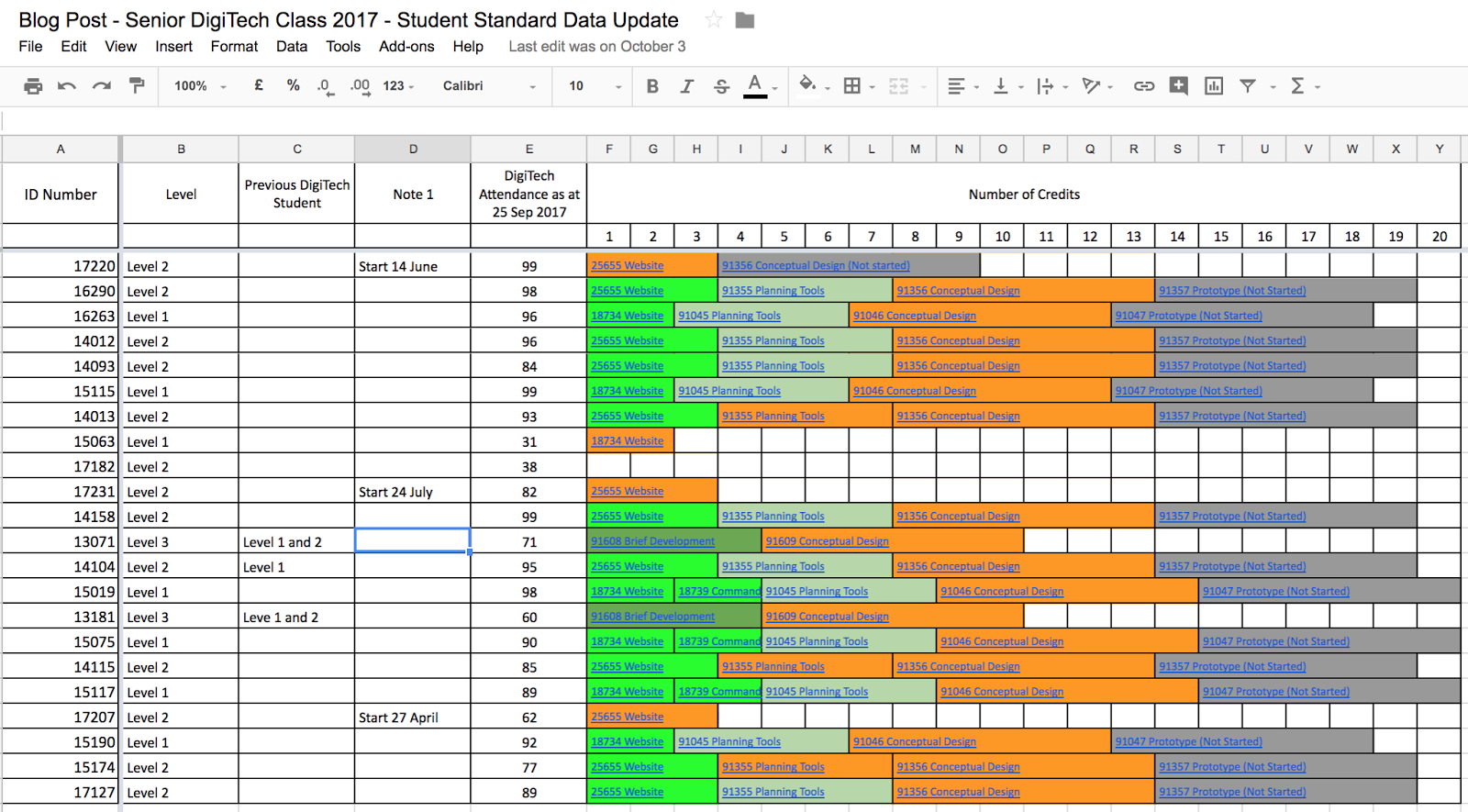
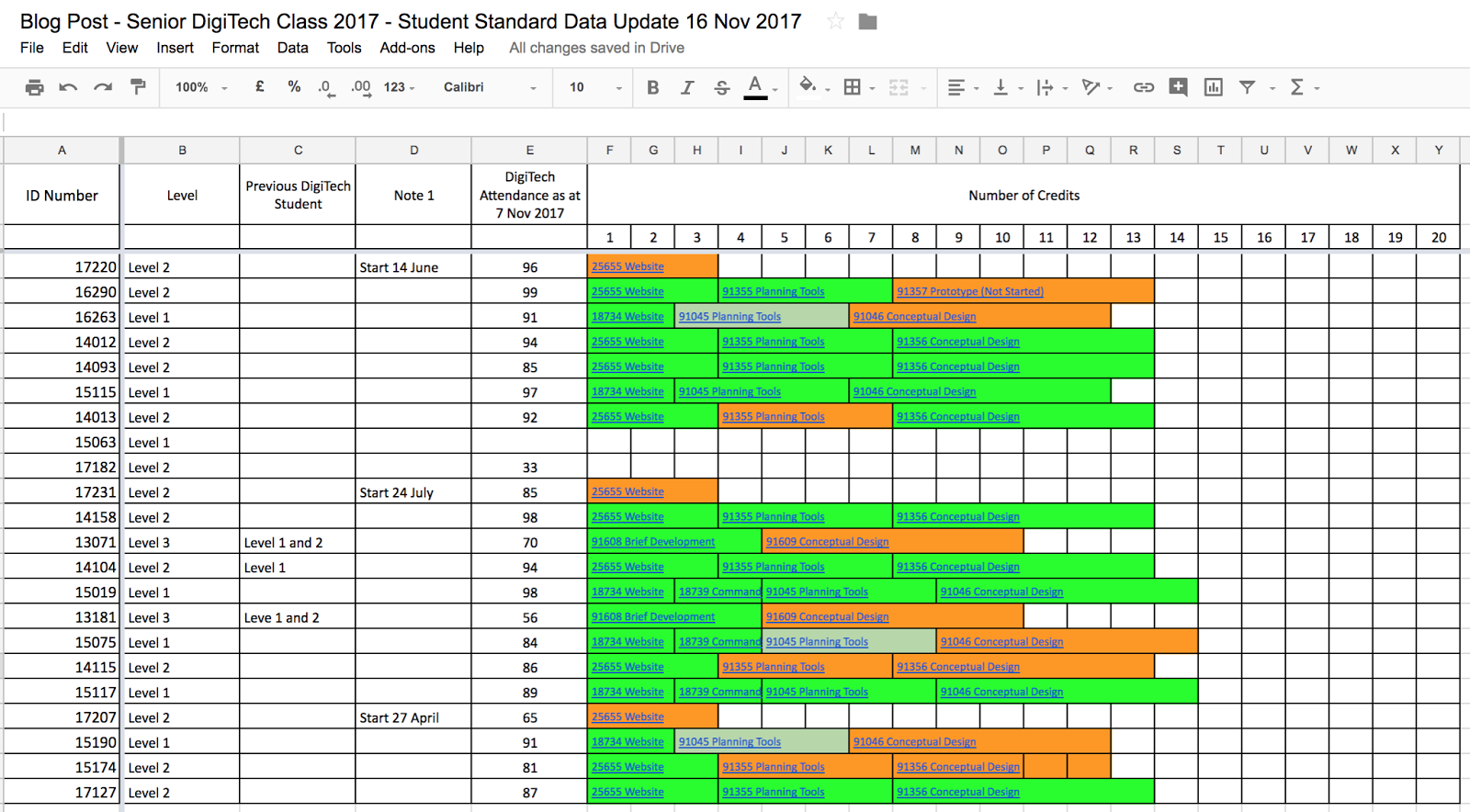
Shift of Student Achievement in Senior DigiTech from September to November

The following diagrams show the shift in achievement in my Senior DigiTech class from September this year, to November.
The learners within my Senior DigiTech class include students undertaking either NCEA Level 1, NCEA Level 2 or NCEA Level 3.  As well as being a multi-level class in terms of NCEA levels, the class is multi-ability at each year level.  Within each of the year levels, only three students in the class had taken DigiTech as a senior subject in 2016, the previous year of learning. This impacts on prior knowledge of content, technical skills, and an understanding of technological practice which is required to achieve at curriculum levels 6 to 8 for NCEA.  Three students also enrolled into the course partway through the year from abroad.  A multi-level (of all three NCEA levels) and multi-ability NCEA class, is not common.  This classroom structure includes a wide range of teaching and learning variables that potentially impact on student achievement.  Identifying achievable teaching and learning strategies is instrumental in enabling student achievement to take place.
The colour codes represent the following; bright green (standard is moderated and achieved), light green (standard is on track to achieve if fully completed and moderated), orange (standard is a work in progress), dark gray (standard is not yet started).

VTaL and Accelerated Shift - Own Practice

The use of various VTaL tools enabled accelerated shift to occur for some of the learners in my Senior DigiTech class.  The following image links to a description and evidence of accelerated shift in my own practice for one of the learners in my class.

VTaL and Accelerated Shift - Staff

It was awesome to see how VTaL has contributed to accelerated shift for students in other learning areas.  This was reflected in the presentation that Lenva delivered at our recent staff meeting, whereby some staff indicated that different VTaL tools were used to accelerate shift in achievement with at least one of the identified learners in their class.


Click on the Full Screen option in the black panel to view the presentation in full.


What evidence do I have for this?

Student Feedback, Staff Feedback, Own Reflections


VTaL and the Impact on Student Achievement – Own Practice

The following are VTaL tools that have had a direct impact on student achievement in either my Senior DigiTech class, or Junior DigiTech classes this year.  The impact on student achievement is either outlined by measuring NCEA standards achieved, or by student feedback explaining that the tool has impacted on their ability to achieve in the subject.
  • Tool 01 – Google Sites
  • Tool 02 – SOLO Learning Activities
  • Tool 03 – Class Project Task Lists
  • Tool 04 – Student Project Checklists
  • Tool 09 – Subject Google+ and Blogs

The following are VTaL tools that have had an indirect impact on student achievement by promoting student engagement, in either my Senior DigiTech class, or Junior DigiTech classes this year:
  • Tool 05 – Subject Google Calendars
  • Tool 07 – Student Google Sites
  • Tool 10 – Student Blogs

The following are VTaL tools that I am either trialling, or are yet to be trialled, and therefore requires time to gain evidence on the impact on student achievement:
  • Tool 06 – Workspaces
  • Tool 08 – Year Level Google Sites

Staff uptake of various VTaL tools

The following presentation shows the uptake of various VTaL tools by staff from Term 1 to Term 3 of this year.


Click on the Full Screen option in the black panel to view the presentation in full.


What did I do to make this happen?

Modelling Visibility and LCS, explicit Teacher Practice


Embedding VTaL Tools into my Subject Site

Modelling the use of VTaL Tools and Learn Create Share was achieved by embedding the various tools into my Subject Site, DigiTech with Ms Anderson, and ensuring all tools were visible at all times.  Also, using my Subject Site as the main portal by which students access their learning was important.

Own Teacher Practice that directed students towards learning processes using various VTaL tools

It was really important that in my own practice, I was able to direct students towards the use of various VTaL tools with a particular achievement outcome in mind.  For example, asking students to load work into a community is one thing, but directing students to the community, and explaining the use of the community as a portal by which to guide their own learning, is a deliberate action on my part that lead to the community being a useful tool that contributed towards student achievement.  The same goes for Class Project Task Lists.  I embedded links into calendar posts as well as embedding the Task Lists themselves into web pages in my site, and directed students to those links and pages, in order for students to make use of the VTaL tool.  In this particular instance, the Class Project Task Lists gave students feedback about their current achievement within a project, and feedforward about what they needed to progress within a project.

Taking the Journey with Technology Staff

I spent time throughout the year with Technology Staff, helping to integrate VTaL into their teaching and learning programs for a specified senior class.  Throughout this process, this enabled me to gain insight into some of the trials and tribulations that staff were experiencing associated with integrating VTaL into classroom practice.  From this, we were able to identify different VTaL tools that could easily be integrated into teacher practice (shown in the image below), and further trialled during JumpStart and also in 2018.


Contributions at Middle Leaders Meetings

Through my own teacher practice, and also throughout my inquiry this year, I have been able to contribute and feedback into discussions at Middle Leaders meetings on a regular basis, about VTaL as well as ideas around Visibility and Consistency.

Creation of VTaL Resources - Google+, Site, StarterKit

The creation of different VTaL Resources such as the Google+ Community and Google Site, are platforms that I set up to share information and resources about VTaL, and enable others to share information, resources and feedback about VTaL as well.  This has been a deliberate action on my part, to enable VTaL to be utilised beyond my own teacher practice.


Wonderings about what next?

More trialling, more refining, more sharing


More trialling

I am keen to continue trialling some of the VTaL tools that I either haven't used extensively yet eg. Workspaces, or that may have more potential to contribute directly (as opposed to indirectly) towards student achievement.

More refining

As updates occur within different apps that are used to develop VTaL tools (such as new or different functions and capabilities), the updates could enable the opportunity to refine existing VTaL tools for greater efficiency and use.  An example of this is the updates to NEW Google Sites.  The easier that an app is to use, may appeal to stakeholders to utilise these tools more extensively in teaching and learning.  Sounds obvious, but when stakeholders invest time and energy into developing resources, it can sometimes be overwhelming to consider that updates that require significant change, may actually be more beneficial to learners and student achievement in the long run.

More sharing

There is a gold mine of information of great examples of teacher practice using VTaL by colleagues from throughout the year.  I'm keen to catch up with these colleagues about the amazing work that they're doing within their teacher practice, and the impact that this has had on student achievement in their classes.

It's been an exciting and interesting year as far as my inquiry goes.  I'm pleased to see the impact that VTaL has had within my own teacher practice in contributing towards student achievement.  I'm also delighted to see the positive impact that VTaL has had with some of my colleagues who have generously shared evidence of their findings into the 'Visible Learning Accelerates Shift' presentation.  In addition to this, that students are feeding back on the benefits that they see from different VTaL tools on their learning and student achievement, reflected in my blog posts labelled Feedback - Student Voice, and VTaL for Students.


Share
Tweet
Pin
Share
No Comments
Older Posts

About Me

Kia ora! I am the Head of Technology at Tāmaki College and also teach Digital Technologies.


My target group of learners for my Inquiry 2021 will be my Year 12 NCEA Level 2 class. This group of learners were my target group from my 2020 Inquiry. I would like to inquire into whether Academic Writing exemplars specific to Digital Technologies, in conjunction with the 'Explanation Writing' classroom display resources for Digital Technologies, based on SOLO taxonomy, could accelerate achievement in literacy in my subject.


My target group of learners for my Inquiry 2020 were my Year 11 NCEA Level 1 class. I inquired into the process of using the LearnCoach online programs (content) and VTaL Visible Teaching and Learning (workflow) to accelerate student achievement for Tamaki College students undertaking courses in Digital Technologies NCEA Levels 1, 2 and 3.


In 2019, my inquiry is to maximise pedagogical practices (relating to integrated education, and collaborative teaching and learning), to effectively shift student achievement, supported by digital platforms connected to visible teaching and learning.


My Inquiry in 2018, was to develop a VTaL Purpose-Built Innovative Tool, to enable all elements of the VTaL Framework to be accessible to teachers, in order to accelerate student achievement.


In 2017, my inquiry was based on raising student achievement and shifting teacher practice around effective pedagogical practices including Learn, Create and Share. This will be achieved through the development, implementation and monitoring of the Visible Teaching and Learning Framework.

recent posts

Blog Archive

  • ▼  2022 (8)
    • ▼  March (3)
      • Hybrid Teaching and Learning | The impact of Omicron
      • Manaiakalani Toolkit | Well-being - Supporting Our...
      • Technology - Manaiakalani Department Discussions M...
    • ►  February (5)
  • ►  2021 (16)
    • ►  November (1)
    • ►  September (2)
    • ►  August (1)
    • ►  July (2)
    • ►  June (4)
    • ►  May (3)
    • ►  March (2)
    • ►  February (1)
  • ►  2020 (42)
    • ►  November (2)
    • ►  September (2)
    • ►  August (7)
    • ►  July (5)
    • ►  June (4)
    • ►  May (7)
    • ►  April (7)
    • ►  March (3)
    • ►  February (4)
    • ►  January (1)
  • ►  2019 (30)
    • ►  September (2)
    • ►  August (3)
    • ►  July (1)
    • ►  June (2)
    • ►  April (1)
    • ►  March (12)
    • ►  February (9)
  • ►  2018 (41)
    • ►  November (7)
    • ►  October (2)
    • ►  September (1)
    • ►  August (4)
    • ►  July (4)
    • ►  May (7)
    • ►  April (4)
    • ►  March (5)
    • ►  February (7)
  • ►  2017 (65)
    • ►  December (2)
    • ►  November (22)
    • ►  October (6)
    • ►  September (6)
    • ►  August (10)
    • ►  June (4)
    • ►  May (3)
    • ►  April (1)
    • ►  March (4)
    • ►  February (6)
    • ►  January (1)
  • ►  2016 (26)
    • ►  December (1)
    • ►  November (18)
    • ►  September (6)
    • ►  August (1)

VTaL

  • VTaL (104)
  • VTaL 01 Subject Sites (33)
  • VTaL 02 Learning Activities (7)
  • VTaL 03 Tracking Sheets (28)
  • VTaL 04 Student Checklists (12)
  • VTaL 05 Calendars with Links (24)
  • VTaL 06 Workspaces (32)
  • VTaL 07 Student Sites (4)
  • VTaL 08 Year Level Sites (3)
  • VTaL 09 Subject Communities (26)
  • VTaL 10 Student Blogs (11)
  • VTaL and Google Hangouts (15)
  • VTaL and Student Achievement (45)
  • VTaL for Parents (13)
  • VTaL for Students (82)
  • VTaL for Teachers (32)

Presentations

  • GAFE (19)
  • My YouTube Videos (8)
  • Presentations (21)

Inquiry

  • Inquiry (134)
  • Inquiry 2019 (27)
  • Inquiry 2020 (34)
  • Inquiry 2021 (15)

Manaiakalani

  • CoL (167)
  • Inquiry (134)
  • Inquiry 2020 (34)
  • Learn Create Share (11)
  • MIT 2018 (16)
  • Manaiakalani (18)
  • Presentations (21)
  • SPARK MIT (59)

Tamaki College

  • 2018 Department Goals (2)
  • 2018 School Goals (3)
  • 2019 Department Goals (2)
  • CoL (167)
  • Collaborative Learning Environments (32)
  • Covid19 (29)
  • Cultural Responsiveness (10)
  • Differentiation (12)
  • EMR Collaborative Project (21)
  • Goals (2)
  • Human Rights Collaborative Project (5)
  • Integrated Education (24)
  • Kia Eke Panuku (8)
  • LearnCoach (2)
  • Literacy (21)
  • PLD (18)
  • Techies (12)
  • Technological Modelling (4)

Practicing Teacher Criteria

  • PTC01 (31)
  • PTC02 (9)
  • PTC03 (6)
  • PTC04 (61)
  • PTC05 (17)
  • PTC06 (42)
  • PTC07 (32)
  • PTC08 (34)
  • PTC09 (8)
  • PTC10 (7)
  • PTC11 (16)
  • PTC12 (54)

General

  • CoL (167)
  • Collaborative Learning Environments (32)
  • Cultural Responsiveness (10)
  • Differentiation (12)
  • Feedback - Parent Voice (2)
  • Feedback - Staff Voice (6)
  • Feedback - Student Voice (23)
  • GAFE (19)
  • Goals (2)
  • Integrated Education (24)
  • Kia Eke Panuku (8)
  • LearnCoach (2)
  • Literacy (21)
  • My YouTube Videos (8)
  • Review (14)
  • Student Agency (15)

Contact Form

Name

Email *

Message *

Total Pageviews

Created with by BeautyTemplates| Distributed By Gooyaabi Templates