My Space and My Place

    • Home
    • Inquiry 2021
    • Digital Technologies Site
    • VTaL Site
    • VTaL G+


https://youtu.be/m5e3cDP85OU


This video is about my journey of developing the VTaL Visible Teaching and Learning Site. The VTaL Visible Teaching and Learning Site enables teachers to understand the purpose of how visible teaching and learning can be used effectively to accelerate learning. VTaL Visible Teaching and Learning is a series of tools that supports Learn, Create and Share in the secondary school environment.


Share
Tweet
Pin
Share
No Comments
What’s the Big Idea for 2018

“Language in Abundance”, Language Acquisition, development, Transfer and sustaining across school levels and curriculum domains.


Language in abundance environments ‘drip’ with language availability
and attention, where noticing and relevant use of words allow for
deeper, wider, more specific and precise, context appropriate
language expression…leading to knowing at deeper and broader
levels. Dr. Jannie Van Hees

At the beginning of the year, when we first started discussing what the CoL focus would be for 2018, and with me already a year into my CoL inquiry, I was unsure as to how to connect "Language in Abundance"with my existing inquiry findings.   Not because what I was inquiring into was irrelevant to the concept of "Language in Abundance", but because my inquiry was and is focused around a framework; so essentially, a collective range of individual components and processes to enable accelerated achievement to take place.

My approach to addressing literacy for students within my inquiry process, focused more on the literacy associated with visibility and clarity of learning information for the students, as opposed to the literacy strategies for students.  This is reiterated in some of the Manaiakalani Inquiries presentation materials delivered by Rebecca Jesson, as shown in the image below "Are the instructions/ways to participate clear?"


Visibility and Clarity of Instructions

Some of the research materials that I'd been looking at with regards to visibility and clarity of learning information includes the following:

  • Instructions https://goo.gl/bqk4Ap
  • How to Write Clear Instructions https://goo.gl/StVytd
  • Making Learning Visible https://goo.gl/TjXUP5

In terms of 'Instructions', useful take-outs from this resource link includes the purpose of instructions, as well as the features of instructions:


In terms of writing clear instructions, this research link focussed on three key areas:

  1. Understanding the Task
  2. Writing Your Instructions
  3. Testing Your Instructions

This year I have been extensively trialing the use of Workspaces to communicate learning information to students, as well as collate evidence of student learning in order to provide students with both formative and summative feedback on learning tasks.  The trialing of the Workspaces is in comparison to the sole use of learning instructions that are embedded, linked and accessible to students via my Subject Google Site.

My next steps for further investigating the Literacy Lens of my Inquiry, is to identify the pros and cons of the use of Workspaces v my Subject Google Site, in terms of which resource (if either) is more effective in enabling visibility and clarity of instructions for students.


Share
Tweet
Pin
Share
No Comments


Today's MIT @ KPMG session involved a lot of reflection about what I've inquired into so far, what the current state of the national looks like with regards to the tool that I am developing, and where to from here ...

Who does this Moonshot project involve?

Purpose: to identify my tribe/team/collaborators

  • Who am I collaborating with on this project?
  • Who are my team?
  • Who has a voice in this project?

Who are the Who?


  • Learners: exactly who
  • Colleagues: co-designers, collaborators, sounding boards etc
  • Experts: who is being invited to add expert opinion

Original Stakeholders


The original stakeholders (previously blogged) are outlined below:

  • Ann/Dorothy - Meet with at PD, gained feedback about tool design
  • App Developers - Meet with Dave/Korene Letele, and gained feedback about tool design
  • Financiers - No longer relevant as I don't need financial backing to develop the tool
  • Sue/Fusion - Not directly relevant to the development of this particular VTaL tool which is targeted towards Teachers and Teaching Practitioners
  • CORE Middle Leaders - Need to consult
  • SLT - Yet to have discussions
  • Teachers - Yet to have specific discussions
  • Families - Not directly relevant to the development of this particular VTaL took which is targeted towards Teachers and Teaching Practitioners

NEW Stakeholders


  • NEW stakeholders to the mix include:
  • NEW - Jim Sill, EdTech, referred me to Kimberley who has shown interest in attending my Sydney GAFE session
  • NEW - Wayne Poncia, Hapara
  • NEW - Andrew Corney SCT Tauranga Boys College
  • NEW - Kalisha Paketama, Frances Kolo, Tamaki College First Year Teachers

Content for the Tool - Stakeholder Feedback

What are the right questions to ask in order to determine appropriate content for the tool?  
How do I ask the questions, in a way that will get me the answers?

I think the scope for identifying appropriate questions can and will be determined from a number of sources.  I gained feedback from a Toolkit Session I ran on VTaL at the beginning of 2017 with staff either new to Tamaki College, or staff who were generally interested in VTaL.  It also makes sense to me to touch base with our newer staff, to find out from them what would be useful as beginning teachers.  Not to say that the feedback should be limited to these sources, but would hopefully help focus the next tier of stakeholder conversations.

Tool Design

Developing the tool itself isn't that difficult for me.  What I do need to consider carefully though is design features (colour schemes, functionality, aesthetics, layout etc).  There is no point in having robust content within the tool, if the way the tool functions and looks is terrible for the end users.  Ironically, this is a conversation I constantly have with my students as a Technology teacher.

There's also the fact that I quickly threw together an original prototype of the tool eg. an original VTaL Google site, when I first launched the VTaL Google+ community.  It dawned on me that the Google+ community was intended to enable users to share and communicate, which is vastly different to a site (even though there may be similar features).  Stakeholder feedback on the design of the original site would also be invaluable, in order to move forward.

Next Steps

It is clear to me that my team of collaborators and original stakeholders has evolved from the beginning of the this year, or even last year when I first started promoting VTaL.  Stakeholder feedback from my current and new stakeholder base on content for the tool, and tool design are what I need to focus on next.  This is likely to include not just the content of the tool eg. the site, but the templates of various VTaL components that I am likely to embed into the site.  A timely process, but also an important and necessary process, if the tool is to be effective for users!


Share
Tweet
Pin
Share
No Comments

Connecting

Sharing progress in our thinking. As we have faced the reality of the cohort of learners (and teachers) we are spending 2018 with, how has the thinking you developed at Kuaotunu gelled when ‘the rubber hit the road’?

Sharing the progress in my thinking with my fellow MIT peers since our first MIT weekend together, meant focusing on the 'problem' as well as the 'opportunity', as outlined in the image below.

The shifts in the usage of various VTaL tools from early in 2017 through to later in the year, showed that the Tracking Sheets was the tool that resonated most clearly with in terms of accelerating and shifting student achievement.  Therefore, I have decided to focus on this particular tool as the main driver of the entire VTaL framework ... well, at least for the time being anyway.  Connecting the focus to the problem, meant that every class (or class site) should have the tracking sheets visible and embedded into their sites for students, teachers and parents to view.

Design Thinking- Experimentation

Session 6: Design Thinking- Experimentation. The one we didn’t get to at Kuaotunu. Prototyping the solution we have arrived at.

This session involved prototyping and sharing our ideas in small groups to gain feedback.  This was a particularly useful exercise which has in actual fact, lead to a re-design of my initial outcome idea, as well as my inquiry.

Pitching the idea gave some clarity on how I envisaged the digital tool could work and would work, in relation to (based on peer feedback) how the digital tool should work, and therefore be developed.  The idea of needing to produce a mobile app wouldn't necessarily meet the needs of the intended user of the app, being teachers.  Feedback suggested that a site would allow for more scope and depth of VTaL as an overall resource.

When I discussed the motivation and intent behind the idea of the app in more detail, it became clear that the responsive design of Google Sites, would enable the VTaL framework to sit nicely in a NEW Google Site for desktop-friendly use, as well as mobile-friendly use.  So, the outcome design has essentially changed.  This in turn, has huge implications on the development process, as there is no longer the need to focus on app development.  This is a game-changer!


The first three images show what a NEW Google Site looks like on a desktop as well as on a mobile device.  The last image shows the existing VTaL website, which I don't believe is particularly effective in it's current form.


Ed Tech Summit

https://events.edtechteam.com/sydney2018
Time to get our proposals in for the workshops we want to present in Sydney
We will help you!! A geeky, toolkit type of session OR Unpacking aspects of your classroom practice

The session about preparing for the Ed Tech Summit in Sydney later this year, provides a great platform to present and gain feedback from an audience who I am unlikely to have spoken to or with about VTaL.  Hence, they will be a set of fresh eyes and ears with new perspectives and views on the tool.  A great resource for stakeholder feedback.

As I am also presenting at the Auckland Ed Tech Summit in the April School Holidays, this will give me an opportunity to trial the resources and presentation that I intend delivering in Sydney.  The presentation details are as follows:

Name : Hinerau Anderson

Kia ora! I am the Head of Technology at a high school in Auckland, New Zealand, Tāmaki College, where I also teach Digital Technologies to 12-18 year olds.  I have developed a Visible Teaching and Learning Framework, aptly named VTaL, based on the pedagogical practices of Learn, Create and Share.


Title : VTaL - Visible Teaching and Learning : Tracking Student Progress in a High School


Outline : Knowledge is key!  Imagine how empowered learners become when they have a very clear idea of what they are learning, the goal or outcome relevant to the learning, information relating to the learning, and the ability to track their own progress towards the goal and outcome.  That is exactly what the VTaL Framework enables students to do.

This session will look at VTaL Tool 03 : Class Project Task Lists, or Tracking Sheets, which have been developed using Google Sheets, and enables students to monitor their progress throughout their projects.

Connecting with Inquiry Frameworks

We have been very clear that the MIT group are participating in a Design Thinking process in 2018. However, the reality is that as teachers we also carry out teaching as inquiry. In this session we want to ensure that people are working smarter not harder. We want to make the connection with your inquiries.

The changes in the development process, have also meant that I will be tweaking my original inquiry idea.  This is what it looks like now ...

"My Proposed Area of Inquiry in 2018, is to develop a VTaL Purpose-Built Innovative Tool, to enable all elements of the VTaL framework to be accessible to teachers, in order to accelerate student achievement."


With the changes and adaptations to my inquiry and design thinking, I feel that I have a clearer idea of the pathway from here.  Thanks to Zac and Dorothy for the feedback during the prototype session, and again to Dorothy and Anne for your ongoing critiques and support of my inquiry which is greatly appreciated.  

Huge thanks to Justine Todd and KPMG for the amazing work space and hospitality today!


Share
Tweet
Pin
Share
No Comments
I’m currently experimenting with the ways in which students can ‘share’ and the reasons behind why I would want them to use different methods of sharing.  I’m looking at doing this by attempting to keep the workload of ‘sharing’ to a minimum, but also by integrating the ‘share’ concepts together.
The following is a link which includes an explanation of portfolios and how portfolios can be used to share student learning  http://elearning.tki.org.nz/Teaching/Assessment/e-Portfolios.

Student Subject Sites

Template sites can be set up at each level for each subject.  The subject teacher and/or department, develops a template site that students can use for that particular subject and for that particular year.  The site can be as detailed or as general as desired.  A detailed site is a site that would have navigational buttons that link to standards or assessments, and within those assessment links, a breakdown of the tasks or evidence associated with that assessment.
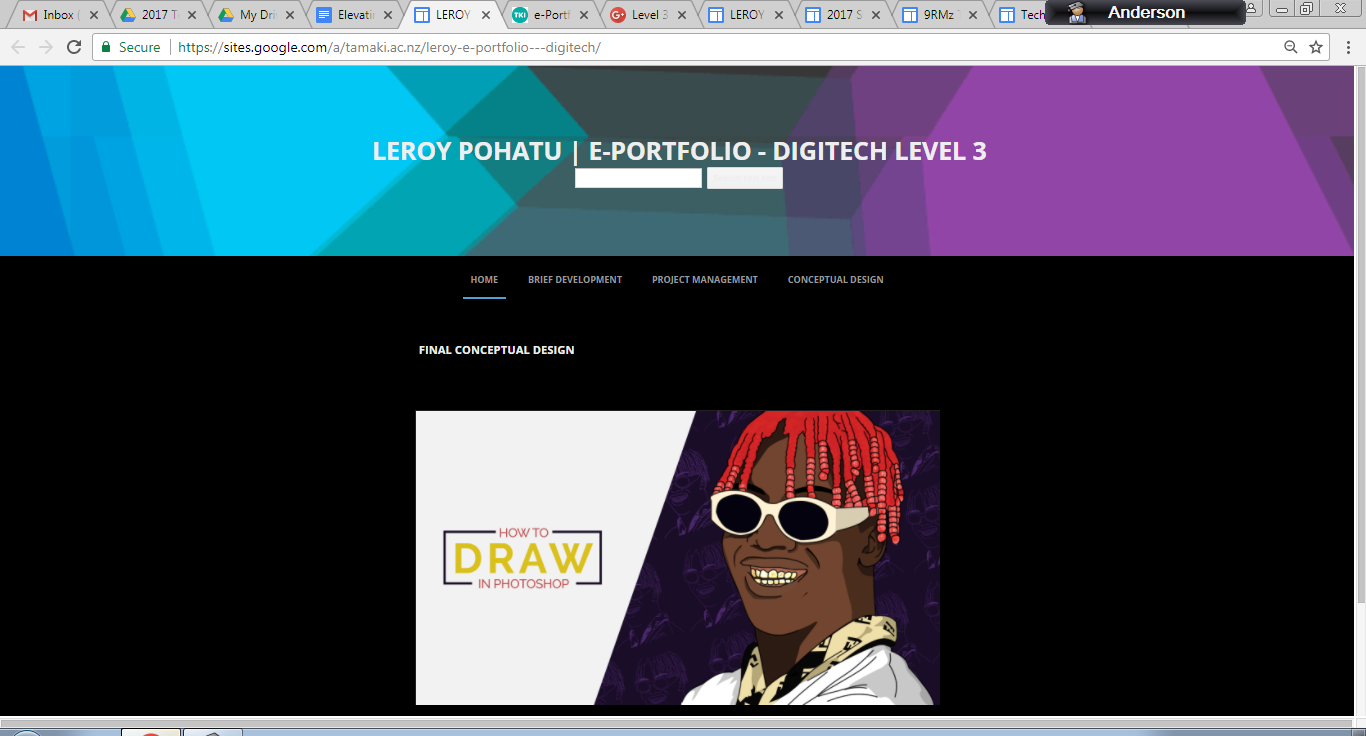
Students can make a copy of that template site.  Students then make the site public to view and can start embedding work into the site.  It helps if the student shares the link with classroom teachers to collate class lists of links into one place, as shown with 2017 DigiTech Portfolios.

This year I have trialled the use of Student Site templates with all year levels, including Year 7 and Year 8 students from Manaiakalani schools who attend Tamaki College for Technology. Here are a couple of examples of Technology Subject Sites used with Year 7 and Year 8 students this year:


  • Aaliyahna Marsters from Glenbrae School 
  • Fraidon Wali from Panmure Bridge School

Some examples of how and why Student Sites can be used include:
  • Visually showcasing student work (according to a project or assessment) for the purpose of parent conferences, career conversations
  • Job interviews or tertiary interviews/scholarship opportunities whereby students need to showcase their work according to a specific industry
  • External moderation by including evidence of work according to specific assessments or standards
The following is an example of a Level 3 DigiTech Subject Site created by Leroy Pohatu in 2016. Click on the image to navigate to the portfolio, and view his work.


The following is a clip of Ilalio Vai showing us how he has used a Technology Site this year in class.


Student Blogs

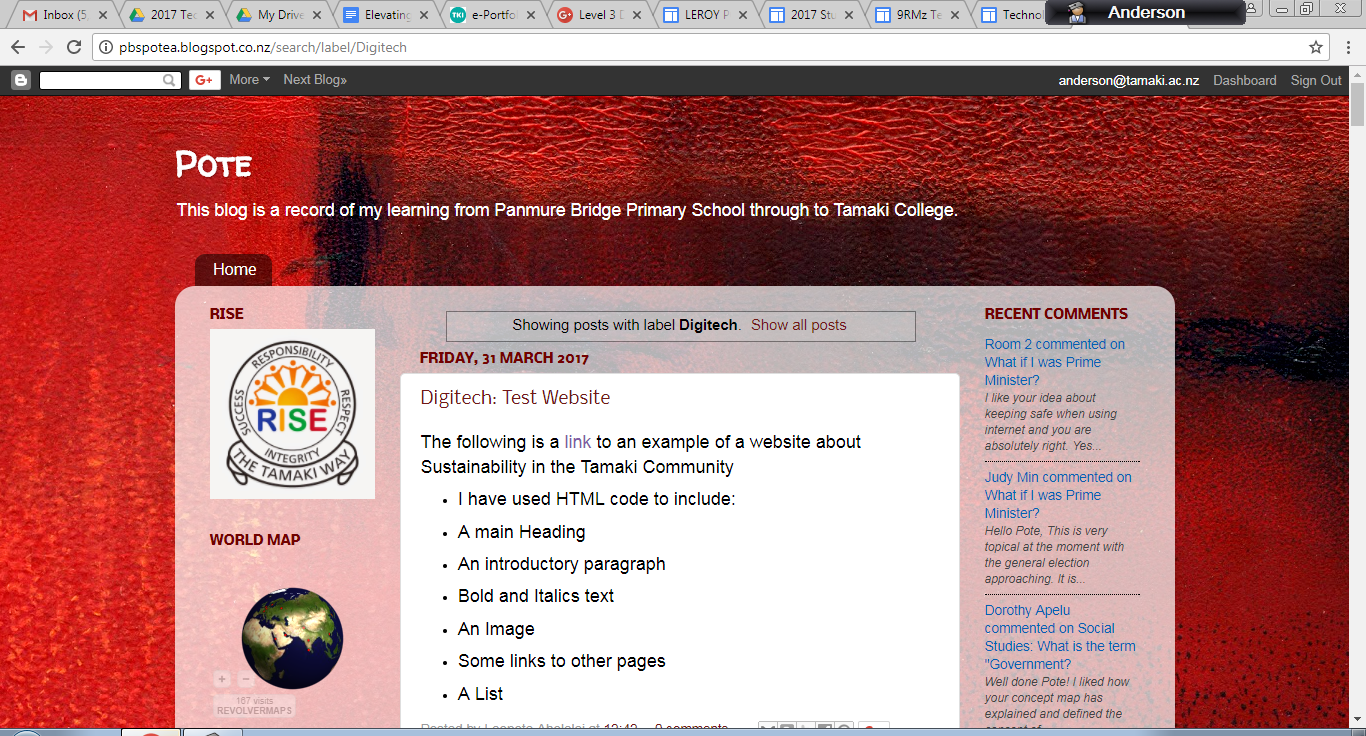
Students who have arrived at Tamaki College from primary schools within the Manaiakalani Cluster have been blogging throughout their years at primary school.  The students post and blog about different aspects of their learning, and reflect on their learning.  Students are able to label their posts according to particular topics, which enables the posts to be grouped and easily located or navigated to within the blog.  The posts enable authentic audiences to read and comment on the individual student’s work and learning journey.   
Some examples of how and why Student Blogs can be used include:
  • Students connecting with authentic audiences on particular topics which can be categorised using labels
  • Students reflecting on their learning, and sharing their reflections with blog readers
  • Students using their reflections and viewer comments to progress forward with next steps in the learning process
  • Live feed and total views can be included in the blogs, alongside other gadgets, that enables feedback to be displayed on blog views etc.
Blog for Fraidon Wali from Panmure Bridge School


Blog for Lepote Aholelei from Tamaki College

Google+ Communities

I have posted earlier about Using Sharing and Communities to Motivate Learners. Some examples of how and why Google+ Communities can be used include:
  • Multiple students posting work into a community portal about the same topic or context
  • Students locating similar examples of peer work, and using the exemplars to guide their own learning
  • Students learning from the comments and feedback that they provide to their peers about next steps forward
  • Students learning from the comments and feedback posted by their peers on either their work, or the work of other students
The following is a clip of Sione Havea and Lisiate Pau'uvale showing us how they use Google+ communities to share and learn from examples of work posted under various categories, as well as the benefit of commenting for students and peers.


Portfolio - The Main Landing Pad

I envisage that a really useful tool, for students, parents, teachers, tertiary providers, employers and other members of the community, is the use of an overall Student Portfolio, that communicates student learning for the benefit of a multitude of different audiences, depending on the purpose.  
Currently in Year 9 and Year 10, the students are using a ‘Future Pathway Planning’ site, which includes information about their career aspirations, skills, personal characteristics etc.  There is the real potential for a site such as this, to be the main landing pad for Student Sites and the Student Blogs, that digitally captures the learning and reflections throughout their entire secondary and primary education, according to specific career pathways. The possibilities are endless. It is just a case of developing a cohesive and efficient process to enable the 'sharing' to take place at this depth and level.

Integrating the ‘Share’ Process together

Whilst I have given examples of various ways of sharing, based around visually showcasing student work in a website format using Student Sites, connecting with audiences for individual reflection using Student Blogs, connecting with audiences across communities for a broad range and access to exemplars using Google+ Communities, and combining the various 'share' tools into a landing pad, the process by which this occurs needs to be made as efficient as possible, in order for the overall purpose of sharing at this level to be worthwhile and sustainable.

I haven't achieved this yet with my students, but am experimenting with the process myself.


Actions to consider in order to make this work!

There are many tiers to the 'bigger picture' of sharing at this level. Here are some of the actions that would be required in order to make this work:

  • A shared understanding of the various types of 'share' within this model
  • Staff buy-in to the 'share' model at this level
  • Staff capability around developing and using Student Subject Site templates with students; including embedding tasks and ensuring that the site and all tasks are public and visible
  • Student blogs working properly when students start at Tamaki College in Year 9. In my experience, the barriers that this has caused in terms of enabling blogging to continue when students arrive at Tamaki College, has been hugely problematic
  • Students being taught appropriate layout styles for sites, including use and choice of fonts, colour schemes, image choices for backgrounds etc
  • Consistent Subject Site template designs to be used across all subject areas. More so in terms of enabling access to information to be the same regardless of the subject site.
  • Consistent expectations of the frequency by which 'sharing' takes place across all subjects.

These are just a few actions for consideration. Much to ponder if 'sharing' at this level is going to be put into place to further engage student learning and promote student achievement.

Share
Tweet
Pin
Share
No Comments
In response to a query from Georgia, about the effectiveness of the use of the Tracking Sheets [Class Task Lists] with students of varying ability levels and behavioural issues, I will attempt to answer the query from experiences that I have had with my own classes.  Essentially, if the Tracking Sheets [Class Task Lists] are set up correctly, and feedback is maintained on a regular basis, the Tracking Sheets [Class Task Lists] are useful and suitable for ALL students, regardless of ability level.

Tracking Sheets [Class Task Lists] - Features and Attributes

The usefulness of the Tracking Sheets [Class Task Lists] comes down to a few important variables:
  • The information that the tracking sheet is reporting on eg. learning activities, specific criteria etc
  • The clarity of the information in the Tracking Sheets [Class Task Lists]
  • The frequency by which the Tracking Sheets [Class Task Lists] are updated
  • The frequency by which the Tracking Sheets [Class Task Lists] are referred to throughout lessons
  • The accessibility of the Tracking Sheets [Class Task Lists] to students as well as the teacher
  • How the information in the Tracking Sheets [Class Task Lists] eg. visual feedback, is being used to enable students to progress onto the next tasks
So, if the Tracking Sheets [Class Task Lists] include clear information about the criteria or tasks that contribute towards a standard, assessment or task being completed, the Tracking Sheets [Class Task Lists] are updated regularly (at least once a week is manageable), the Tracking Sheets [Class Task Lists] are referred to regularly in class (‘regularly’ is debatable as there’s a fine line between not enough and overkill!), the Tracking Sheets [Class Task Lists] are accessible and ‘visible’, then, the Tracking Sheets [Class Task Lists] can be set up in a way that enables students to progress forward.

Tracking Sheets [Class Task Lists] and Colour Codes

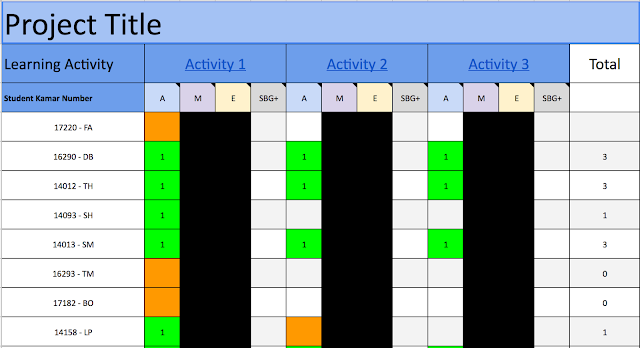
I tend to use green (complete), orange (work in progress, or criteria not quite met), and red (task not started) as the colour codes for students to use and track where they are at.  At this point I have to be very clear about the fact that a colour coded tracking sheet does not guarantee that students will complete assessments, and finish work.  The Tracking Sheets [Class Task Lists] are a tool that enables teachers and students to make informed decisions about where a student is at, and what needs to happen in order for the student to progress forward.

Tracking Sheets [Class Task Lists] and other Teaching Strategies

Student motivation over an entire class increases if there are a lot of GREENS displayed across many tasks for a wide range of students.  The opposite occurs when there are huge clusters of REDS displayed across the entire class.  Student motivation diminishes.  Whilst the design of the Tracking Sheets [Class Task Lists] (in conjunction with other VTaL tools such as Google+ communities, learning activities etc) enables many types of differentiation to occur in class, the colour coded feedback should provide feedback to the classroom teacher that other interventions may be required to assist students to progress forward.  For example, I wouldn’t keep progressing forward with learning activities, if I’m loading column after column after column of REDS against particular learning activities.  Clearly, other teaching strategies need to be applied to enable the reds to turn to greens.  A page of reds is demoralising.

Junior Tracking Sheets [Class Task Lists] for DigiTech

I approach the design of the junior Tracking Sheets [Class Task Lists] quite differently to the design of the senior Tracking Sheets [Class Task Lists].  This is based on the students needing to complete a Technology project with a DigiTech focus over the course of a semester.  In Technology, within the design process, sometimes there are tasks that I can afford to skip in order to progress into the next stage.  Therefore, I list the learning activities within the Tracking Sheets [Class Task Lists] according to their name and stage in the design process, eg. Design Ideas, Conceptual Designs etc.  I used to list the tasks according to activity eg. Activity 1, Activity 2, Activity 3 etc.  However, if I ended up skipping activities (due to time, and the fact that we could afford to skip that activity in the design process), it would look weird and confusing to students to see Activity 1, Activity 5, Activity 6, Activity 11 etc, in the tracking sheet.

Original Junior Tracking Sheet

Revised Junior Tracking Sheet


Tracking Sheets [Class Task Lists] and Hyperlinks (also included in Calendar Events, and Project Instructions)

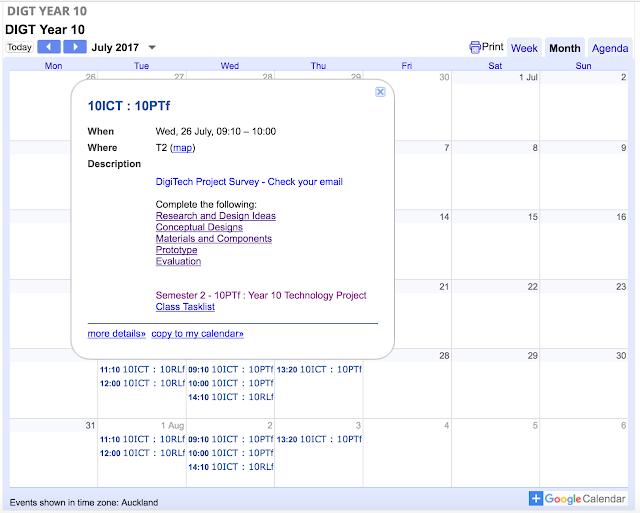
I also include hyperlinks within the Tracking Sheets [Class Task Lists] to tasks and/or learning activities.  The same hyperlinks are also included in the calendar events, learning activities and project instructions.  The reason why the hyperlinks appear in multiple locations, is dependant on which resource the student is accessing at the time to progress with their work.  You really have to think as a student thinks in order to understand the logic of why the hyperlinks are in so many locations.  When the student logs into my site, and accesses the calendar, the hyperlinked learning activity, navigates the student to the task according to today’s date.  When the student accesses the tracking sheet and sees that a task needs to be completed because it is in orange, a hyperlink to the learning activity is included at the top of the column.  The student doesn’t need to exit the tracking sheet and try to locate the previous task; they just need to click on the hyperlink within the tracking sheet to go back to the work that needs to be completed.  If a student is looking at the project instructions to get an overview of the project, there are hyperlinks to the learning activities, according to each instruction.
Level 2 : 25655 Create a Website : Class Task Sheet

DIGT Year 10 Calendar w Hyperlinks to Learning Activities and Class Tasklists


Senior Tracking Sheets [Class Task Lists] for DigiTech

For Senior DigiTech, students are working through and completing standards; which includes all of the criteria that needs to be met.  Some of the activities have multiple criteria that needs to be met.  Therefore, the Tracking Sheets [Class Task Lists] are set up according to activities eg. Activity 1, Activity 2 etc.  The students use the standard tracking sheet to see which activities they have completed.  However, they use their own checklists, to monitor which criteria they have met within each activity.

Senior DigiTech Project Class Task List

Senior DigiTech Class 2017 - Student Standard Checklists


Tracking Sheets [Class Task Lists] and Student - Teacher Conversations

In Senior DigiTech, we use the Tracking Sheets [Class Task Lists] to have student-teacher conversations around next steps in the project.  We discuss where the student is at within an activity and particular tasks, what needs to occur to progress forward, and what the student will do next.  Essentially, the Tracking Sheets [Class Task Lists] are guiding the learning process forward, which students find useful in terms of feedback and feedforward.

Senior DigiTech : Student - Teacher Conversations


Tracking Sheets [Class Task Lists] and Student Collaboration

Something that I had not anticipated, when I started developing the Tracking Sheets [Class Task Lists] 4-5 years ago, is how students would start using the tracking sheet information.  Students started to identify and self-group according to where others were in the class.  Students who were on red or orange, and who could see that one of their mates was on green, would start having discussions with that student about what they needed to do in order to progress forward.  I did not set the discussion up, students did this themselves.  Or, instead of talking to that student, they might just go into the relevant Year Level community, to view the exemplar of what their class mate had completed that met the criteria, and used the exemplar to guide their own learning.  I did set up the communities for this purpose, so it was great to see that the communities were and are useful to the students for the intended purpose.  Another way that the students were and are using the Tracking Sheets [Class Task Lists] to self group and collaborate, is by seeing which class mates are at the same or similar level as them in the class.  They would then have conversations with their peers, get feedback or guidance from them, and continue working on their particular learning activity.

Tracking Sheets [Class Task Lists] and Mixed Ability Levels

As mentioned in the previous paragraph, the Tracking Sheets [Class Task Lists] have a lot of scope in terms of student agency, and also in terms of how teachers use the tracking sheet feedback to apply other teaching strategies and interventions.  The Tracking Sheets [Class Task Lists] are an excellent guide of knowing where each student is at, and where they need to progress to.  However, the Tracking Sheets [Class Task Lists] themselves are just a guide.  The Tracking Sheets [Class Task Lists] are made more powerful, when used in conjunction with other learning tools eg. project instructions, learning activities etc, and that all of the learning tools are visible to both the teacher and the students at all times.  If the learning activities are set up for engagement, and to enable students to achieve, then students will be motivated to learn. Linking the learning activities to the tracking sheets is what enables student progress to be communicated back to the students.

Tracking Sheets [Class Task Lists] - What’s Important?

As mentioned previously, Tracking Sheets [Class Task Lists] are only useful if they are up to date.  I find keeping them up to date on a weekly basis, a manageable process.  They are also only useful if they are accessible and visible, which is why embedding the sheets into subject sites is a great idea.

Tracking Sheets [Class Task Lists] - Tips and Tricks

  • As mentioned, I hyperlink learning activities into the sheets.  
  • I upload a Student Number into the sheets and email these numbers through to the students.  This keeps the student information anonymous to anyone who doesn’t know the student.
  • Each week I make a duplicate of the sheet eg. Week 1, Week 2 etc.  This enables progress to be monitored over a particular timeframe.  If a student hasn’t progressed from Week 1 to Week 3, then some pretty interesting discussions need to be had with that student!

Hopefully this information is useful, and hopefully it answers the original questions I was asked.


The Benefits of VTaL Class Task Lists and Tracking Sheets - So what do the Students have to say?


The Benefits of VTaL Class Task Lists and Tracking Sheets - What do Teachers have to say?


Share
Tweet
Pin
Share
No Comments
Older Posts

About Me

Kia ora! I am the Head of Technology at Tāmaki College and also teach Digital Technologies.


My target group of learners for my Inquiry 2021 will be my Year 12 NCEA Level 2 class. This group of learners were my target group from my 2020 Inquiry. I would like to inquire into whether Academic Writing exemplars specific to Digital Technologies, in conjunction with the 'Explanation Writing' classroom display resources for Digital Technologies, based on SOLO taxonomy, could accelerate achievement in literacy in my subject.


My target group of learners for my Inquiry 2020 were my Year 11 NCEA Level 1 class. I inquired into the process of using the LearnCoach online programs (content) and VTaL Visible Teaching and Learning (workflow) to accelerate student achievement for Tamaki College students undertaking courses in Digital Technologies NCEA Levels 1, 2 and 3.


In 2019, my inquiry is to maximise pedagogical practices (relating to integrated education, and collaborative teaching and learning), to effectively shift student achievement, supported by digital platforms connected to visible teaching and learning.


My Inquiry in 2018, was to develop a VTaL Purpose-Built Innovative Tool, to enable all elements of the VTaL Framework to be accessible to teachers, in order to accelerate student achievement.


In 2017, my inquiry was based on raising student achievement and shifting teacher practice around effective pedagogical practices including Learn, Create and Share. This will be achieved through the development, implementation and monitoring of the Visible Teaching and Learning Framework.

recent posts

Blog Archive

  • ▼  2022 (8)
    • ▼  March (3)
      • Hybrid Teaching and Learning | The impact of Omicron
      • Manaiakalani Toolkit | Well-being - Supporting Our...
      • Technology - Manaiakalani Department Discussions M...
    • ►  February (5)
  • ►  2021 (16)
    • ►  November (1)
    • ►  September (2)
    • ►  August (1)
    • ►  July (2)
    • ►  June (4)
    • ►  May (3)
    • ►  March (2)
    • ►  February (1)
  • ►  2020 (42)
    • ►  November (2)
    • ►  September (2)
    • ►  August (7)
    • ►  July (5)
    • ►  June (4)
    • ►  May (7)
    • ►  April (7)
    • ►  March (3)
    • ►  February (4)
    • ►  January (1)
  • ►  2019 (30)
    • ►  September (2)
    • ►  August (3)
    • ►  July (1)
    • ►  June (2)
    • ►  April (1)
    • ►  March (12)
    • ►  February (9)
  • ►  2018 (41)
    • ►  November (7)
    • ►  October (2)
    • ►  September (1)
    • ►  August (4)
    • ►  July (4)
    • ►  May (7)
    • ►  April (4)
    • ►  March (5)
    • ►  February (7)
  • ►  2017 (65)
    • ►  December (2)
    • ►  November (22)
    • ►  October (6)
    • ►  September (6)
    • ►  August (10)
    • ►  June (4)
    • ►  May (3)
    • ►  April (1)
    • ►  March (4)
    • ►  February (6)
    • ►  January (1)
  • ►  2016 (26)
    • ►  December (1)
    • ►  November (18)
    • ►  September (6)
    • ►  August (1)

VTaL

  • VTaL (104)
  • VTaL 01 Subject Sites (33)
  • VTaL 02 Learning Activities (7)
  • VTaL 03 Tracking Sheets (28)
  • VTaL 04 Student Checklists (12)
  • VTaL 05 Calendars with Links (24)
  • VTaL 06 Workspaces (32)
  • VTaL 07 Student Sites (4)
  • VTaL 08 Year Level Sites (3)
  • VTaL 09 Subject Communities (26)
  • VTaL 10 Student Blogs (11)
  • VTaL and Google Hangouts (15)
  • VTaL and Student Achievement (45)
  • VTaL for Parents (13)
  • VTaL for Students (82)
  • VTaL for Teachers (32)

Presentations

  • GAFE (19)
  • My YouTube Videos (8)
  • Presentations (21)

Inquiry

  • Inquiry (134)
  • Inquiry 2019 (27)
  • Inquiry 2020 (34)
  • Inquiry 2021 (15)

Manaiakalani

  • CoL (167)
  • Inquiry (134)
  • Inquiry 2020 (34)
  • Learn Create Share (11)
  • MIT 2018 (16)
  • Manaiakalani (18)
  • Presentations (21)
  • SPARK MIT (59)

Tamaki College

  • 2018 Department Goals (2)
  • 2018 School Goals (3)
  • 2019 Department Goals (2)
  • CoL (167)
  • Collaborative Learning Environments (32)
  • Covid19 (29)
  • Cultural Responsiveness (10)
  • Differentiation (12)
  • EMR Collaborative Project (21)
  • Goals (2)
  • Human Rights Collaborative Project (5)
  • Integrated Education (24)
  • Kia Eke Panuku (8)
  • LearnCoach (2)
  • Literacy (21)
  • PLD (18)
  • Techies (12)
  • Technological Modelling (4)

Practicing Teacher Criteria

  • PTC01 (31)
  • PTC02 (9)
  • PTC03 (6)
  • PTC04 (61)
  • PTC05 (17)
  • PTC06 (42)
  • PTC07 (32)
  • PTC08 (34)
  • PTC09 (8)
  • PTC10 (7)
  • PTC11 (16)
  • PTC12 (54)

General

  • CoL (167)
  • Collaborative Learning Environments (32)
  • Cultural Responsiveness (10)
  • Differentiation (12)
  • Feedback - Parent Voice (2)
  • Feedback - Staff Voice (6)
  • Feedback - Student Voice (23)
  • GAFE (19)
  • Goals (2)
  • Integrated Education (24)
  • Kia Eke Panuku (8)
  • LearnCoach (2)
  • Literacy (21)
  • My YouTube Videos (8)
  • Review (14)
  • Student Agency (15)

Contact Form

Name

Email *

Message *

Total Pageviews

Created with by BeautyTemplates| Distributed By Gooyaabi Templates