My Space and My Place

    • Home
    • Inquiry 2021
    • Digital Technologies Site
    • VTaL Site
    • VTaL G+


Using VTaL to track Student Achievement in DigiTech

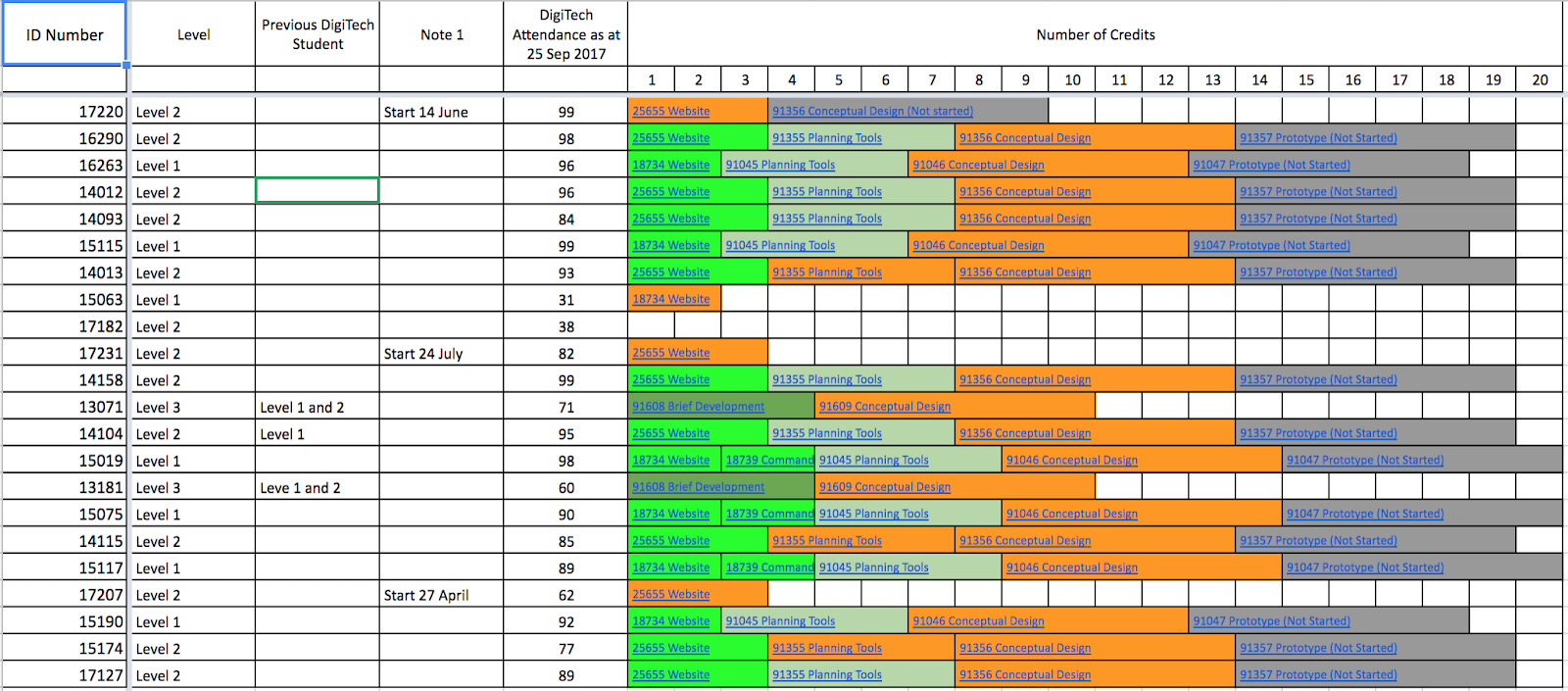
I’ve recently adapted the tracking sheet in my Senior DigiTech class to reflect the credit goals for senior subjects, and to align with the Kamar NCEA Statistics Summary used to discuss student achievement in meetings with the Senior Leadership Team.

The colour codes within the tracking sheet represent the following:

Standard has been completed, marked, achieved, moderated, published in Kamar

Standard has been marked, is awaiting final date entries, and moderation

Standard is not yet complete

Standard has not been started

The Student Standard Data Update tracking sheet is shared with students.  There are more comprehensive details included in the actual tracking sheet, such as NSN Numbers, Student Names etc.  For this reason, that particular tracking sheet is not fully ‘visible’ and embedded into my subject site.  However, the tracking sheet (including the one linked from the image in this post), includes hyperlinks to Class Task Lists (Tracking Sheets) for each standard, which IS visible in my subject site.

Profiling DigiTech Students

  • Multi-Level - The Student Standard Date Update tracking sheet also shows that the class is multi-level; made up of students undertaking NCEA Level 3, NCEA Level 2 and NCEA Level 1.  
  • Multi-Ability - As well as being multi-level, students within each level also achieve at various ability levels.  This is why the benefits of being able to differentiate using VTaL is particularly important in terms of meeting the learning needs of all students.  
  • Prior Knowledge - Of the twenty two students on the class roll, only three of those students took Senior DigiTech in the previous year.  The greatest cohort of students to join the class without prior knowledge from the previous year, is twelve Level 2 students.  This is why previous years of student exemplars shared in the DigiTech Google+ communities is particularly effective, in terms of helping to guide student learning.  
  • Attendance to DigiTech - Eleven students have 90+% attendance per week, five students have 80+% attendance per week, two students have 70+% attendance per week, two students have 60+% attendance per week, and two students have 30+% attendance per week.  In addition to this, three students arrived at different times during the year from overseas, and joined the class.  Student attendance and student start dates impact on student learning and student achievement.

Using VTaL Student Standard Data Updates to Identify Interventions

The Student Standard Data Updates visually shows a snapshot of where students are achieving at.  This information is used in one-to-one conversations between myself and students to identify student needs in terms of progressing forward in the project (and standard).  It is essentially a Formative Assessment Tool, with levels of hyperlinks to progress within a standard, as well as individual student progress.  The students can see how many credits each standard is worth, and a cumulative total of the number of credits achieved and required to gain a minimum number of credits within DigiTech.  This includes a breakdown of the credits offered in class time, and doesn’t include the credits and standards offered through our IT partners, Fusion IT and Techtorium.
Term 4 is going to be crunch time for the students!  Every day counts, every lesson counts.  So does ensuring that formative feedback is turned over quickly, is kept up to date, and accessible to the students!

Share
Tweet
Pin
Share
No Comments

2017 Parent Survey

Recently I had discussions with some Tamaki College Parents at the Subject Pathways Evening and Student Parent Conference Days, about accessing their child's learning online.  The following photos are of one of our parents, Melisa Vili, in conversation with me about VTaL Visible Teaching and Learning.


The following shows feedback from parents in terms of access to information about their child or children's teaching and learning. 


Click on the triangle or right arrow (bottom left corner of the presentation) to view each slide.  Click on the square shape to view the 2017 Parent Survey 1 in full screen.


Survey Findings

Twenty six of the twenty eight parents surveyed (93%), have access to and use the internet.  The vast majority of parents are accessing the internet at home the majority of the time.  However, many of using the internet at work and also out and about.

The most popular device that parents are using is their mobile phone, followed by other mobile devices such as netbooks for laptops.

The vast majority of parents are not accessing information about their child's teaching and learning; neither through the school website nor dashboard.  However, the vast majority of parents also indicate that they would love to access information online about their child's teaching and learning.  This includes an overview of what their child is learning over an entire year, what their child is learning on a daily and weekly basis, progress on their child's learning on a regular basis, or all of the information outlined.

Positive Parent Response to the use of VTaL

The following is positive feedback from a parent, Natasha Taylor, viewing information about her son's progress using VTaL Visible Teaching and Learning in my DigiTech subject site: VTaL Parent Voice - Using Tracking Sheets (Class Task Lists) to see my Child's Progress.

Next Steps

The survey data and comments, shows that of the parents who were surveyed, all of the parents have access to the internet, and the vast majority would like to access information on their child's learning.

Currently, parents are not sure 'how' to do this, and so, the opportunity presents itself on how communicating access to student teaching and learning can be refined to enable parents to access the learning.  Once the process of accessing the information is streamlined for parents, what will the parents see when they arrive at the Class Websites?  Will the information be consistent across all websites in terms of the aesthetics and layout of the site, and also how the site functions?  That is not to say that every site should look 'exactly' the same as the next.  However, consistent flow to the layout and function of sites, in order for the site to be easily accessed as parents (and students) would really help.

The technical capability is there in terms of internet access and using a device.  Packaging the information in a transparent and user-friendly way for parents, through the use and VTaL or Visible Teaching and Learning is a way that could make this happen.


Share
Tweet
Pin
Share
No Comments
I had the pleasure of meeting with Natasha Taylor, parent of Lukis Taylor in Year 9, at the Student Parent Conferences.  Natasha wanted to know what Lukis's progress looked like in DigiTech, and so we had the discussion based on information that was available in my DigiTech with Ms Anderson subject site for Year 9 Student Academic Progress.


Natasha was delighted to see what Luki's progress looks like in class so far.  Here are a few comments about what Natasha had to say:

"OMG he's doing work".
"It's nice having good feedback from teachers".
"The colours are so clear.  It's pretty obvious what the colours mean.  Green means he's doing work.  Red means students haven't done anything.  Kind of like how marking is always done in red pen, so you know something isn't right".

As a teacher, it is really enlightening to see how transparent and useful the colour codes are in the tracking sheets and class lists for parents and students.  Natasha was really keen to catch up with Lukis and commend him on the information she'd just learnt about his progress in class.


Share
Tweet
Pin
Share
No Comments


A Strategy - Commenting to Boost Motivation

One of the strategies that I have been applying this term with my multi-level senior class, is meeting with the students one-on-one and having discussions around the online tracking sheets.  These discussions have been useful for some of the students in terms of motivating the students to stay on task and progress forward.  However, for other students who were falling behind, the process of meeting one-on-one certainly gave them an idea of where they were at (which most of them already knew), but it also left them feeling slightly bewildered as to how long from the final goal post they actually were.  So I decided to try a different strategy ...


... in an attempt to motivate the students into progressing at a faster rate forward with their work, I asked the students to buddy up with someone who was working on the same learning activity.  It didn't matter if they were working on a different task with the learning activity, but preferred to buddy themselves with someone who was working in the same learning activity.

The next step was for students to load up their current task, and explain where they were at with the task.  Their buddy would then comment with feedback and what they could do next, and the student would reply.

The Process - Using a Google+ Community to Comment

The process that students undertook in order to share their work and comment, was essentially the same as quad blogging.  However, posting and sharing in a community, enables the tasks and comments eg. the learning process, to be accessible, to any reader of the community according to the 'category' as opposed to individual learners.  In this instance, most of the tasks were loaded for the 'Conceptual Design' achievement standard.  The real benefit to readers, is that they have access to a wide range of examples of the same task, as well as the comments that buddies had posted to a task.

The Challenge

Students appeared to enjoy the process of commenting on each other's tasks, and receiving feedback on their own tasks.  However, the 'real' challenge, is needing to coach the students on how to post constructive comments that directly relates to the task and task criteria, and would also enable the learners (whose task was being commented on) to progress forward with their task.

Some of the comments were really positive, but didn't necessarily give feedback on 'how' the learner could progress.  Given that the purpose of the strategy was to motivate learners to move forward with the task, if positive comments were able to achieve this, then the exercise was not a fruitless one.  However, the next level, is most definitely to encourage students to comment in a way that enables their partner to progress forward, and giving feedback on what can be done in order to progress forward.

DigiTech Google+ Communities

Level 1 DigiTech at Tamaki College
Level 2 DigiTech at Tamaki College
Level 3 DigiTech at Tamaki College

Student Voice

The following are examples of what students had to say about the process of commenting within a Google+ community.

Kori-Lee - Year 11 DigiTech Student

Found the feedback useful from his partner, in terms of needing to stayed focussed on stick to the deadlines.  [See Comments and Feedback]


Tauhogofulu Haffeiki and Gustavo Pohatu - Year 12 DigiTech Students

Found the feedback useful from his partner, in terms of being given advise on how the use of one of the previous outcomes from another project could be used as one of the conceptual design ideas in his current project.  [See Comments and Feedback]


Filipe Alipate, Cruz Putu-King and Jaydenzel Pitolua - Year 12 and Year 13 DigiTech Students

Found the feedback useful, in terms of reflecting on their own work, reminders of deadlines, and general feedback on tasks. [See Comments and Feedback - Filipe, Cruz, Jaydenzel]


Share
Tweet
Pin
Share
3 Comments

The following is a snapshot of the notes relating to my inquiry process.  In order to make sense of the inquiry, it is important to know what the challenges are, and the desired outcome from the inquiry.

Achievement Challenge 1

Raise Māori student achievement through the development of cultural visibility and responsive practices across the pathway as measured against National Standards and agreed targets for reading Years 1-10 and NCEA years 11-13.

The Challenge for Learners


Students did not know what they were learning, and where they were at with their learning, in every subject.  Students were not getting the same access to learning in each class and subject.  Students needed to deconstruct the learning information, due to transitioning from one subject to the next, six times per day, five days per week.

The Holy Grail

Students know what they are learning, each day, week and month.  Students know how this learning contributes into the bigger picture of achievement; achievement including NCEA credits that contributes towards the students building towards a meaningful career pathway of their interest.  Students can track their learning with up to date and regular formative feedback.

The Inquiry


My inquiry is based on raising student achievement and shifting teacher practice around effective pedagogical practices including Learn, Create and Share.  This will be achieved through the development, implementation and monitoring of the Visible Teaching and Learning Framework.


Profiling


Profiling: understanding patterns of student achievement and other valued learning outcomes in detail

  • Teacher Practice - Consistent teacher practice. Inconsistent use of learning tools - Staff Survey
  • Barriers to Learning - cyclical. Students bringing devices - why, why not - Student Survey
  • Barriers to learning. Why should I change my practice? Teacher-focused - Staff blogs?
  • Baseline expectations on the use of learning tools - e-Learning audit for Staff
  • Inconsistent recording and assessment of data in junior school eg. curriculum levels - Kamar Entries


Hypothesis generation and testing
Hypothesis generation and testing: identifying and systematically testing possible explanations for the problem

  • Teachers not having an understanding or valuing the holistic concepts around Learn, Create and Share, and the benefit to the learner and other stakeholders - Audit of Subject Sites
  • A lack of accountability around consistent expectations of teacher practice - Audit of Subject Sites
  • Teachers not realising that in many ways, existing teacher practice contributes to barriers to learning - Student Voice
  • Learning resources sharing learning to suit the teacher, rather than in a way that suits the students - Subject Site setup and screenshot/links to sites
  • Effective teacher practice needing to be modelled at all levels eg. walk the journey with staff versus do what I say, not what I do - Online resources (communities, resource sites)


Redesigning practice
Redesigning practice: Using research evidence to design refined and highly tailored responses to issues identified in the profiling

  • Visible Learning John Hattie  - https://visible-learning.org/john-hattie/
  • VISIBLE LEARNING What works best for learning - https://visible-learning.org/john-hattie/
  • 2016 NCEA Results - https://goo.gl/Bp5RxP
  • Staff Survey Responses
  • Manaiakalani Professional Learning - https://goo.gl/Xjtajv
  • Share Staff Meeting and Term 3 Notes - Tamaki College https://goo.gl/75BWkn
  • Manaiakalani Classroom Observations 2017 - Aaron Wilson 14th August https://goo.gl/UbgZso
  • Manaiakalani NCEA Data Presentation Aaron Wilson - https://goo.gl/jhbyvi


Implementation
Implementation

  • Run a Toolkit Session about VTaL Visible Teaching and Learning
  • Focus on shifting practice within the Technology department by identifying professional development needs, one-to-one sessions with staff, and developing templates for staff to apply with students
  • Compare shifts in teacher practice from Staff Survey Term 1 and Staff Survey Term 2
  • Identify factors relating to Belief, Capability and Motivation, with regards to teacher practice
  • Use models of teacher practice from ‘teacher shift’ in the Staff Surveys, to model examples of the use of VTaL across different learning areas, within the VTaL Google+ Community
  • Promote existing Manaiakalani professional development options to teaching staff
  • Promote examples of shifts in teacher practice; especially staff who are using different VTaL components for the first time eg. Learn Create Share (Carol and Blogging)
  • Obtain student voice and feedback on VTaL Visible Teaching and Learning


Evaluation & Re-redesign

  • Compare NCEA Data 2016 and NCEA Data 2017
  • Evaluate Staff Survey results and comparisons
  • Identify strategies to address the School Goals and feedback from survey results


Share
Tweet
Pin
Share
2 Comments
I ran a Toolkit session about Visible Teaching and Learning, focused around what that might look like in a secondary school context.  The session was aimed primarily at new staff to Tamaki College, but also for any staff would may have wanted a refresher overview on VTaL as well.

We had a brief discussion around what we understand Visible Teaching and Learning to be.  Then the bulk of the session was locating information about a particular Year 11 learner [ID 16179], as well as tracking the learning and progress for this learner within the DigiTech with Ms Anderson site.


Share
Tweet
Pin
Share
No Comments
Older Posts

About Me

Kia ora! I am the Head of Technology at Tāmaki College and also teach Digital Technologies.


My target group of learners for my Inquiry 2021 will be my Year 12 NCEA Level 2 class. This group of learners were my target group from my 2020 Inquiry. I would like to inquire into whether Academic Writing exemplars specific to Digital Technologies, in conjunction with the 'Explanation Writing' classroom display resources for Digital Technologies, based on SOLO taxonomy, could accelerate achievement in literacy in my subject.


My target group of learners for my Inquiry 2020 were my Year 11 NCEA Level 1 class. I inquired into the process of using the LearnCoach online programs (content) and VTaL Visible Teaching and Learning (workflow) to accelerate student achievement for Tamaki College students undertaking courses in Digital Technologies NCEA Levels 1, 2 and 3.


In 2019, my inquiry is to maximise pedagogical practices (relating to integrated education, and collaborative teaching and learning), to effectively shift student achievement, supported by digital platforms connected to visible teaching and learning.


My Inquiry in 2018, was to develop a VTaL Purpose-Built Innovative Tool, to enable all elements of the VTaL Framework to be accessible to teachers, in order to accelerate student achievement.


In 2017, my inquiry was based on raising student achievement and shifting teacher practice around effective pedagogical practices including Learn, Create and Share. This will be achieved through the development, implementation and monitoring of the Visible Teaching and Learning Framework.

recent posts

Blog Archive

  • ▼  2022 (8)
    • ▼  March (3)
      • Hybrid Teaching and Learning | The impact of Omicron
      • Manaiakalani Toolkit | Well-being - Supporting Our...
      • Technology - Manaiakalani Department Discussions M...
    • ►  February (5)
  • ►  2021 (16)
    • ►  November (1)
    • ►  September (2)
    • ►  August (1)
    • ►  July (2)
    • ►  June (4)
    • ►  May (3)
    • ►  March (2)
    • ►  February (1)
  • ►  2020 (42)
    • ►  November (2)
    • ►  September (2)
    • ►  August (7)
    • ►  July (5)
    • ►  June (4)
    • ►  May (7)
    • ►  April (7)
    • ►  March (3)
    • ►  February (4)
    • ►  January (1)
  • ►  2019 (30)
    • ►  September (2)
    • ►  August (3)
    • ►  July (1)
    • ►  June (2)
    • ►  April (1)
    • ►  March (12)
    • ►  February (9)
  • ►  2018 (41)
    • ►  November (7)
    • ►  October (2)
    • ►  September (1)
    • ►  August (4)
    • ►  July (4)
    • ►  May (7)
    • ►  April (4)
    • ►  March (5)
    • ►  February (7)
  • ►  2017 (65)
    • ►  December (2)
    • ►  November (22)
    • ►  October (6)
    • ►  September (6)
    • ►  August (10)
    • ►  June (4)
    • ►  May (3)
    • ►  April (1)
    • ►  March (4)
    • ►  February (6)
    • ►  January (1)
  • ►  2016 (26)
    • ►  December (1)
    • ►  November (18)
    • ►  September (6)
    • ►  August (1)

VTaL

  • VTaL (104)
  • VTaL 01 Subject Sites (33)
  • VTaL 02 Learning Activities (7)
  • VTaL 03 Tracking Sheets (28)
  • VTaL 04 Student Checklists (12)
  • VTaL 05 Calendars with Links (24)
  • VTaL 06 Workspaces (32)
  • VTaL 07 Student Sites (4)
  • VTaL 08 Year Level Sites (3)
  • VTaL 09 Subject Communities (26)
  • VTaL 10 Student Blogs (11)
  • VTaL and Google Hangouts (15)
  • VTaL and Student Achievement (45)
  • VTaL for Parents (13)
  • VTaL for Students (82)
  • VTaL for Teachers (32)

Presentations

  • GAFE (19)
  • My YouTube Videos (8)
  • Presentations (21)

Inquiry

  • Inquiry (134)
  • Inquiry 2019 (27)
  • Inquiry 2020 (34)
  • Inquiry 2021 (15)

Manaiakalani

  • CoL (167)
  • Inquiry (134)
  • Inquiry 2020 (34)
  • Learn Create Share (11)
  • MIT 2018 (16)
  • Manaiakalani (18)
  • Presentations (21)
  • SPARK MIT (59)

Tamaki College

  • 2018 Department Goals (2)
  • 2018 School Goals (3)
  • 2019 Department Goals (2)
  • CoL (167)
  • Collaborative Learning Environments (32)
  • Covid19 (29)
  • Cultural Responsiveness (10)
  • Differentiation (12)
  • EMR Collaborative Project (21)
  • Goals (2)
  • Human Rights Collaborative Project (5)
  • Integrated Education (24)
  • Kia Eke Panuku (8)
  • LearnCoach (2)
  • Literacy (21)
  • PLD (18)
  • Techies (12)
  • Technological Modelling (4)

Practicing Teacher Criteria

  • PTC01 (31)
  • PTC02 (9)
  • PTC03 (6)
  • PTC04 (61)
  • PTC05 (17)
  • PTC06 (42)
  • PTC07 (32)
  • PTC08 (34)
  • PTC09 (8)
  • PTC10 (7)
  • PTC11 (16)
  • PTC12 (54)

General

  • CoL (167)
  • Collaborative Learning Environments (32)
  • Cultural Responsiveness (10)
  • Differentiation (12)
  • Feedback - Parent Voice (2)
  • Feedback - Staff Voice (6)
  • Feedback - Student Voice (23)
  • GAFE (19)
  • Goals (2)
  • Integrated Education (24)
  • Kia Eke Panuku (8)
  • LearnCoach (2)
  • Literacy (21)
  • My YouTube Videos (8)
  • Review (14)
  • Student Agency (15)

Contact Form

Name

Email *

Message *

Total Pageviews

Created with by BeautyTemplates| Distributed By Gooyaabi Templates