My Space and My Place

    • Home
    • Inquiry 2021
    • Digital Technologies Site
    • VTaL Site
    • VTaL G+

Use and Impact of Tool 10 - Student Blogs in DigiTech

I mostly used Student Blogs with my intermediate, Year 9 and Year 10 students.  Student blogs of intermediate students who I teach, are all up and running, and the students use the blogs on a regular basis.  This made blogging easy to continue with when the students come to me for Technology.  


The use of Year 9 and Year 10 blogs were somewhat of a logistical exercise.  Students who blogged in primary school were able to continue blogging if their blogs had transferred over to the Tamaki College domain, and the student had access to their blog.  If this was not the case, then blogging for that student had a few hurdles to overcome.  Students who were completely new to Tamaki College, and who did not arrive from one of the local primary schools, needed a blog.  As simple as these problems may appear in terms of addressing the issue of blogging, they are actually quite time consuming barriers, when you only have the students for 3 x 50 minute lessons per week.


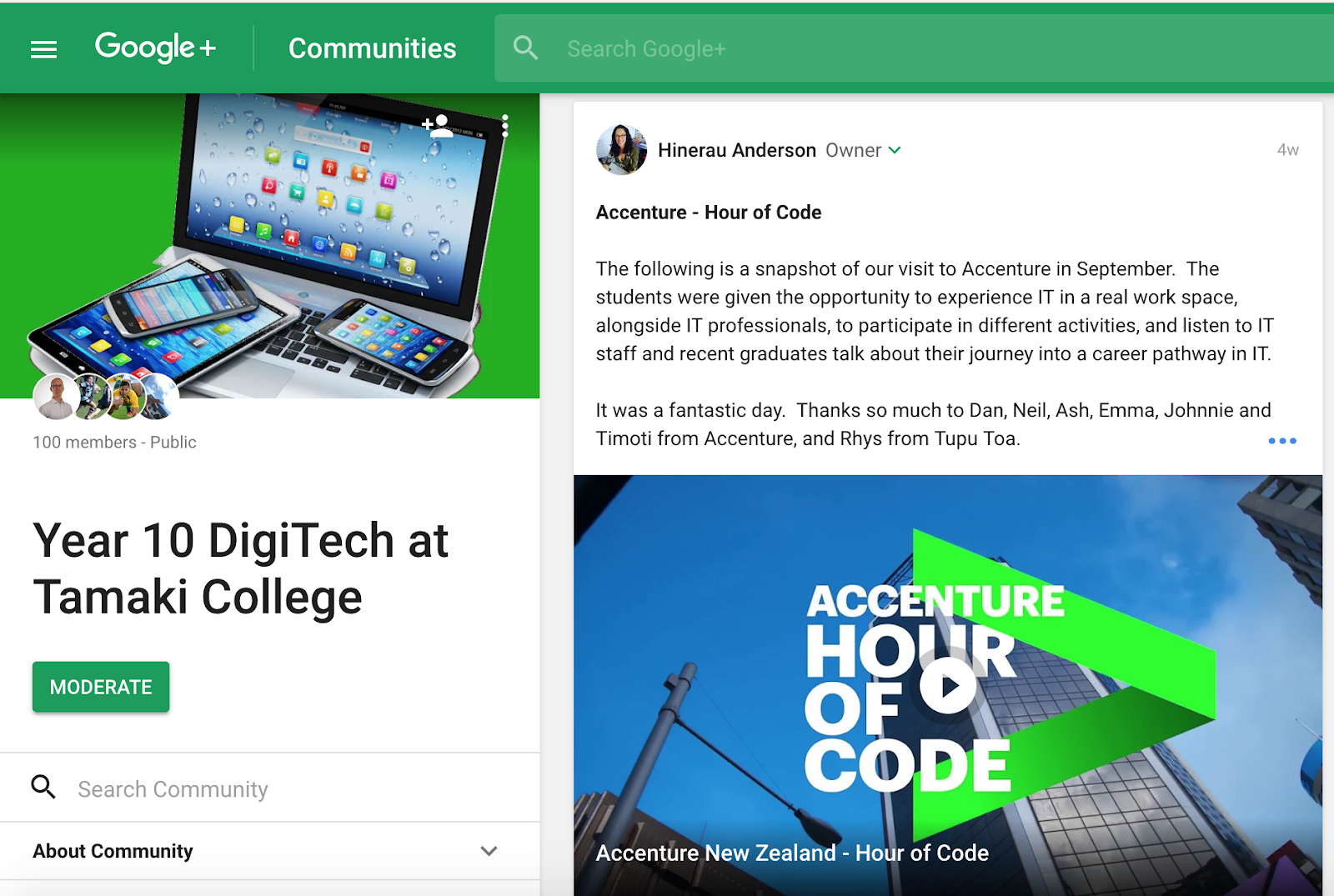
An example of when blogging with authentic audiences was particularly effective, was after I took a group of Year 10 students to Accenture in Auckland City.  The Accenture staff joined the Year 10 Google+ Community, where students had shared their blog posts, or if they didn’t have blogs, then shared their reflections directly into the community.  The Accenture staff commented on many of the posts, and began interacting with the students, which was a highly engaging exercise.  These interactions can be viewed in the following link: Year 10 DigiTech at Tamaki College > Accenture or click into the individual blog posts to see the comment discussions for Kaden, Catherine, Teina, Hala, and Alarzae.

As mentioned, this demonstrates the use of student blogs and blogging as a means of student engagement.  I could say that this indirectly relates or connects to student achievement, as I don’t have evidence of how it directly connected to student achievement.


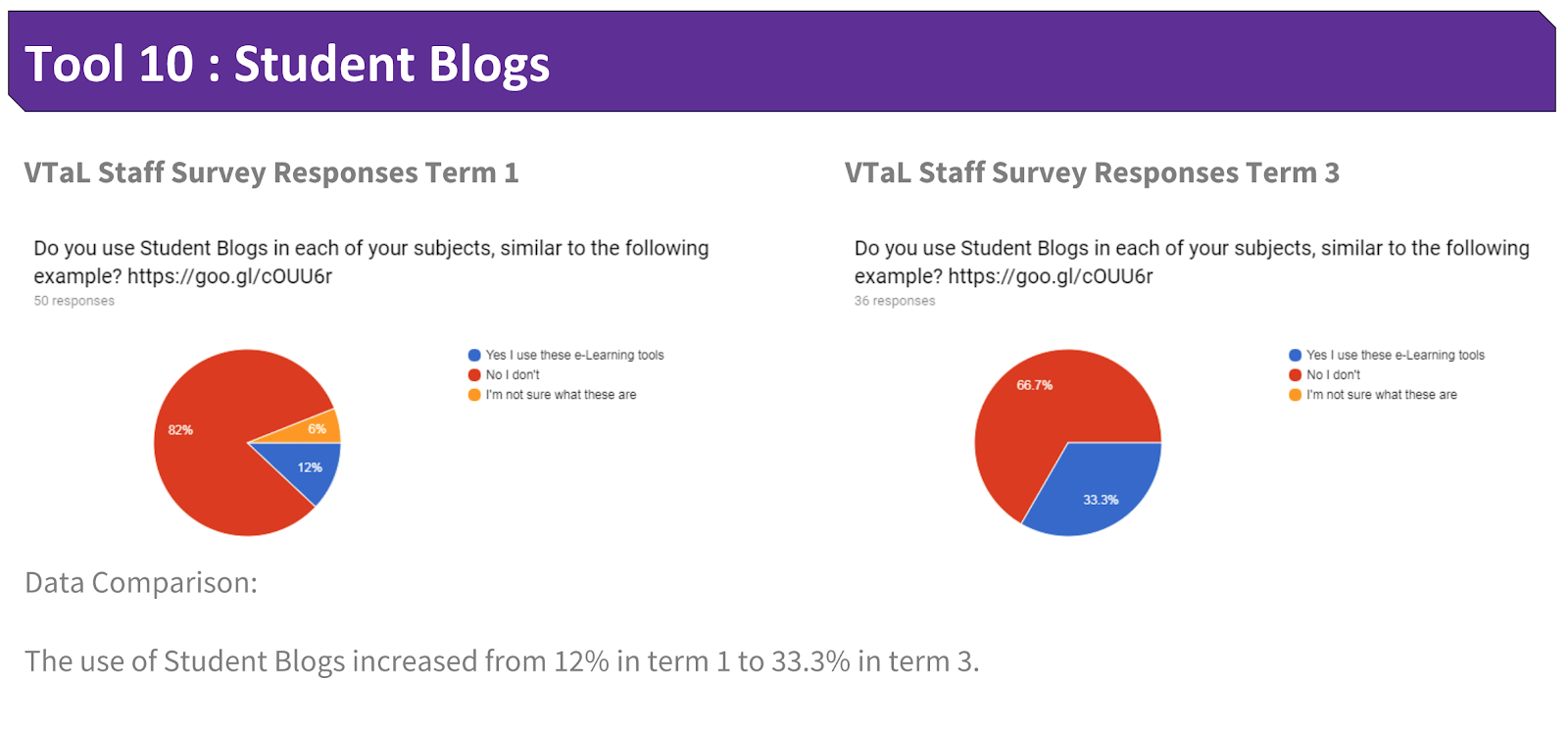
Use of Tool 10 - Student Blogs across Staff

The following shows the use of Student Blogs by staff from Term 1 to Term 3 this year.


Share
Tweet
Pin
Share
4 Comments

Use and Impact of Tool 09 - Subject Google+ and Blogs in DigiTech

I mostly used Google+ Communities with my multi-level Senior DigiTech students.  I created a separate community for Level 1, Level 2, and Level 3; all of which are linked out of the Communities tab in my DigiTech subject site.  


Senior students would share completed tasks into the community under various project categories.  This became a hub for students to view examples of their peers work in order to guide their own learning.  The senior students found the communities an invaluable resource that they say, directly impacted on their ability to complete tasks and produce evidence that met criteria within different NCEA unit and achievement standards.  This feedback is reflected in the following blog post Senior DigiTech Students discuss the benefits of Student Checklists and Google+ on their achievement.  


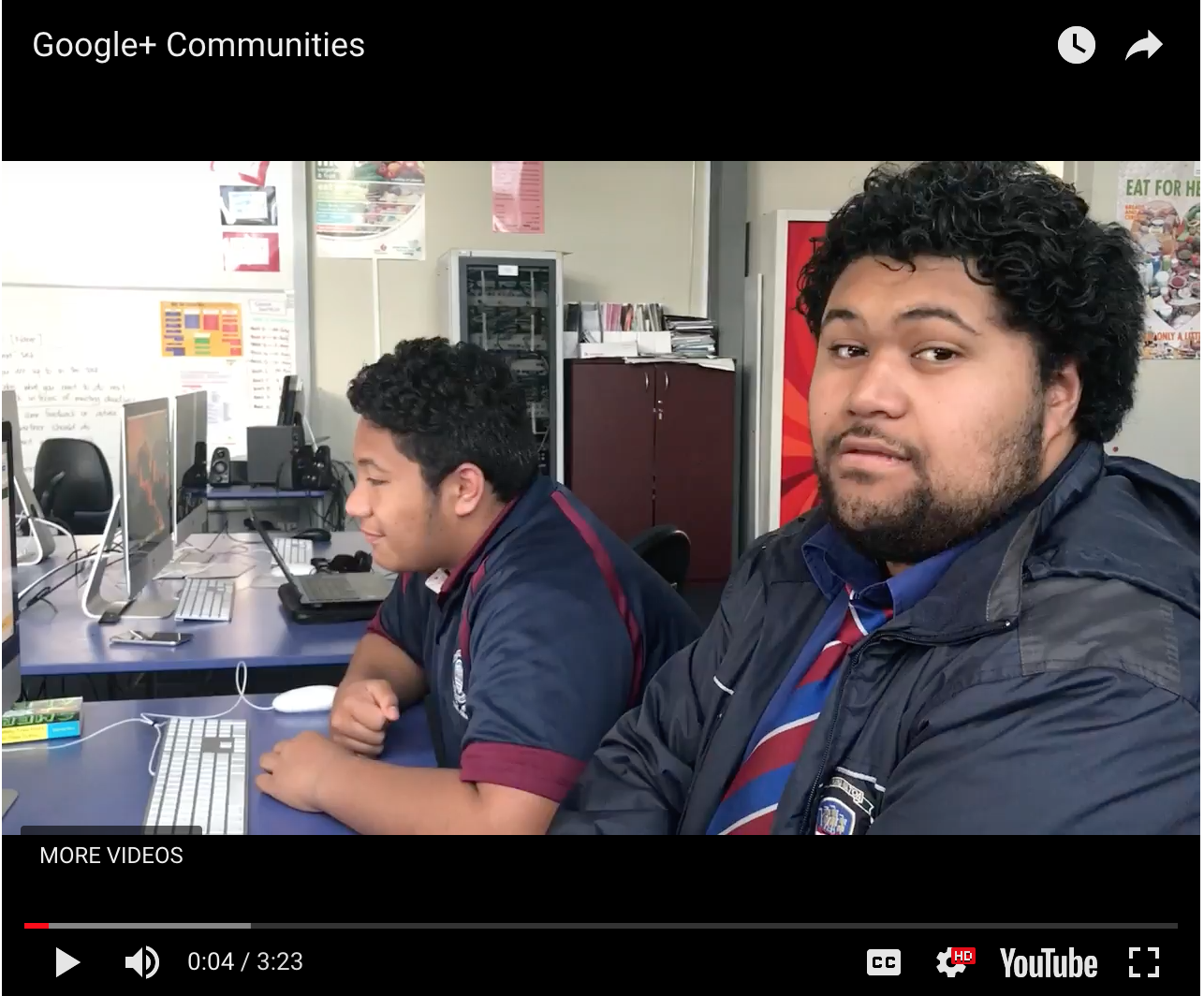
Senior DigiTech students also give examples of how feedback on their work within the Google+ communities was really useful for their learning, as outlined in the blog post Using Sharing and Communities to Motivate Learners.  The commenting function is the same in Google+ communities as it is within individual student blogs.  The main difference is that students can see and view work and comments according to categories which they all post into, giving them a broader perspective on both their own as well as their peers work.  Two students, Lisiate and Sione, explain this to us in the following YouTube clip.


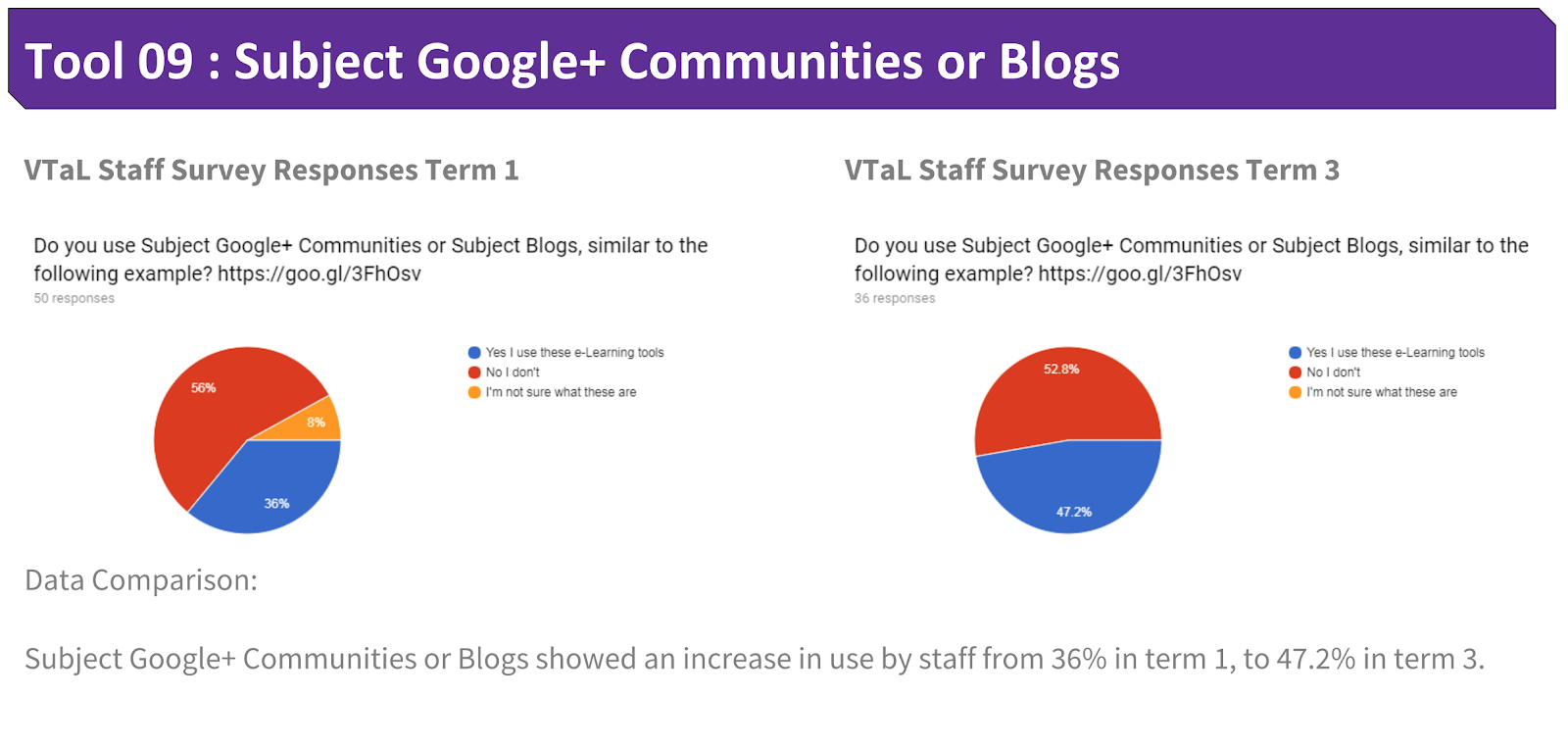
Use of Tool 09 - Subject Google+ and Blogs across Staff

The following shows the use of Subject Google+ and Blogs by staff from Term 1 to Term 3 this year.


Share
Tweet
Pin
Share
No Comments

Use and Impact of Tool 08 - Year Level Google Sites

I did not trial this tool this year.  This tool requires a collaborative approach across learning areas within a year level, and is another form of ‘sharing’ alongside Student Blogs and Google+ Communities.

Use of Tool 08 - Year Level Google Sites across Staff

The following shows the use of Student Google Sites by staff from Term 1 to Term 3 this year.


Share
Tweet
Pin
Share
No Comments

Use and Impact of Tool 07 - Student Google Sites in DigiTech

Student Sites in a tool that I trialled with students in order to visually showcase their work.  I initially trialled this with senior students in previous years as a means of providing evidence for external moderation, and decided to trial it with junior students this year.  The purpose being to enable students to collate evidence of learning according to various Technology achievement objectives across different Technology Specialist areas throughout the year.  


Students loved having ownership of their sites, and having the ability to customize their sites.  This is reflected in a previous blogpost Elevating Share to New Heights! Whilst students enjoyed using this tool to showcase their work, it contributed more towards student engagement, than having a direct connection to student achievement.  I can see how this may change over time, as students realise the benefits of ‘sharing’ sites with comprehensive sets of completed work, as opposed to either incomplete or non-existent tasks.  However, getting to that stage, this is still a work in progress.


Use of Tool 07 - Student Google Sites across Staff

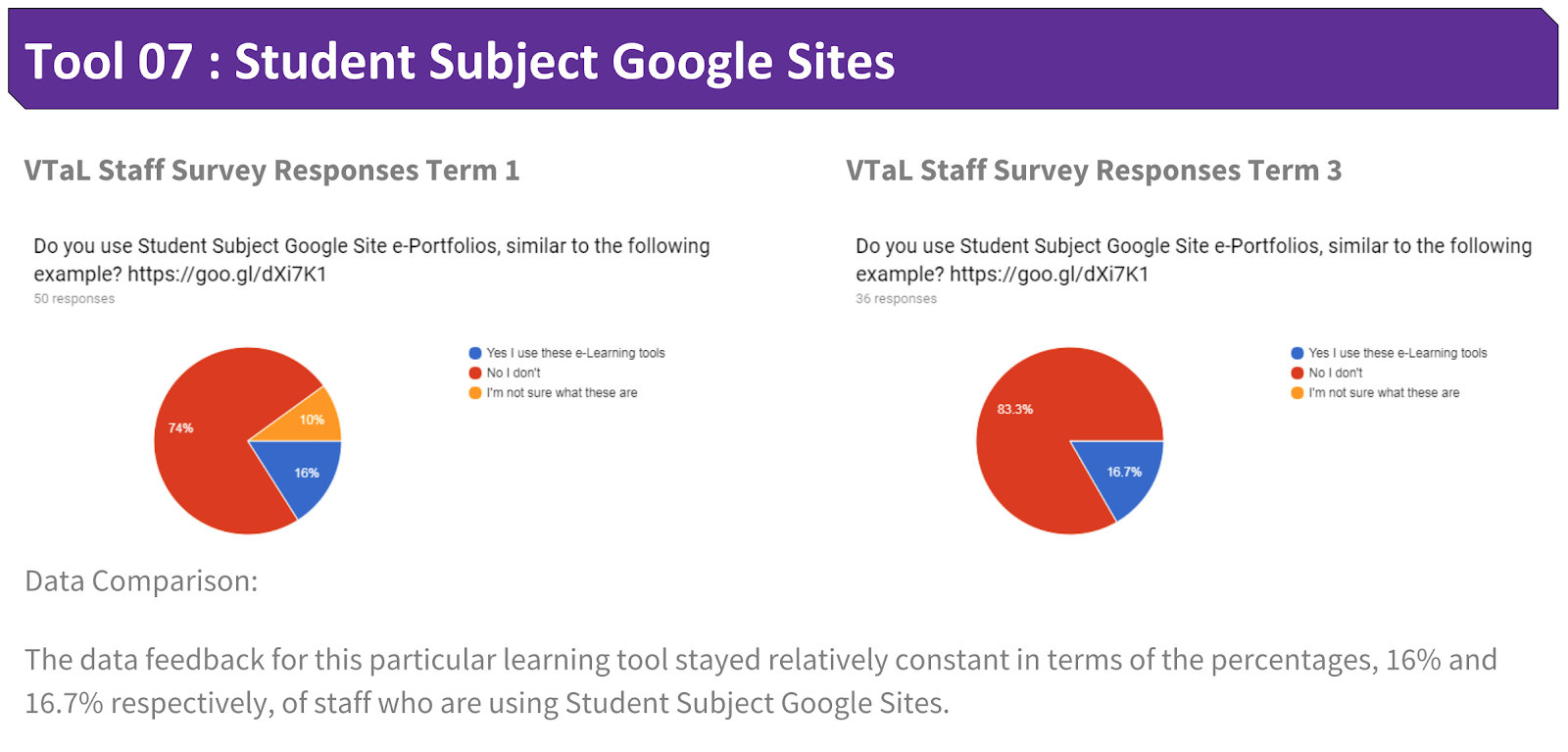
The following shows the use of Student Google Sites by staff from Term 1 to Term 3 this year.


Share
Tweet
Pin
Share
No Comments

Use and Impact of Tool 06 - Workspaces in DigiTech

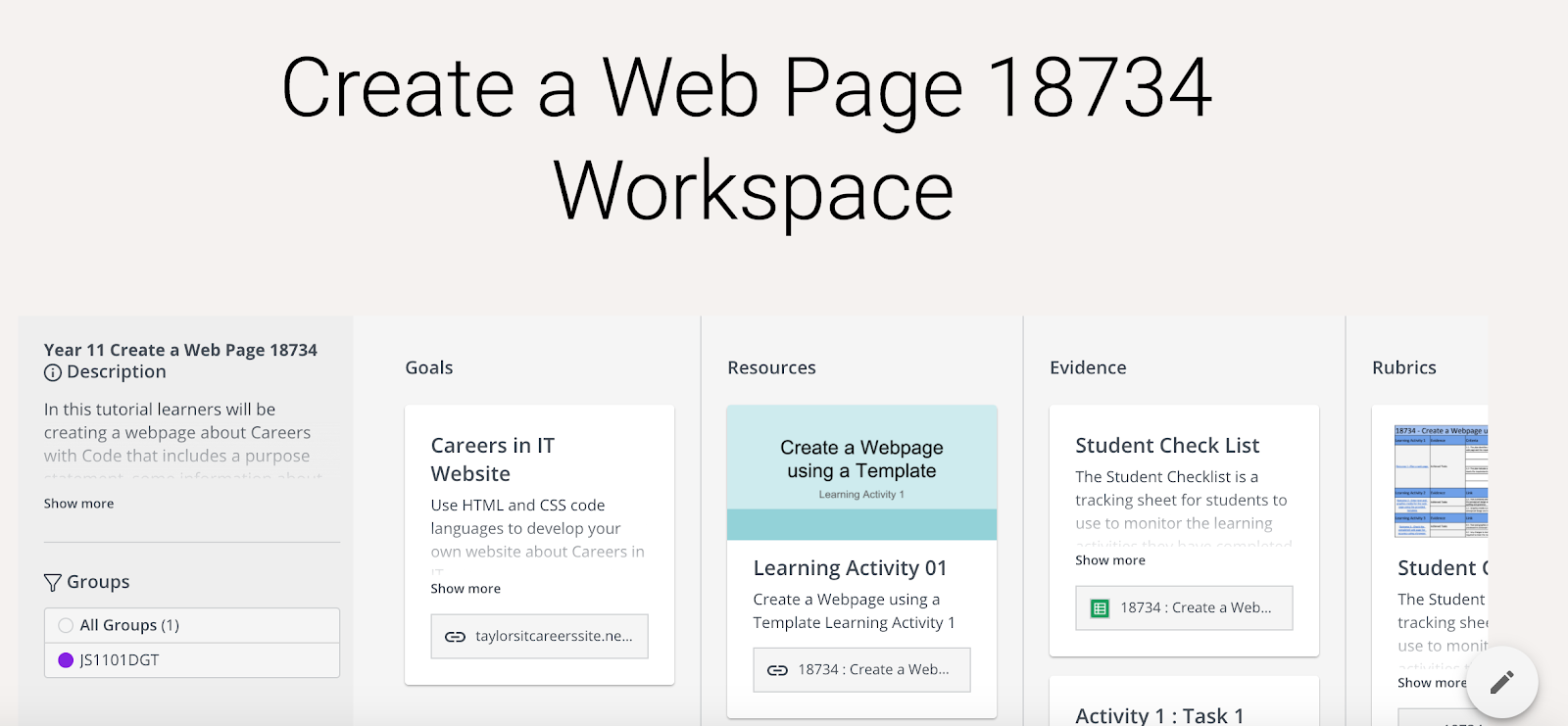
As mentioned in a recent blog post, VTaL Class Task Lists and Student Checklists, and, Dates and Grade Sheets in Workspace, Workspaces are still relatively new to me and I’m undergoing a trial process with my current JumpStart class.  I can see the potential for Workspaces to enable student achievement within projects, but do not currently have data or evidence to reflect this theory.  This will be one of the tools that I revisit in order to review its effectiveness in 2018.


Use of Tool 06 - Workspaces across Staff

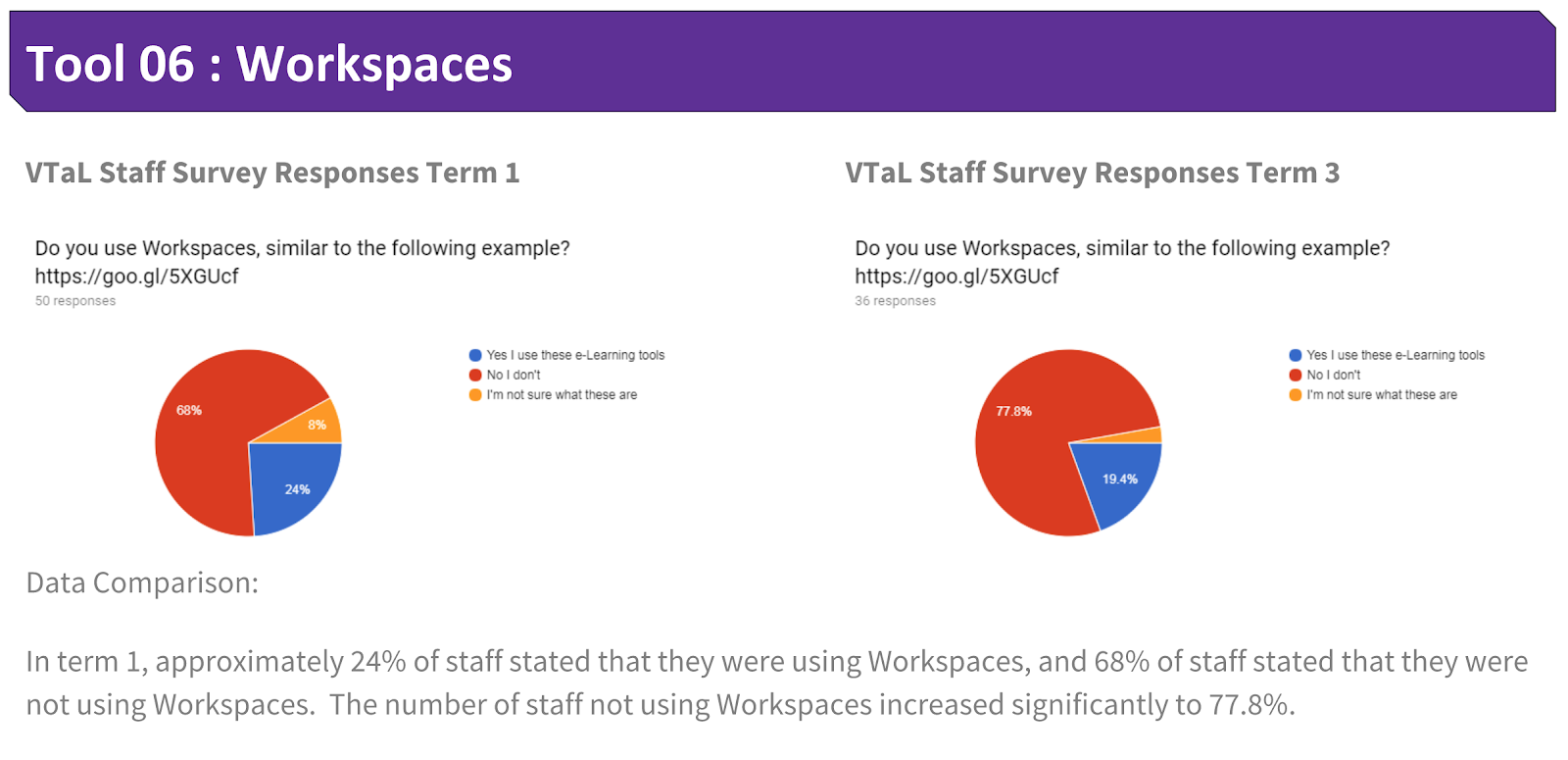
The following shows the use of Workspaces by staff from Term 1 to Term 3 this year.


Share
Tweet
Pin
Share
No Comments

Use and Impact of Tool 05 - Subject Google Calendars in DigiTech

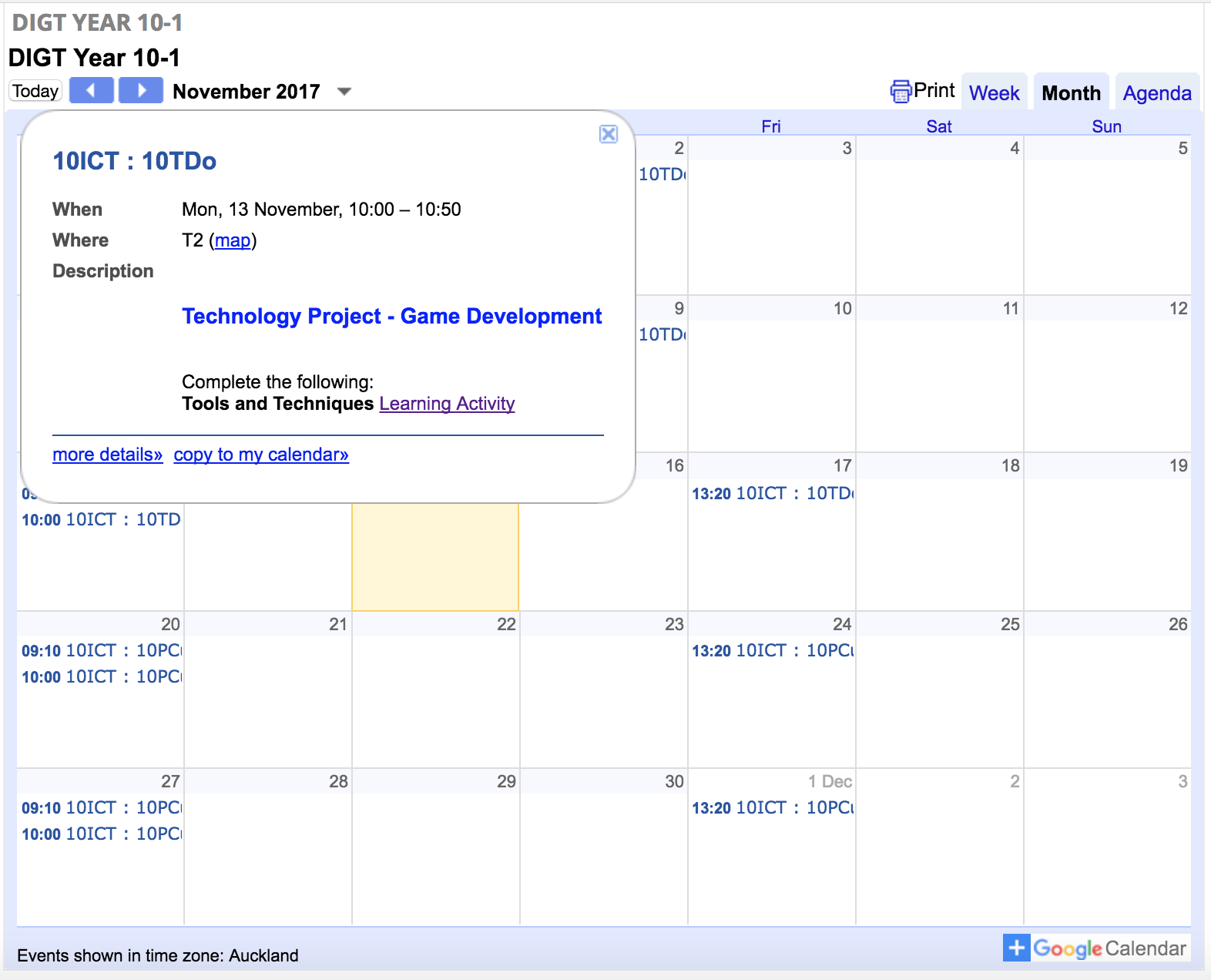
I used Subject Google Calendars with all of my Year Levels, both junior and senior.  I include brief instructions within individual calendar events to direct students towards the learning for that particular lesson.  The calendar posts are rewindable resources that enables students (and other any stakeholders) access to learning instructions from previous lessons simply by viewing dates within a year level calendar.


Although I use calendars with both junior and senior classes, it is mostly the junior classes that are highly dependant on the use of the calendars to direct them towards to the learning for each lesson.  Senior students tend to refer back to the Student Checklists to guide the next steps in their learning process, whereas the juniors rely more on myself to redirect them back towards the learning.  I also include links within calendar posts to the Class Project Task Lists as well as Learning Activities.  Junior students will often click on the Class Project Task List link to track their progress.  


Overall, the calendar posts enable students to know what the focus is for each lesson according to the date and time.  This is particularly useful in a secondary school environment where students are transitioning between different classes multiple times throughout the day and week.  However, I have not yet made any direct links between the use of the calendar posts and student achievement.  It is moreso a case of the tool being used to direct workflow for students on any given day.


Use of Tool 05 - Subject Google Calendars across Staff

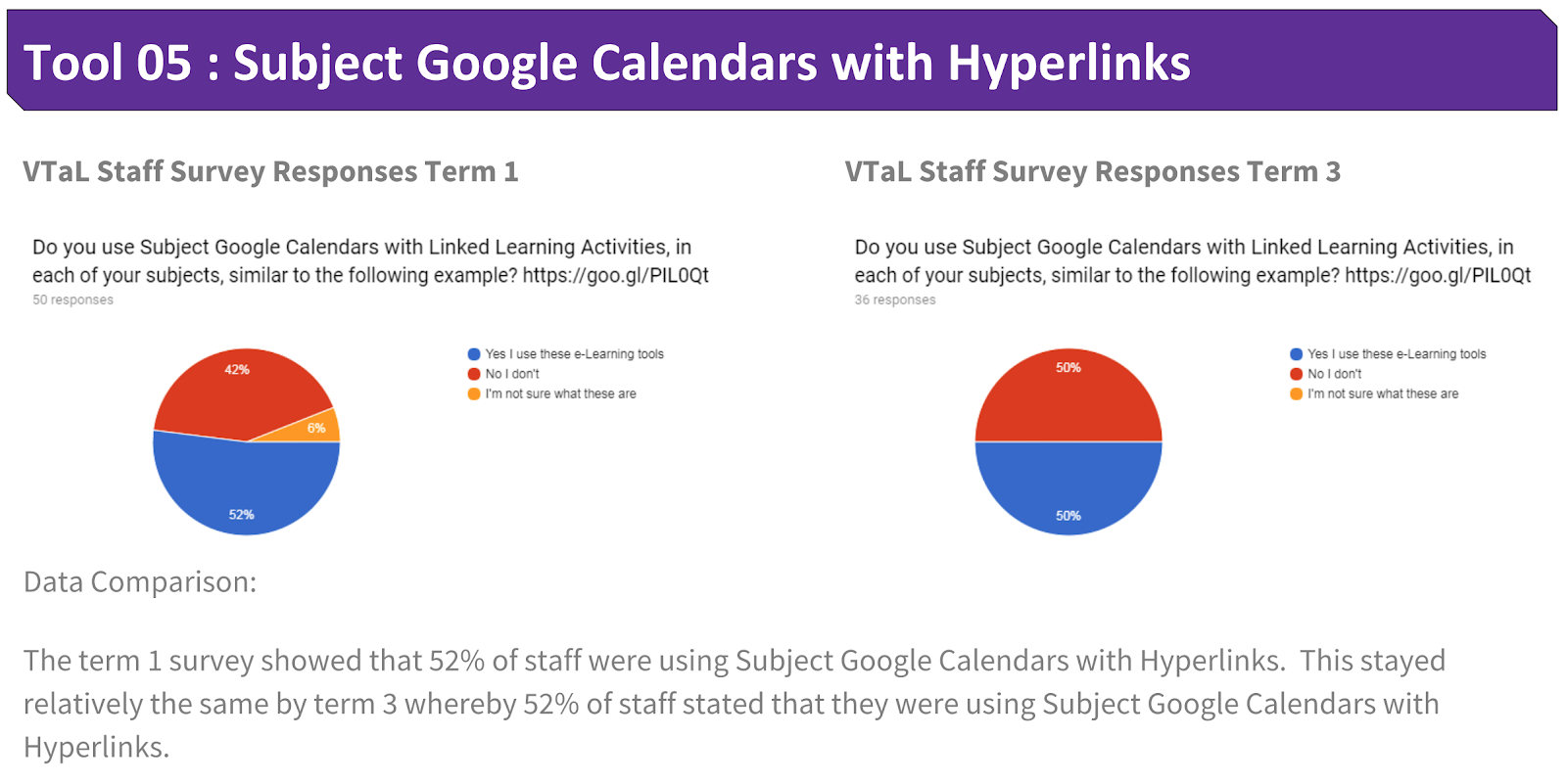
The following shows the use of Subject Google Calendars by staff from Term 1 to Term 3 this year.


Share
Tweet
Pin
Share
No Comments

Use and Impact of Tool 04 - Student Project Checklists in DigiTech

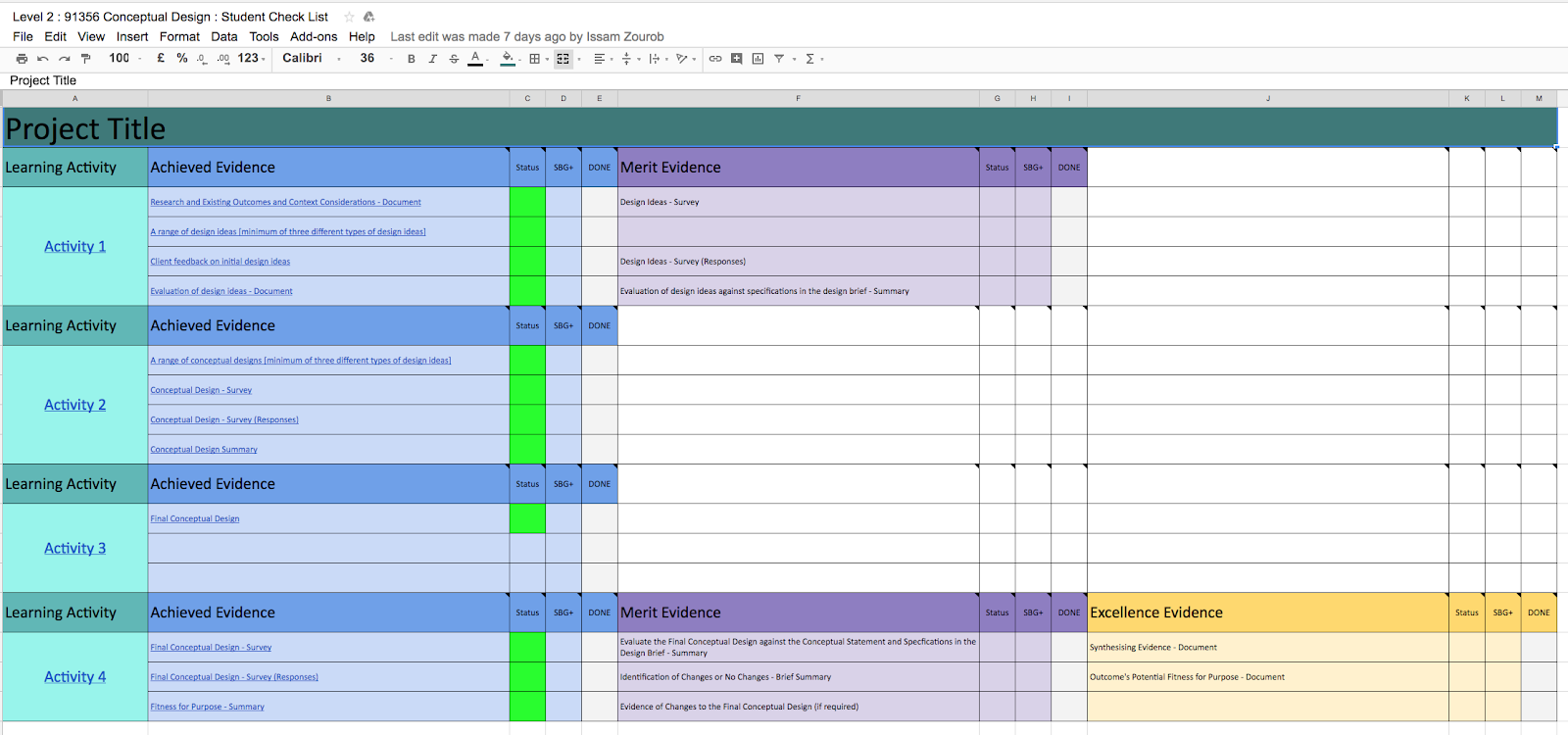
I used Student Project Checklists mostly with my multi-level Senior DigiTech class.  The senior students found it useful and empowering being able to track and monitor their own progress within projects, leading towards the achievement of credits for NCEA standards.  Although I initially trialled the Project Checklists with Junior Classes, time restraints (3 x 50 minute lessons per week, out of a total of 30 lessons per week), as well as junior students seeing their progress within the Class Project Task Lists, meant that the Student Checklists were not as favourable with junior students as they were with senior students, in terms of students monitoring their own progress and achievement in class.


As with the Class Project Task Lists, Student Project Checklists also use the colour code system to track and monitor achievement eg. green (complete), orange (incomplete) and red (not started).  


The following are examples of student feedback or posts about the effectiveness of Student Project Checklists to enable students to track and monitor their achievement:
  • Senior DigiTech Students discuss the benefits of Student Checklists and Google+ on their achievement
  • VTaL - Student Project Checklists to track Student Achievement

Use of Tool 04 - Student Project Checklists across Staff

The following are examples of student and staff feedback across other Learning Areas, about the effectiveness of Class Project Task Lists to track and monitor their achievement:
  • VTaL Tracking Sheets and Class Task Lists in Maths
  • The Benefits of VTaL Class Task Lists and Tracking Sheets - What do Teachers have to say?


In addition to this, many staff directly attributed the use of VTaL Tracking Sheets to Accelerating Shift within their subject areas this year.  This is reflected within the presentation in the following blog post: Visible Learning accelerates shift - Term 4 2017 Tamaki College


The following shows the use of Student Project Checklists by staff from Term 1 to Term 3 this year.


Share
Tweet
Pin
Share
No Comments
Newer Posts
Older Posts

About Me

Kia ora! I am the Head of Technology at Tāmaki College and also teach Digital Technologies.


My target group of learners for my Inquiry 2021 will be my Year 12 NCEA Level 2 class. This group of learners were my target group from my 2020 Inquiry. I would like to inquire into whether Academic Writing exemplars specific to Digital Technologies, in conjunction with the 'Explanation Writing' classroom display resources for Digital Technologies, based on SOLO taxonomy, could accelerate achievement in literacy in my subject.


My target group of learners for my Inquiry 2020 were my Year 11 NCEA Level 1 class. I inquired into the process of using the LearnCoach online programs (content) and VTaL Visible Teaching and Learning (workflow) to accelerate student achievement for Tamaki College students undertaking courses in Digital Technologies NCEA Levels 1, 2 and 3.


In 2019, my inquiry is to maximise pedagogical practices (relating to integrated education, and collaborative teaching and learning), to effectively shift student achievement, supported by digital platforms connected to visible teaching and learning.


My Inquiry in 2018, was to develop a VTaL Purpose-Built Innovative Tool, to enable all elements of the VTaL Framework to be accessible to teachers, in order to accelerate student achievement.


In 2017, my inquiry was based on raising student achievement and shifting teacher practice around effective pedagogical practices including Learn, Create and Share. This will be achieved through the development, implementation and monitoring of the Visible Teaching and Learning Framework.

recent posts

Blog Archive

  • ▼  2022 (8)
    • ▼  March (3)
      • Hybrid Teaching and Learning | The impact of Omicron
      • Manaiakalani Toolkit | Well-being - Supporting Our...
      • Technology - Manaiakalani Department Discussions M...
    • ►  February (5)
  • ►  2021 (16)
    • ►  November (1)
    • ►  September (2)
    • ►  August (1)
    • ►  July (2)
    • ►  June (4)
    • ►  May (3)
    • ►  March (2)
    • ►  February (1)
  • ►  2020 (42)
    • ►  November (2)
    • ►  September (2)
    • ►  August (7)
    • ►  July (5)
    • ►  June (4)
    • ►  May (7)
    • ►  April (7)
    • ►  March (3)
    • ►  February (4)
    • ►  January (1)
  • ►  2019 (30)
    • ►  September (2)
    • ►  August (3)
    • ►  July (1)
    • ►  June (2)
    • ►  April (1)
    • ►  March (12)
    • ►  February (9)
  • ►  2018 (41)
    • ►  November (7)
    • ►  October (2)
    • ►  September (1)
    • ►  August (4)
    • ►  July (4)
    • ►  May (7)
    • ►  April (4)
    • ►  March (5)
    • ►  February (7)
  • ►  2017 (65)
    • ►  December (2)
    • ►  November (22)
    • ►  October (6)
    • ►  September (6)
    • ►  August (10)
    • ►  June (4)
    • ►  May (3)
    • ►  April (1)
    • ►  March (4)
    • ►  February (6)
    • ►  January (1)
  • ►  2016 (26)
    • ►  December (1)
    • ►  November (18)
    • ►  September (6)
    • ►  August (1)

VTaL

  • VTaL (104)
  • VTaL 01 Subject Sites (33)
  • VTaL 02 Learning Activities (7)
  • VTaL 03 Tracking Sheets (28)
  • VTaL 04 Student Checklists (12)
  • VTaL 05 Calendars with Links (24)
  • VTaL 06 Workspaces (32)
  • VTaL 07 Student Sites (4)
  • VTaL 08 Year Level Sites (3)
  • VTaL 09 Subject Communities (26)
  • VTaL 10 Student Blogs (11)
  • VTaL and Google Hangouts (15)
  • VTaL and Student Achievement (45)
  • VTaL for Parents (13)
  • VTaL for Students (82)
  • VTaL for Teachers (32)

Presentations

  • GAFE (19)
  • My YouTube Videos (8)
  • Presentations (21)

Inquiry

  • Inquiry (134)
  • Inquiry 2019 (27)
  • Inquiry 2020 (34)
  • Inquiry 2021 (15)

Manaiakalani

  • CoL (167)
  • Inquiry (134)
  • Inquiry 2020 (34)
  • Learn Create Share (11)
  • MIT 2018 (16)
  • Manaiakalani (18)
  • Presentations (21)
  • SPARK MIT (59)

Tamaki College

  • 2018 Department Goals (2)
  • 2018 School Goals (3)
  • 2019 Department Goals (2)
  • CoL (167)
  • Collaborative Learning Environments (32)
  • Covid19 (29)
  • Cultural Responsiveness (10)
  • Differentiation (12)
  • EMR Collaborative Project (21)
  • Goals (2)
  • Human Rights Collaborative Project (5)
  • Integrated Education (24)
  • Kia Eke Panuku (8)
  • LearnCoach (2)
  • Literacy (21)
  • PLD (18)
  • Techies (12)
  • Technological Modelling (4)

Practicing Teacher Criteria

  • PTC01 (31)
  • PTC02 (9)
  • PTC03 (6)
  • PTC04 (61)
  • PTC05 (17)
  • PTC06 (42)
  • PTC07 (32)
  • PTC08 (34)
  • PTC09 (8)
  • PTC10 (7)
  • PTC11 (16)
  • PTC12 (54)

General

  • CoL (167)
  • Collaborative Learning Environments (32)
  • Cultural Responsiveness (10)
  • Differentiation (12)
  • Feedback - Parent Voice (2)
  • Feedback - Staff Voice (6)
  • Feedback - Student Voice (23)
  • GAFE (19)
  • Goals (2)
  • Integrated Education (24)
  • Kia Eke Panuku (8)
  • LearnCoach (2)
  • Literacy (21)
  • My YouTube Videos (8)
  • Review (14)
  • Student Agency (15)

Contact Form

Name

Email *

Message *

Total Pageviews

Created with by BeautyTemplates| Distributed By Gooyaabi Templates