My Space and My Place

    • Home
    • Inquiry 2021
    • Digital Technologies Site
    • VTaL Site
    • VTaL G+

Use and Impact of Tool 08 - Year Level Google Sites

I did not trial this tool this year.  This tool requires a collaborative approach across learning areas within a year level, and is another form of ‘sharing’ alongside Student Blogs and Google+ Communities.

Use of Tool 08 - Year Level Google Sites across Staff

The following shows the use of Student Google Sites by staff from Term 1 to Term 3 this year.


Share
Tweet
Pin
Share
No Comments

Use and Impact of Tool 07 - Student Google Sites in DigiTech

Student Sites in a tool that I trialled with students in order to visually showcase their work.  I initially trialled this with senior students in previous years as a means of providing evidence for external moderation, and decided to trial it with junior students this year.  The purpose being to enable students to collate evidence of learning according to various Technology achievement objectives across different Technology Specialist areas throughout the year.  


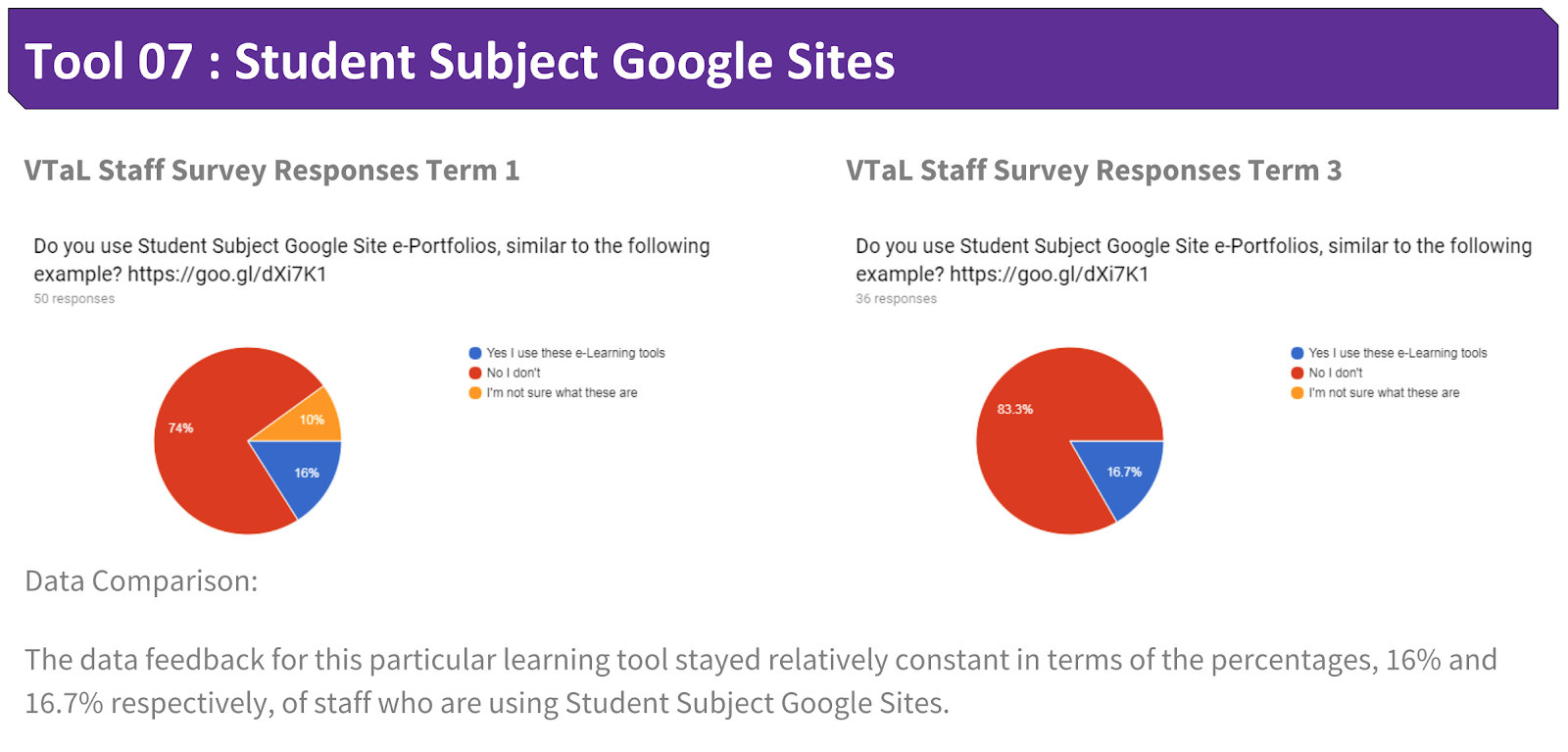
Students loved having ownership of their sites, and having the ability to customize their sites.  This is reflected in a previous blogpost Elevating Share to New Heights! Whilst students enjoyed using this tool to showcase their work, it contributed more towards student engagement, than having a direct connection to student achievement.  I can see how this may change over time, as students realise the benefits of ‘sharing’ sites with comprehensive sets of completed work, as opposed to either incomplete or non-existent tasks.  However, getting to that stage, this is still a work in progress.


Use of Tool 07 - Student Google Sites across Staff

The following shows the use of Student Google Sites by staff from Term 1 to Term 3 this year.


Share
Tweet
Pin
Share
No Comments

Use and Impact of Tool 06 - Workspaces in DigiTech

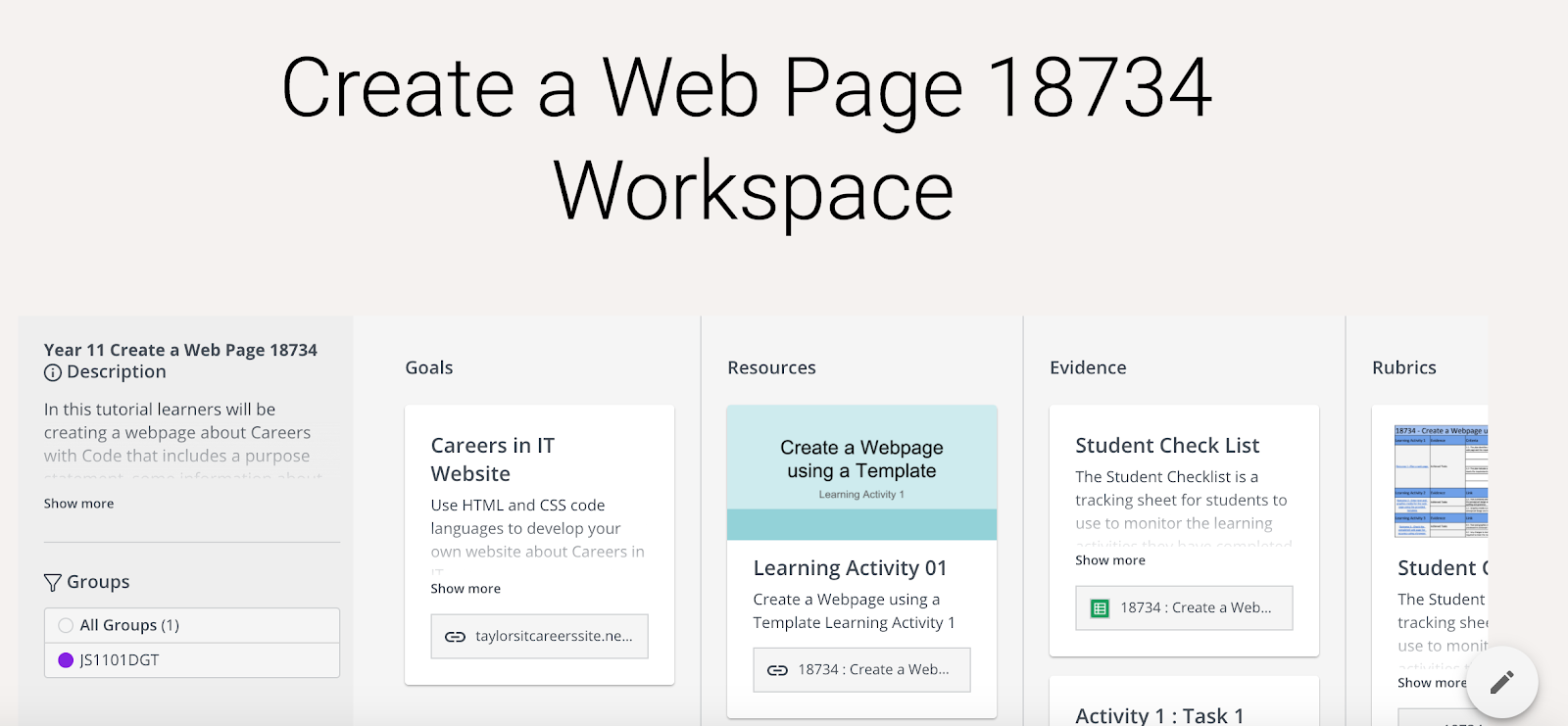
As mentioned in a recent blog post, VTaL Class Task Lists and Student Checklists, and, Dates and Grade Sheets in Workspace, Workspaces are still relatively new to me and I’m undergoing a trial process with my current JumpStart class.  I can see the potential for Workspaces to enable student achievement within projects, but do not currently have data or evidence to reflect this theory.  This will be one of the tools that I revisit in order to review its effectiveness in 2018.


Use of Tool 06 - Workspaces across Staff

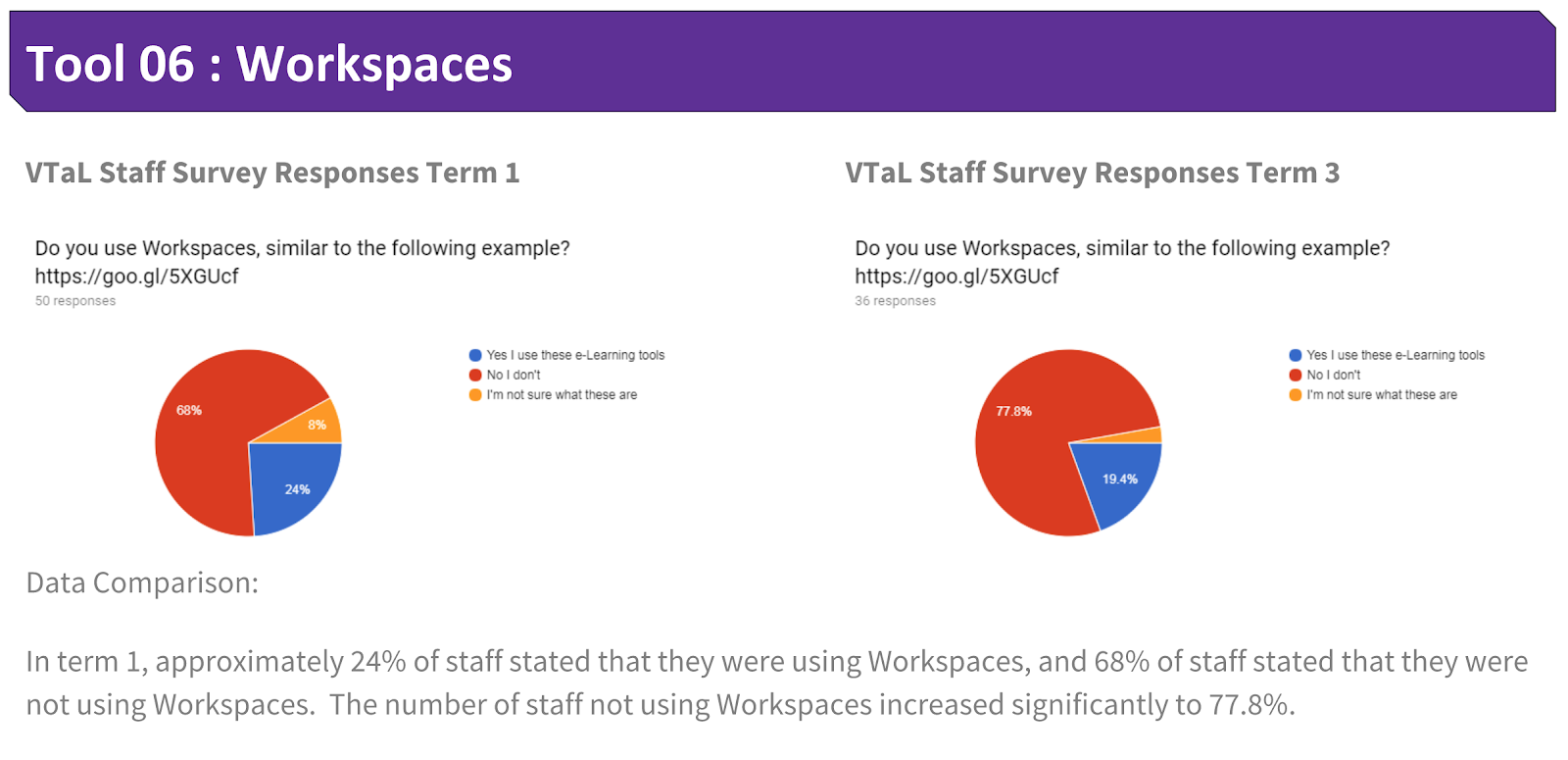
The following shows the use of Workspaces by staff from Term 1 to Term 3 this year.


Share
Tweet
Pin
Share
No Comments

Use and Impact of Tool 05 - Subject Google Calendars in DigiTech

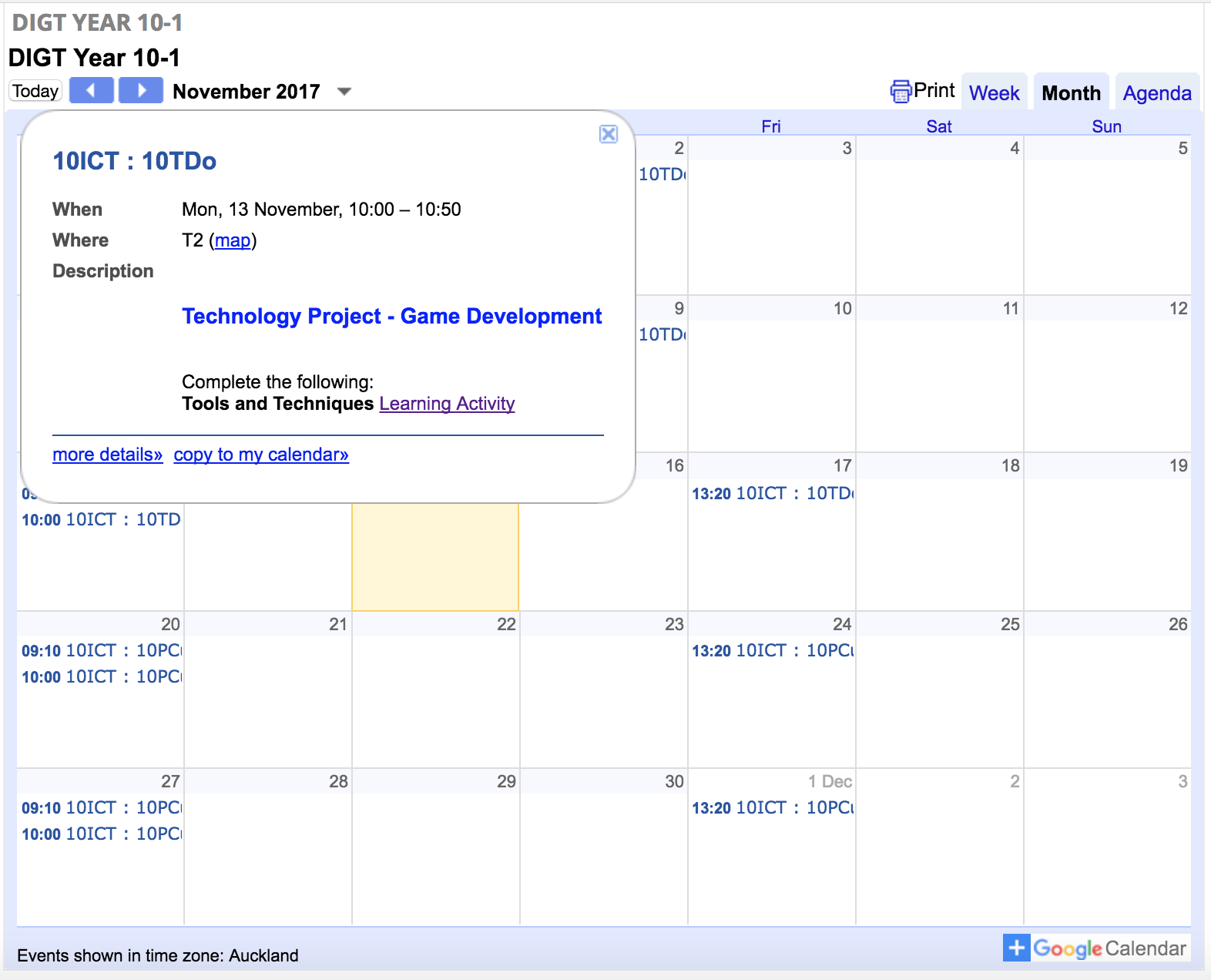
I used Subject Google Calendars with all of my Year Levels, both junior and senior.  I include brief instructions within individual calendar events to direct students towards the learning for that particular lesson.  The calendar posts are rewindable resources that enables students (and other any stakeholders) access to learning instructions from previous lessons simply by viewing dates within a year level calendar.


Although I use calendars with both junior and senior classes, it is mostly the junior classes that are highly dependant on the use of the calendars to direct them towards to the learning for each lesson.  Senior students tend to refer back to the Student Checklists to guide the next steps in their learning process, whereas the juniors rely more on myself to redirect them back towards the learning.  I also include links within calendar posts to the Class Project Task Lists as well as Learning Activities.  Junior students will often click on the Class Project Task List link to track their progress.  


Overall, the calendar posts enable students to know what the focus is for each lesson according to the date and time.  This is particularly useful in a secondary school environment where students are transitioning between different classes multiple times throughout the day and week.  However, I have not yet made any direct links between the use of the calendar posts and student achievement.  It is moreso a case of the tool being used to direct workflow for students on any given day.


Use of Tool 05 - Subject Google Calendars across Staff

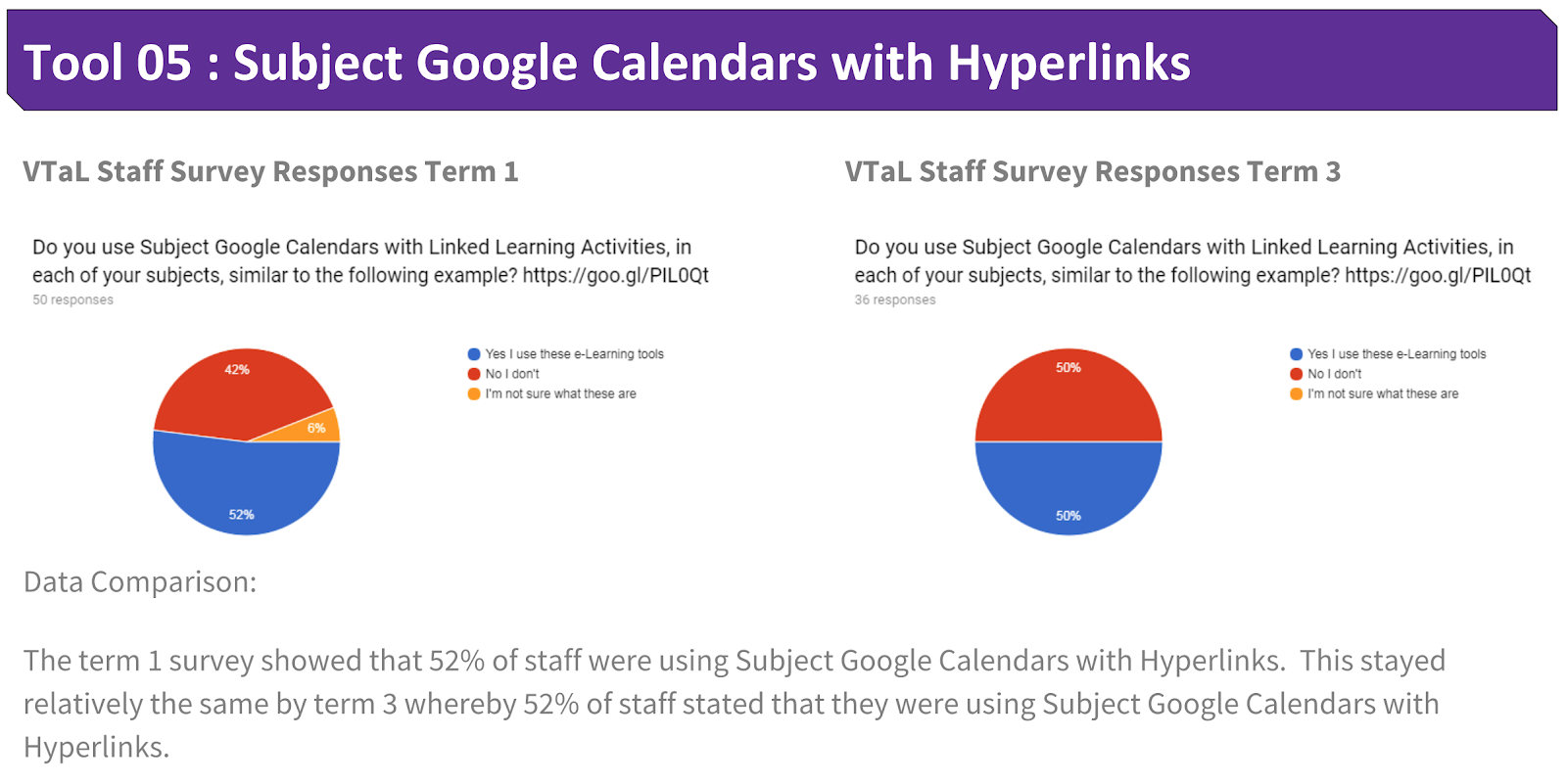
The following shows the use of Subject Google Calendars by staff from Term 1 to Term 3 this year.


Share
Tweet
Pin
Share
No Comments

Use and Impact of Tool 04 - Student Project Checklists in DigiTech

I used Student Project Checklists mostly with my multi-level Senior DigiTech class.  The senior students found it useful and empowering being able to track and monitor their own progress within projects, leading towards the achievement of credits for NCEA standards.  Although I initially trialled the Project Checklists with Junior Classes, time restraints (3 x 50 minute lessons per week, out of a total of 30 lessons per week), as well as junior students seeing their progress within the Class Project Task Lists, meant that the Student Checklists were not as favourable with junior students as they were with senior students, in terms of students monitoring their own progress and achievement in class.


As with the Class Project Task Lists, Student Project Checklists also use the colour code system to track and monitor achievement eg. green (complete), orange (incomplete) and red (not started).  


The following are examples of student feedback or posts about the effectiveness of Student Project Checklists to enable students to track and monitor their achievement:
  • Senior DigiTech Students discuss the benefits of Student Checklists and Google+ on their achievement
  • VTaL - Student Project Checklists to track Student Achievement

Use of Tool 04 - Student Project Checklists across Staff

The following are examples of student and staff feedback across other Learning Areas, about the effectiveness of Class Project Task Lists to track and monitor their achievement:
  • VTaL Tracking Sheets and Class Task Lists in Maths
  • The Benefits of VTaL Class Task Lists and Tracking Sheets - What do Teachers have to say?


In addition to this, many staff directly attributed the use of VTaL Tracking Sheets to Accelerating Shift within their subject areas this year.  This is reflected within the presentation in the following blog post: Visible Learning accelerates shift - Term 4 2017 Tamaki College


The following shows the use of Student Project Checklists by staff from Term 1 to Term 3 this year.


Share
Tweet
Pin
Share
No Comments

Use and Impact of Tool 03 - Class Project Task Lists in DigiTech

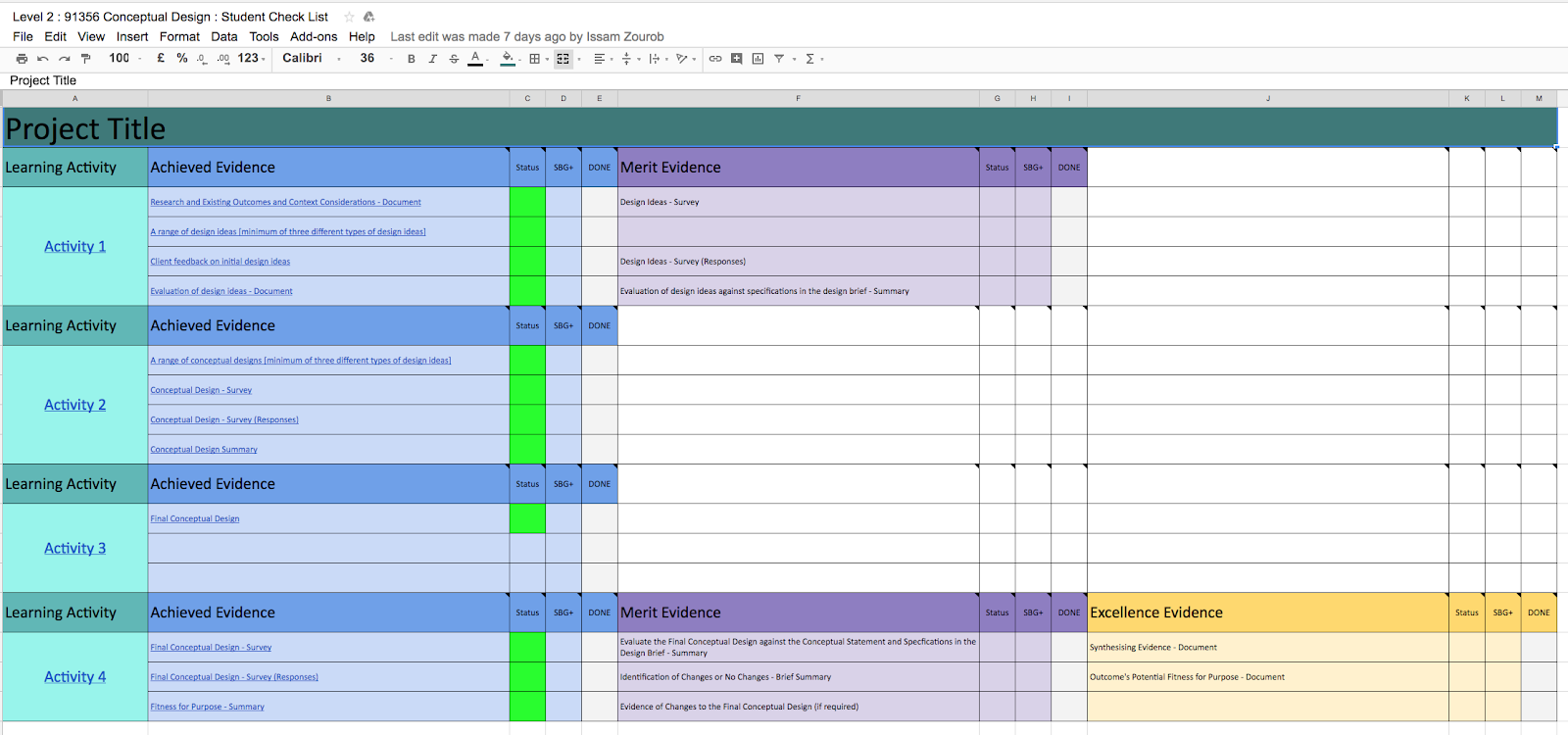
I used Class Project Task Lists with both junior and senior classes.  Junior classes found the Class Project Task Lists useful in terms of tracking their achievement for task completion within a project.  Although I also used the Class Project Task Lists with Senior Classes, senior students often preferred to use the Student Checklists to monitor and track their progress within projects.


The green (complete), orange (incomplete) and red (not started) colour codes enabled students to easily identify their progress.  


The following are examples of student feedback about the effectiveness of Class Project Task Lists to track and monitor their achievement:
  • The Benefits of VTaL Class Task Lists and Tracking Sheets - So what do the Students have to say?
  • VTaL Student Voice - Visible Teaching and Learning for Year 8 Students


Use of Tool 03 - Class Project Task Lists across Staff

The following are examples of student and staff feedback across other Learning Areas, about the effectiveness of Class Project Task Lists to track and monitor their achievement:
  • VTaL Tracking Sheets and Class Task Lists in Maths
  • The Benefits of VTaL Class Task Lists and Tracking Sheets - What do Teachers have to say?


The following shows the use of Class Project Task Lists by staff from Term 1 to Term 3 this year.


Share
Tweet
Pin
Share
No Comments

Use and Impact of Tool 02 - SOLO Learning Activities in DigiTech

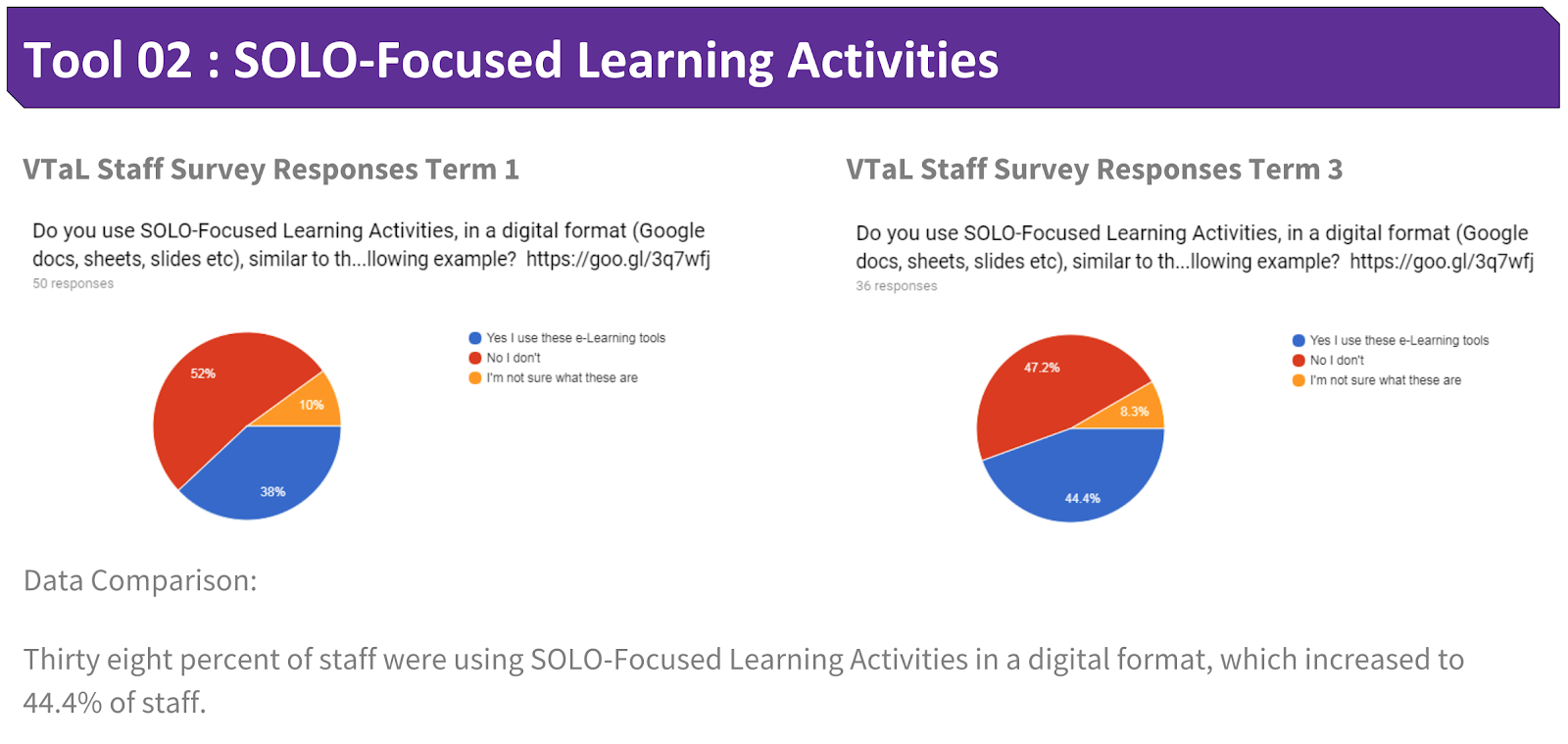
In 2017, I have included links to SOLO Learning Activities into a range of tools within my site.  This includes calendar posts for each level, project instructions for junior and senior projects, class task lists, and student checklists.


It is the instructions within the learning activities that have directed student learning.  The links to learning activities within the Class Task Lists also allows students to easily navigate to learning activity instructions for incomplete tasks, identified by the colour orange.  Thus enabling students to complete the work for that task.  It is the accessibility of the learning activities within different learning tools, that enables the learning activity instructions to contribute towards student progress and achievement.


Use of Tool 02 - SOLO Learning Activities across Staff

The following shows the use of SOLO-Focused Learning Activities by staff from Term 1 to Term 3 this year.


Share
Tweet
Pin
Share
No Comments
Newer Posts
Older Posts

About Me

Kia ora! I am the Head of Technology at Tāmaki College and also teach Digital Technologies.


My target group of learners for my Inquiry 2021 will be my Year 12 NCEA Level 2 class. This group of learners were my target group from my 2020 Inquiry. I would like to inquire into whether Academic Writing exemplars specific to Digital Technologies, in conjunction with the 'Explanation Writing' classroom display resources for Digital Technologies, based on SOLO taxonomy, could accelerate achievement in literacy in my subject.


My target group of learners for my Inquiry 2020 were my Year 11 NCEA Level 1 class. I inquired into the process of using the LearnCoach online programs (content) and VTaL Visible Teaching and Learning (workflow) to accelerate student achievement for Tamaki College students undertaking courses in Digital Technologies NCEA Levels 1, 2 and 3.


In 2019, my inquiry is to maximise pedagogical practices (relating to integrated education, and collaborative teaching and learning), to effectively shift student achievement, supported by digital platforms connected to visible teaching and learning.


My Inquiry in 2018, was to develop a VTaL Purpose-Built Innovative Tool, to enable all elements of the VTaL Framework to be accessible to teachers, in order to accelerate student achievement.


In 2017, my inquiry was based on raising student achievement and shifting teacher practice around effective pedagogical practices including Learn, Create and Share. This will be achieved through the development, implementation and monitoring of the Visible Teaching and Learning Framework.

recent posts

Blog Archive

  • ▼  2022 (8)
    • ▼  March (3)
      • Hybrid Teaching and Learning | The impact of Omicron
      • Manaiakalani Toolkit | Well-being - Supporting Our...
      • Technology - Manaiakalani Department Discussions M...
    • ►  February (5)
  • ►  2021 (16)
    • ►  November (1)
    • ►  September (2)
    • ►  August (1)
    • ►  July (2)
    • ►  June (4)
    • ►  May (3)
    • ►  March (2)
    • ►  February (1)
  • ►  2020 (42)
    • ►  November (2)
    • ►  September (2)
    • ►  August (7)
    • ►  July (5)
    • ►  June (4)
    • ►  May (7)
    • ►  April (7)
    • ►  March (3)
    • ►  February (4)
    • ►  January (1)
  • ►  2019 (30)
    • ►  September (2)
    • ►  August (3)
    • ►  July (1)
    • ►  June (2)
    • ►  April (1)
    • ►  March (12)
    • ►  February (9)
  • ►  2018 (41)
    • ►  November (7)
    • ►  October (2)
    • ►  September (1)
    • ►  August (4)
    • ►  July (4)
    • ►  May (7)
    • ►  April (4)
    • ►  March (5)
    • ►  February (7)
  • ►  2017 (65)
    • ►  December (2)
    • ►  November (22)
    • ►  October (6)
    • ►  September (6)
    • ►  August (10)
    • ►  June (4)
    • ►  May (3)
    • ►  April (1)
    • ►  March (4)
    • ►  February (6)
    • ►  January (1)
  • ►  2016 (26)
    • ►  December (1)
    • ►  November (18)
    • ►  September (6)
    • ►  August (1)

VTaL

  • VTaL (104)
  • VTaL 01 Subject Sites (33)
  • VTaL 02 Learning Activities (7)
  • VTaL 03 Tracking Sheets (28)
  • VTaL 04 Student Checklists (12)
  • VTaL 05 Calendars with Links (24)
  • VTaL 06 Workspaces (32)
  • VTaL 07 Student Sites (4)
  • VTaL 08 Year Level Sites (3)
  • VTaL 09 Subject Communities (26)
  • VTaL 10 Student Blogs (11)
  • VTaL and Google Hangouts (15)
  • VTaL and Student Achievement (45)
  • VTaL for Parents (13)
  • VTaL for Students (82)
  • VTaL for Teachers (32)

Presentations

  • GAFE (19)
  • My YouTube Videos (8)
  • Presentations (21)

Inquiry

  • Inquiry (134)
  • Inquiry 2019 (27)
  • Inquiry 2020 (34)
  • Inquiry 2021 (15)

Manaiakalani

  • CoL (167)
  • Inquiry (134)
  • Inquiry 2020 (34)
  • Learn Create Share (11)
  • MIT 2018 (16)
  • Manaiakalani (18)
  • Presentations (21)
  • SPARK MIT (59)

Tamaki College

  • 2018 Department Goals (2)
  • 2018 School Goals (3)
  • 2019 Department Goals (2)
  • CoL (167)
  • Collaborative Learning Environments (32)
  • Covid19 (29)
  • Cultural Responsiveness (10)
  • Differentiation (12)
  • EMR Collaborative Project (21)
  • Goals (2)
  • Human Rights Collaborative Project (5)
  • Integrated Education (24)
  • Kia Eke Panuku (8)
  • LearnCoach (2)
  • Literacy (21)
  • PLD (18)
  • Techies (12)
  • Technological Modelling (4)

Practicing Teacher Criteria

  • PTC01 (31)
  • PTC02 (9)
  • PTC03 (6)
  • PTC04 (61)
  • PTC05 (17)
  • PTC06 (42)
  • PTC07 (32)
  • PTC08 (34)
  • PTC09 (8)
  • PTC10 (7)
  • PTC11 (16)
  • PTC12 (54)

General

  • CoL (167)
  • Collaborative Learning Environments (32)
  • Cultural Responsiveness (10)
  • Differentiation (12)
  • Feedback - Parent Voice (2)
  • Feedback - Staff Voice (6)
  • Feedback - Student Voice (23)
  • GAFE (19)
  • Goals (2)
  • Integrated Education (24)
  • Kia Eke Panuku (8)
  • LearnCoach (2)
  • Literacy (21)
  • My YouTube Videos (8)
  • Review (14)
  • Student Agency (15)

Contact Form

Name

Email *

Message *

Total Pageviews

Created with by BeautyTemplates| Distributed By Gooyaabi Templates