My Space and My Place

    • Home
    • Inquiry 2021
    • Digital Technologies Site
    • VTaL Site
    • VTaL G+


The 2017 Manaiakalani Hui was a great forum to participate in, and share ideas and strategies around teaching and learning for staff and students within our schools.

It goes without saying, that so many of us, who are either directly, or indirectly connected to the learners in our community, want the very best for our students.  The discussions around the 'hows', the 'whys', the backward reflecting and the forward projecting is where a lot of the rich and meaningful conversations come from.  Within our own teaching environments, it is easy to feel overwhelmed somedays when the challenges seem so great.  However, connecting with colleagues within our community of learning on a day such as this, is a timely way of expressing, appreciating and celebrating all of the positive initiatives that are contributing to outcomes for our students.
   

It was wonderful to see the student ambassadors share part of their learning journey from the Manaiakalani schools.  So much enthusiasm and insight shared by all of the students; an absolute delight to watch.  Extremely grateful to take in the knowledge shared by my fellow 2017 SPARK MIT colleagues, Sandy, Dorothy, Angela and Troy, as well as inquiry displays from my fellow CoL teachers.

I appreciated the opportunity to share my vision and latest inquiry updates around VTaL, and what the VTaL framework means to me, in terms of breaking down barriers and access to learning for students in our community, with the potential for the framework to be utilised on a much wider scale.

Some of the 'Impact stories' that I had, included discussions with the following attendees at the Hui:

  • Pat Snedden around the logistics of shifting culture, belief and capability across an entire cohort of people.  Student feedback is what has driven the majority of changes in my own practice, as well as the development of the VTaL framework.  Whilst the student feedback has at times been particularly frank about which subjects utilise digital tools such as sites, calendars etc the most, I have not generally used this feedback to create shift, other than with staff in my own department.  This lead to a particularly interesting conversation around responding to student voice.
  • Maria Krausse from Core Education, about the collective impact and logistics around students commenting within Google+ communities.   In the past I had set up Google+ communities for each class, whereby students within classes would share and comment on work.  However, at the end of that year, the students would move into another class, and so, it made more sense for me to set up Year Level Communities, to promote the longevity and usefulness of the resources that students were uploading and sharing.  As discussed in a previous blog post, I've found that students posting and commenting within a community, enables other students to view the resources from many sources (their peers) on a particular category all at once.  This is especially useful when developing exemplars relating to NCEA levels, as our students do not necessarily connect with the NZQA exemplars online.  What I'd like to investigate is students blogging to their own blogs, and sharing the blog post to the Year Level Google+ Community, to see if that enables ownership of the original post, as well as community sharing according to particular topics.
  • Gina Harduar and Christine Mitchell about the overall purpose and function of the VTaL Visible Teaching and Learning Framework, it's potential and benefits to learners so far.  I was able to show Christine a short video of students from Glenbrae School using VTaL at the end of last year.  The benefit of this is being able to show that although VTaL was set up in a secondary school context, essentially, it is a series of digital tools and components that enables work flow to take place in a range of educational settings; including primary schools.

A big thanks to those who touched base with me throughout the day to talk about VTaL and other challenges within education.  Hugely inspiring discussions and exciting times ahead for us all.


https://sites.google.com/a/manaiakalani.org/annualhui/home


Share
Tweet
Pin
Share
No Comments


A Strategy - Commenting to Boost Motivation

One of the strategies that I have been applying this term with my multi-level senior class, is meeting with the students one-on-one and having discussions around the online tracking sheets.  These discussions have been useful for some of the students in terms of motivating the students to stay on task and progress forward.  However, for other students who were falling behind, the process of meeting one-on-one certainly gave them an idea of where they were at (which most of them already knew), but it also left them feeling slightly bewildered as to how long from the final goal post they actually were.  So I decided to try a different strategy ...


... in an attempt to motivate the students into progressing at a faster rate forward with their work, I asked the students to buddy up with someone who was working on the same learning activity.  It didn't matter if they were working on a different task with the learning activity, but preferred to buddy themselves with someone who was working in the same learning activity.

The next step was for students to load up their current task, and explain where they were at with the task.  Their buddy would then comment with feedback and what they could do next, and the student would reply.

The Process - Using a Google+ Community to Comment

The process that students undertook in order to share their work and comment, was essentially the same as quad blogging.  However, posting and sharing in a community, enables the tasks and comments eg. the learning process, to be accessible, to any reader of the community according to the 'category' as opposed to individual learners.  In this instance, most of the tasks were loaded for the 'Conceptual Design' achievement standard.  The real benefit to readers, is that they have access to a wide range of examples of the same task, as well as the comments that buddies had posted to a task.

The Challenge

Students appeared to enjoy the process of commenting on each other's tasks, and receiving feedback on their own tasks.  However, the 'real' challenge, is needing to coach the students on how to post constructive comments that directly relates to the task and task criteria, and would also enable the learners (whose task was being commented on) to progress forward with their task.

Some of the comments were really positive, but didn't necessarily give feedback on 'how' the learner could progress.  Given that the purpose of the strategy was to motivate learners to move forward with the task, if positive comments were able to achieve this, then the exercise was not a fruitless one.  However, the next level, is most definitely to encourage students to comment in a way that enables their partner to progress forward, and giving feedback on what can be done in order to progress forward.

DigiTech Google+ Communities

Level 1 DigiTech at Tamaki College
Level 2 DigiTech at Tamaki College
Level 3 DigiTech at Tamaki College

Student Voice

The following are examples of what students had to say about the process of commenting within a Google+ community.

Kori-Lee - Year 11 DigiTech Student

Found the feedback useful from his partner, in terms of needing to stayed focussed on stick to the deadlines.  [See Comments and Feedback]


Tauhogofulu Haffeiki and Gustavo Pohatu - Year 12 DigiTech Students

Found the feedback useful from his partner, in terms of being given advise on how the use of one of the previous outcomes from another project could be used as one of the conceptual design ideas in his current project.  [See Comments and Feedback]


Filipe Alipate, Cruz Putu-King and Jaydenzel Pitolua - Year 12 and Year 13 DigiTech Students

Found the feedback useful, in terms of reflecting on their own work, reminders of deadlines, and general feedback on tasks. [See Comments and Feedback - Filipe, Cruz, Jaydenzel]


Share
Tweet
Pin
Share
3 Comments

The following is a snapshot of the notes relating to my inquiry process.  In order to make sense of the inquiry, it is important to know what the challenges are, and the desired outcome from the inquiry.

Achievement Challenge 1

Raise Māori student achievement through the development of cultural visibility and responsive practices across the pathway as measured against National Standards and agreed targets for reading Years 1-10 and NCEA years 11-13.

The Challenge for Learners


Students did not know what they were learning, and where they were at with their learning, in every subject.  Students were not getting the same access to learning in each class and subject.  Students needed to deconstruct the learning information, due to transitioning from one subject to the next, six times per day, five days per week.

The Holy Grail

Students know what they are learning, each day, week and month.  Students know how this learning contributes into the bigger picture of achievement; achievement including NCEA credits that contributes towards the students building towards a meaningful career pathway of their interest.  Students can track their learning with up to date and regular formative feedback.

The Inquiry


My inquiry is based on raising student achievement and shifting teacher practice around effective pedagogical practices including Learn, Create and Share.  This will be achieved through the development, implementation and monitoring of the Visible Teaching and Learning Framework.


Profiling


Profiling: understanding patterns of student achievement and other valued learning outcomes in detail

  • Teacher Practice - Consistent teacher practice. Inconsistent use of learning tools - Staff Survey
  • Barriers to Learning - cyclical. Students bringing devices - why, why not - Student Survey
  • Barriers to learning. Why should I change my practice? Teacher-focused - Staff blogs?
  • Baseline expectations on the use of learning tools - e-Learning audit for Staff
  • Inconsistent recording and assessment of data in junior school eg. curriculum levels - Kamar Entries


Hypothesis generation and testing
Hypothesis generation and testing: identifying and systematically testing possible explanations for the problem

  • Teachers not having an understanding or valuing the holistic concepts around Learn, Create and Share, and the benefit to the learner and other stakeholders - Audit of Subject Sites
  • A lack of accountability around consistent expectations of teacher practice - Audit of Subject Sites
  • Teachers not realising that in many ways, existing teacher practice contributes to barriers to learning - Student Voice
  • Learning resources sharing learning to suit the teacher, rather than in a way that suits the students - Subject Site setup and screenshot/links to sites
  • Effective teacher practice needing to be modelled at all levels eg. walk the journey with staff versus do what I say, not what I do - Online resources (communities, resource sites)


Redesigning practice
Redesigning practice: Using research evidence to design refined and highly tailored responses to issues identified in the profiling

  • Visible Learning John Hattie  - https://visible-learning.org/john-hattie/
  • VISIBLE LEARNING What works best for learning - https://visible-learning.org/john-hattie/
  • 2016 NCEA Results - https://goo.gl/Bp5RxP
  • Staff Survey Responses
  • Manaiakalani Professional Learning - https://goo.gl/Xjtajv
  • Share Staff Meeting and Term 3 Notes - Tamaki College https://goo.gl/75BWkn
  • Manaiakalani Classroom Observations 2017 - Aaron Wilson 14th August https://goo.gl/UbgZso
  • Manaiakalani NCEA Data Presentation Aaron Wilson - https://goo.gl/jhbyvi


Implementation
Implementation

  • Run a Toolkit Session about VTaL Visible Teaching and Learning
  • Focus on shifting practice within the Technology department by identifying professional development needs, one-to-one sessions with staff, and developing templates for staff to apply with students
  • Compare shifts in teacher practice from Staff Survey Term 1 and Staff Survey Term 2
  • Identify factors relating to Belief, Capability and Motivation, with regards to teacher practice
  • Use models of teacher practice from ‘teacher shift’ in the Staff Surveys, to model examples of the use of VTaL across different learning areas, within the VTaL Google+ Community
  • Promote existing Manaiakalani professional development options to teaching staff
  • Promote examples of shifts in teacher practice; especially staff who are using different VTaL components for the first time eg. Learn Create Share (Carol and Blogging)
  • Obtain student voice and feedback on VTaL Visible Teaching and Learning


Evaluation & Re-redesign

  • Compare NCEA Data 2016 and NCEA Data 2017
  • Evaluate Staff Survey results and comparisons
  • Identify strategies to address the School Goals and feedback from survey results


Share
Tweet
Pin
Share
2 Comments
We've heard from some of the staff, here are some snippets from a few students, and how they have found the VTaL Class Task Lists and Tracking Sheets and Student Project Checklists to be beneficial to monitoring their progress, and to track their own learning.


Tauola Masua - Year 10 Student

Benefits of using the VTaL tracking sheets includes the fact that Tauola knows what she has to do, and what she hasn't finished in class.


x


Isabella Pohatu - Year 10 Student

Benefits of using the VTaL tracking sheets includes the ability to keep Isabella on track, and she knew what would be happening in the next lesson.


Lisiate Pau'uvale - Year 12 Student

Benefits of using the VTaL tracking sheets includes Lisiate using the sheets to know what he has to do in class.  The class list shows him where he is at in his work, according to the different activities relating to a project.  Lisiate's own checklist allows him to track his own progress during an activity.

In addition to these students, Year 7 and Year 8 students are also able to use the tracking sheets to monitor these learning.  


Share
Tweet
Pin
Share
6 Comments

The following is a snapshot of how various staff from different learning areas have found the VTaL Class Task Lists and Tracking Sheets to be beneficial to themselves and to their students in terms of monitoring student progress, and enabling students to track their own learning.


Scott Mansell - History Teacher and Year 12 Dean

Benefits of using the VTaL tracking sheets include:
  • scaffolding the learning
  • tracking components of individual tasks


Nobel Pineda - Junior Technology Graphics DVC Teacher 

Benefits of using the VTaL tracking sheets include:
  • the information being transparent
  • students being able to monitor their own progress from the marking
  • the positive use of the colour code systems


Brent Dunn - Te Reo Maori Teacher

Benefits of using the VTaL tracking sheets include:


  • helping students to identify various tasks that they need to work on
  • helping the teacher and students to see how they are going with their work, and work completion
  • helping students to check their own progress


Monty Jones - Maths Teacher, 2017 Class on Air Teacher

Benefits of using the VTaL tracking sheets include:


  • the teacher being able to see where the students are up to
  • the students have a 'live' version of where they are up to as well
  • students being able to see what sub topic they are up to, and what they need to move onto next
  • monitoring student progress


Renee Gordon - Geography Teacher

Benefits of using the VTaL tracking sheets include:


  • monitoring of where students are at, especially after absence from school
  • the teacher providing students with feedback on their progress


Sonya Robertson - Social Studies Teacher

Benefits of using the VTaL tracking sheets include:


  • allowing the students to see where they are at
  • using the data with target groups such as priority students
  • students seeing their own progress eg. green for completed tasks, red for incomplete tasks
  • motivating students to push ahead when they know where they are at


Share
Tweet
Pin
Share
2 Comments
   

Really, this is just a reflection on the process that I am undertaking to organise my presentation materials and communicate ideas around my inquiry about Visible Teaching and Learning.

I've always been a keen advocate of sketching and note taking in order to rationalise my thoughts and ideas.  In this particular instance, I decided to use a separate page for each slide in my presentation.  Mostly so that I could just throw my thoughts (focussed thoughts that is), at each page, and both decipher and rearrange the order of each page (and slide) for my presentation once the ideas had been tabled!

Transferring my ideas from note form into digital form is the easy part for me.  So is generating the ideas.  Extracting the ideas out of my head and into a logical sequence has always been the killer!  However, this process works for me.
Share
Tweet
Pin
Share
No Comments
The start of today’s session kicked off with a bit of a reflection, recap, of as Dorothy put it, an analogy of ‘The Holy Grail’.
This was a great way of really focussing in on what the real guts of my inquiry is, and how to refine what I’m trying to achieve out of my inquiry.  
To Recap:
My inquiry is based on raising student achievement and shifting teacher practice around effective pedagogical practices including Learn, Create and Share. This will be achieved through the development, implementation and monitoring of the Visible Teaching and Learning Framework.
What does this mean? ‘The Holy Grail’ of my Inquiry:
Students know what they’re learning … each day, week, and month.  The students know how this learning contributes into the bigger picture of achievement; achievement including NCEA credits that contributes towards the students building towards a meaningful career pathway of their interest.  
Students can track their learning with up to date and regular formative feedback.
This will be achieved through teachers using visible teaching and learning.
Teachers effectively use digital tools to deliver visible teaching and learning and improve achievement outcomes for students.

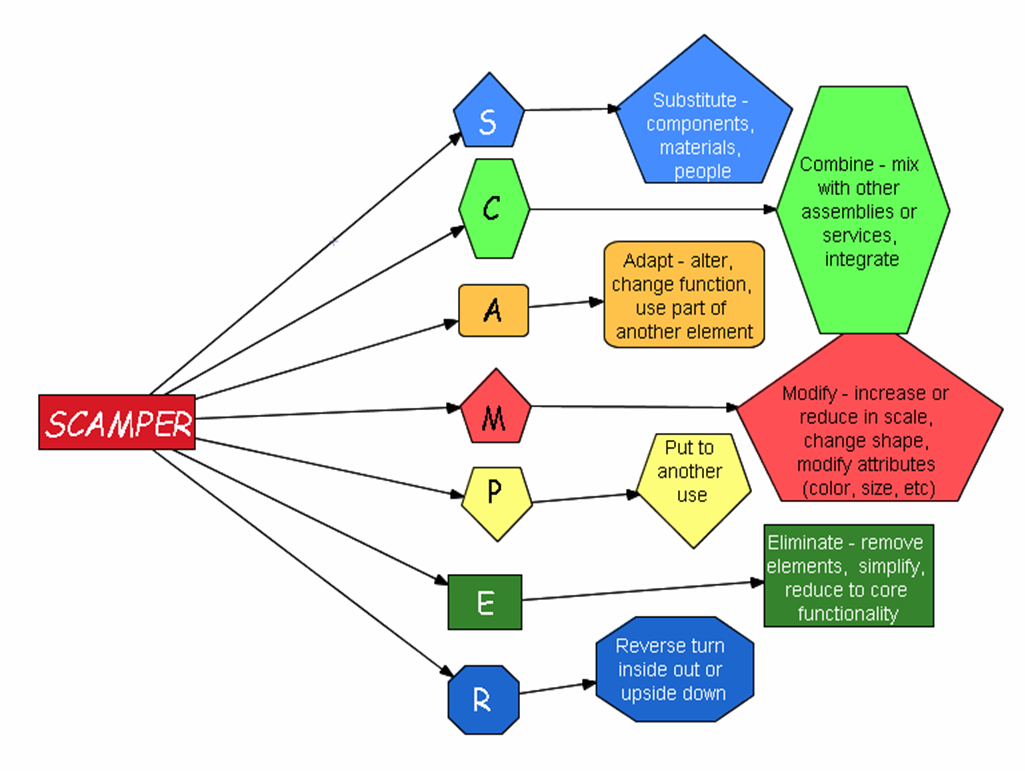
Image result for scamper
Focus Future for my Inquiry:
  • Put to Another Use - Highlight examples of effective teacher practice using VTaL, and share these findings
  • Combine - Remind staff of, and highlight the use of existing professional development opportunities around the use of digital tools, to shift teacher practice.
  • Adapt - Get more of the Technology staff onto the digital immersion program
  • Combine - Compare shifts in teacher practice from earlier in 2017 to now
  • Combine - Ask students for feedback on the use and benefits of VTaL for their learning
Share
Tweet
Pin
Share
No Comments
Newer Posts
Older Posts

About Me

Kia ora! I am the Head of Technology at Tāmaki College and also teach Digital Technologies.


My target group of learners for my Inquiry 2021 will be my Year 12 NCEA Level 2 class. This group of learners were my target group from my 2020 Inquiry. I would like to inquire into whether Academic Writing exemplars specific to Digital Technologies, in conjunction with the 'Explanation Writing' classroom display resources for Digital Technologies, based on SOLO taxonomy, could accelerate achievement in literacy in my subject.


My target group of learners for my Inquiry 2020 were my Year 11 NCEA Level 1 class. I inquired into the process of using the LearnCoach online programs (content) and VTaL Visible Teaching and Learning (workflow) to accelerate student achievement for Tamaki College students undertaking courses in Digital Technologies NCEA Levels 1, 2 and 3.


In 2019, my inquiry is to maximise pedagogical practices (relating to integrated education, and collaborative teaching and learning), to effectively shift student achievement, supported by digital platforms connected to visible teaching and learning.


My Inquiry in 2018, was to develop a VTaL Purpose-Built Innovative Tool, to enable all elements of the VTaL Framework to be accessible to teachers, in order to accelerate student achievement.


In 2017, my inquiry was based on raising student achievement and shifting teacher practice around effective pedagogical practices including Learn, Create and Share. This will be achieved through the development, implementation and monitoring of the Visible Teaching and Learning Framework.

recent posts

Blog Archive

  • ▼  2022 (8)
    • ▼  March (3)
      • Hybrid Teaching and Learning | The impact of Omicron
      • Manaiakalani Toolkit | Well-being - Supporting Our...
      • Technology - Manaiakalani Department Discussions M...
    • ►  February (5)
  • ►  2021 (16)
    • ►  November (1)
    • ►  September (2)
    • ►  August (1)
    • ►  July (2)
    • ►  June (4)
    • ►  May (3)
    • ►  March (2)
    • ►  February (1)
  • ►  2020 (42)
    • ►  November (2)
    • ►  September (2)
    • ►  August (7)
    • ►  July (5)
    • ►  June (4)
    • ►  May (7)
    • ►  April (7)
    • ►  March (3)
    • ►  February (4)
    • ►  January (1)
  • ►  2019 (30)
    • ►  September (2)
    • ►  August (3)
    • ►  July (1)
    • ►  June (2)
    • ►  April (1)
    • ►  March (12)
    • ►  February (9)
  • ►  2018 (41)
    • ►  November (7)
    • ►  October (2)
    • ►  September (1)
    • ►  August (4)
    • ►  July (4)
    • ►  May (7)
    • ►  April (4)
    • ►  March (5)
    • ►  February (7)
  • ►  2017 (65)
    • ►  December (2)
    • ►  November (22)
    • ►  October (6)
    • ►  September (6)
    • ►  August (10)
    • ►  June (4)
    • ►  May (3)
    • ►  April (1)
    • ►  March (4)
    • ►  February (6)
    • ►  January (1)
  • ►  2016 (26)
    • ►  December (1)
    • ►  November (18)
    • ►  September (6)
    • ►  August (1)

VTaL

  • VTaL (104)
  • VTaL 01 Subject Sites (33)
  • VTaL 02 Learning Activities (7)
  • VTaL 03 Tracking Sheets (28)
  • VTaL 04 Student Checklists (12)
  • VTaL 05 Calendars with Links (24)
  • VTaL 06 Workspaces (32)
  • VTaL 07 Student Sites (4)
  • VTaL 08 Year Level Sites (3)
  • VTaL 09 Subject Communities (26)
  • VTaL 10 Student Blogs (11)
  • VTaL and Google Hangouts (15)
  • VTaL and Student Achievement (45)
  • VTaL for Parents (13)
  • VTaL for Students (82)
  • VTaL for Teachers (32)

Presentations

  • GAFE (19)
  • My YouTube Videos (8)
  • Presentations (21)

Inquiry

  • Inquiry (134)
  • Inquiry 2019 (27)
  • Inquiry 2020 (34)
  • Inquiry 2021 (15)

Manaiakalani

  • CoL (167)
  • Inquiry (134)
  • Inquiry 2020 (34)
  • Learn Create Share (11)
  • MIT 2018 (16)
  • Manaiakalani (18)
  • Presentations (21)
  • SPARK MIT (59)

Tamaki College

  • 2018 Department Goals (2)
  • 2018 School Goals (3)
  • 2019 Department Goals (2)
  • CoL (167)
  • Collaborative Learning Environments (32)
  • Covid19 (29)
  • Cultural Responsiveness (10)
  • Differentiation (12)
  • EMR Collaborative Project (21)
  • Goals (2)
  • Human Rights Collaborative Project (5)
  • Integrated Education (24)
  • Kia Eke Panuku (8)
  • LearnCoach (2)
  • Literacy (21)
  • PLD (18)
  • Techies (12)
  • Technological Modelling (4)

Practicing Teacher Criteria

  • PTC01 (31)
  • PTC02 (9)
  • PTC03 (6)
  • PTC04 (61)
  • PTC05 (17)
  • PTC06 (42)
  • PTC07 (32)
  • PTC08 (34)
  • PTC09 (8)
  • PTC10 (7)
  • PTC11 (16)
  • PTC12 (54)

General

  • CoL (167)
  • Collaborative Learning Environments (32)
  • Cultural Responsiveness (10)
  • Differentiation (12)
  • Feedback - Parent Voice (2)
  • Feedback - Staff Voice (6)
  • Feedback - Student Voice (23)
  • GAFE (19)
  • Goals (2)
  • Integrated Education (24)
  • Kia Eke Panuku (8)
  • LearnCoach (2)
  • Literacy (21)
  • My YouTube Videos (8)
  • Review (14)
  • Student Agency (15)

Contact Form

Name

Email *

Message *

Total Pageviews

Created with by BeautyTemplates| Distributed By Gooyaabi Templates