My Space and My Place

    • Home
    • Inquiry 2021
    • Digital Technologies Site
    • VTaL Site
    • VTaL G+
Today my Year 9 students and I had a go at Quad Blogging.  This was our approach ...


  1. I used the chat function to "chunk" instructions, and asked students to demonstrate their understanding of the instructions that I was giving relating to Quad Blogging.  This included determining their understanding of Quad Blogging.
  2. Next I used the Hangout function to demonstrate the steps required to undertake Quad Blogging, including writing the blog post, and asking for feedback.  The setup of each of the students blogs are generic as they were following my example.  In this instance, that is irrelevant, as the purpose of this exercise was to teach the students how to Quad Blog.
  3. The students used the chat function to share access to their published blog posts.  At this point, we (myself and students) determined that at least one of the students didn't have access to their blog.  So, during the hangout, they sent an email asking that access to their blog be fixed.  This student continued the Quad Blog process in a Google doc.
  4. The students accessed each other's blogs, read each others blog posts, and attempted to provide feedback to others and gain feedback from others.  There was a huge gap in the lesson where the comments were not coming through and I needed to provide guidance to enable students to provide meaningful feedback to each other's work.  The students really struggled with this part.  I used the Hangout function to demonstrate blog comments coming through from learners and to guide the learners on appropriate ways to provide feedback.  [At this stage, the students underwent many edits to their comments that they were writing for others].
  5. The students then wrote at least one comment on another learners' blog post.
  6. We ended the lesson, with me explaining what our next steps would be for tomorrow's class.  The next step being for students to reflect on the blog comments, think about what their next steps will be based on the comments, reply to the comments explaining what their next steps will be, and then making the changes to their designs.


Here is a link to a couple of the students' blog posts:

School Stuff Website - Feedback on my Home Page Design - Student 1
School Stuff Website - Feedback on my Home Page Design - Student 2

The following are a series of screenshots that shows different parts of our process.  I hope to edit this post in the not too distant future to make these screenshots more user friendly to navigate.  However, in the meantime, hopefully they will be easy enough to follow.


EDIT:  The follow up in today's lesson (Wednesday 22 April) is that one of the student's went through the process of replying to the initial blog comment feedback on their design layout, with constructive ideas of what they were going to do next.  The following is a screenshot that shows the changes that the student is in the process of making.


Share
Tweet
Pin
Share
10 Comments
I've just created a Screen Recording, using Google Hangouts Meet, to show how to check your Subject Site Incognito, that all of the work in your site is Visible, and also that your lessons are set up to run Google Hangout Meets with your learners.

The purpose of this Screen Recording, using Google Hangouts Meet, is to model the following:
  1. what your calendar would look like for the week, in terms of including the work, instructions and links for all lessons
  2. ensuring that your calendar events are set up to run Google hangout meets
  3. inviting guests to your Google hangout meets, including both your students and any other guests
  4. viewing your site Incognito, and navigating to each of the lessons for the week for each year level to ensure that the instructions and the work is visible


Share
Tweet
Pin
Share
No Comments
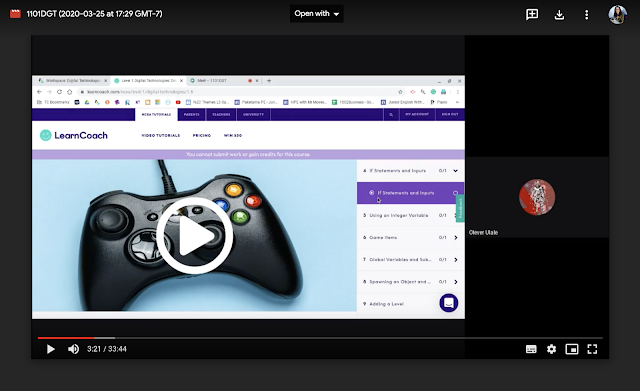
 1101DT Lesson 25 March 2020

Google Hangout Video Link

Lesson Sequence in the Google Hangout

The lesson sequence in the Google Hangout accessible through the video link, includes the following:
  1. Teacher (myself) - Instructing and demonstrating
  2. Learner - Following instructions
  3. Learner - Completing a task
  4. Learner - Capturing evidence of the task
  5. Learner - Submitting the task
  6. Teacher - Checking work and marking
  7. Learner - Sharing work in the Year 11 DigiTech Google+ Community
  8. Teacher - Asking for feedback of the lesson


Teacher Reflection

After undertaking the lesson with this learner, I understood that this particular learner's progress would accelerate (which is excellent for Olever!) and that other learners in the class may not progress at the same stage as Olever in their learning journey.  Therefore, I need to investigate ways to address the staggered progress by looking into Differentiation and seeing how I can adapt that to suit Remote Learning.

Differentiation

The following is a blog post about Differentiation that I came across quite a few years back, which I think will be really useful https://stivodifferentiation.wordpress.com/differentiation-tips/.  

In particular, the section on Differentiation by task would be particularly useful.  I find within the classroom setting that students would complete tasks at a different pace to each other, and therefore achievement would occur at a different pace for different learners.  

My experience of remote teaching in Week 1 of Lockdown, showed that students who joined the hangout for their session, often completed tasks quickly, enabling me to turn over formative feedback quickly for the student, who after making changes would achieve that particular aspect of the task.

Tracking Student Progress

The following is an example of work completed by a student during Week 1 of Lockdown in relation to the other students in their class who were not able to join the hangouts that week.


My students are used to tracking sheets in our classes.  Usually I use a traffic light system of Green to show that aspect of the task meets the criteria, Orange to show that the task is either work in progress, or that I have sent the work back to the student with formative feedback for changes to be made, and Red to show that the task hasn't been started.  In this particular case, the tasks are not directly related to assessment criteria, and therefore I opted to go for a different colour scheme, so as to not confuse the students about the summative feedback that they were being provided with.

Differentiation 

to Address Gaps in Student Progress Across a Class

Group Work and Collaboration: One of the teaching strategies that I am going to trial in the remote learning setting is group work and collaboration.  

Tracking Sheets: I am going to use the tracking sheets, to enable myself and my learners to identify who is working on the same tasks and then I will group the students accordingly.

Year Level Google+ Community: I intend referencing the Year Level Google+ community, so that students can refer to each others (completed and assessed) work, as guidelines of the expectations for completing tasks.  

Chat Function in the Hangout: I think I'll aim to have the students within a particular group, talk to each other via the chat function in the hangout, to share ideas with each other.  The group may be pairs or threes, I'll try to keep this small.  While small groups are working together, I am going to interact with a small group of learners at one time, or that is the intention anyway.

Wish me luck!


Google Hangouts - Tips and Tricks


  • If neither you or your student or students are interacting in the hangout, ask one of the students to go into presentation mode, otherwise the recording will show yourself (as the hangout owner) for long chunks of time in the recording
  • Stay in the hangout and let the students know that you're still there.  That way they can complete the work that you've set for them, but they also know that they can ask you for help.


Share
Tweet
Pin
Share
No Comments
The following is an activity that the Techies participated in relating to Teaching and Learning in Google Hangouts on Monday 6 April 2020.
The activity includes the Session Instructions, a video of the Activity (as Learners), and Reflections within the video (as Learners and Teachers).
It’s got a little bit of everything:
  • Learners who are absent
  • Learners who arrive late
  • Learners who leave class early
  • Learners who need help following or understanding instructions
  • Learners who play up
  • Learners experiencing technical issues
  • And also … Learners cyber bullying classmates in the hangout
  • The Teacher who talks too fast
  • The Teacher who doesn’t give learners all of the instructions
  • And also … the Teacher who doesn’t have all of the resources ready for the lesson
__________________________________________________
Session One [30 minutes] - Sending Love outside of your Bubble 
PLEASE DON'T START SESSION ONE UNTIL OUR MEETING
This is a fun activity for us to do using Google Hangouts.  Please make sure that you have a square piece of paper or card for this session.
I'm going to run this session as a Google Hangout Meet lesson.  At the conclusion, we will reflect on and discuss the session
  1. Log into the DigiTech with Ms Anderson Google Site http://bit.ly/2TMuF3V
  2. Navigate to the Techies tab
  3. Navigate to the Calendar for Techies
  4. Click on the Class Hyperlink for today's date (Monday 6 April 2020 when the session took place)
  5. Click on More details
  6. Locate the work for today's Learning Activities


__________________________________________________

Google Hangouts Tips and Tricks

If anyone is feeling nervous about using hangouts to teach your lessons, or if you haven’t run a hangout before, consider running a hangout with someone outside of your bubble, and teach them how to make breakfast, or something relatively simple.  Hopefully that will give you a bit of confidence before using hangouts to teach your students.
Video Link

Teaching and Learning in Google Hangouts

Share
Tweet
Pin
Share
No Comments
The following are some musings on what I'm aiming to learn about inquiry this year.  Some of these musings are either about what I'm aiming to learn about the process of inquiry, or what I'm aiming to learn from different outcomes within the inquiry.

Identifying valued learning outcomes (VLOs) to focus on

  • I'm interested to know about ways to identify valued learning outcomes associated with measuring student engagement throughout the year.  At this stage, I've been having discussions with students, and asking them to anonymously drop emojis to communicate how they feel about different questions I've asked them about the learning process (connected to my inquiry) ... 
  • Now that I've written that last statement, I'm actually wondering whether I'm asking the students the right questions in the first place.  
Some direction here may be useful to gauge whether I'm asking the right questions, and also identifying valued learning outcomes.

Profiling students learning in those VLOs

  • In terms of profiling students; especially my NCEA level students, I generally tend to build profiles around previous achievement data, ethnicity, age, reason for taking the subject, career pathways (if known) etc.  It is generally really data based.
  • Other profiling methods that I use but don't necessarily measure or record, is asking about whanau and siblings; especially if they collect younger siblings from school, where they live and how they come to school, interests outside of school, interests in music etc.  These are usually casual conversation depending on the student that I'm talking with.  I will always ask students new to Tamaki College, what school they attended previously, why they left that school, and who they're living with.
I'm starting to wonder whether I'm profiling students appropriately according to the VLOs, or whether I'm just generating profiles based on how I've always done it.  Maybe I am, maybe I'm not ... I'm a bit Corona-wired at the moment to tackle this today.

Generating hypotheses (especially teaching)

  • This is a good one.  As soon as an idea pops into my head that relates to improving teaching and learning, I tend to launch into it head-on.  Not to say that I don't come up with good or useful ideas every now and again, but I probably don't spend enough time discussing hypotheses.  A lightbulb goes off, whilst simultaneously considering what's on top right now as a mum, middle leader, mum, classroom teacher, mum, CoL teacher, mum, sister, aunty blah blah blah (you get the picture) and then the next minute you know, I'm fully executing whatever the idea was.  Yes I know and understand that as teachers we're all balancing a juggling act.  I guess I'm just reflecting on why I default straight into the 'doing' and that I need to spend more time thinking about the 'what' 'why' and 'how'.

I really need to be having more discussions around hypotheses before executing ideas.  Taking time to smell the roses or so to speak, and talking about what others think of the roses, and approaches they might consider, suggest or take.

Testing hypotheses (investigating own teaching)

  • I have a relatively positive relationship with my senior students, including getting their feedback or opinions on what is working in terms of supporting their learning.  
  • I do wonder whether I am doing this enough though (obtaining student feedback at regular intervals), and whether I'm getting feedback relative to hypothesis about teaching leading to student outcomes. 

I think I'm going to tag this section of Testing hypotheses leading on from Generating hypotheses.  Other musings I'm having is 'what to test' and 'how to test', and executing the teaching and learning within the 'how to test' process.

Using research literature and other sources to identify more effective approaches

  • I really enjoyed talking with Karen and Christine during our last CoL meeting about our inquiry ideas etc.  I know that in previous CoL meetings we would often break off into smaller groups according to our achievement challenges that our inquiry linked to.  Sometimes this worked for me, and sometimes it didn't.  I think I enjoyed the conversations with Karen and Christine, because we share and understand the same teaching and learning environment, which meant that I could engage in the conversation straight away without having to deconstruct my thinking before communicating my ideas.  That's not to say that I don't find conversations with my colleagues outside of school meaningful and interesting, it's just easier to platform ideas with my Tamaki College colleagues first in terms of identifying more effective approaches to shifting achievement.
  • I had the most amazing couple of sessions with Danni sharing ideas about our different inquiries.  I loved visiting Danni's students during one of Danni's Class on Air sessions.  I'm yet to articulate my musings around this, but it will happen!

I guess what I've figured out or am figuring out is different ways that enables me to progress forward with efficient and effective intent.  That being to connect with like-people to identify and cement initial ideas, then connect with un-like people to introduce the broader perspective, and hopefully the next move will be use these platforms to identify research literature that could be most useful to my inquiry.  Well that's my idea at this stage anyway.

I've also talked with my Tamaki College CoL colleagues about whether we're able to meet on a semi-regular basis to chew the fat over our inquiries and give each other some critical feedback.  We've pencilled this in and will see how we go.


More Aspects of Inquiry

In terms of the following aspects of inquiry, I'm considering what I'm aiming to learn about them this year based on how the initial stages unravel and what I learn to start with.  I'll revisit these sections a little later on.
  • Implementing new approaches
  • Monitoring (and tweaking) new approaches
  • Evaluate shifts in own teaching
  • Evaluate shifts in student learning
  • Keep a clear and detailed record of all stages of inquiry


Share
Tweet
Pin
Share
4 Comments

Initially, the inquiry idea that I had for 2020 is that I would focus on the target group of my combined NCEA Level 2 and Level 3 students. 

The desired change in student learning that wanted to inquiry into was 'Whether increased and sustained engagement leading to achievement, could occur via the combination of online tutorials for learning (skills and content specific to NCEA standards), and Hapara Workspaces for resource sharing, evidence gathering, tracking and monitoring of student achievement'. 

The reason that I wanted to focus on NCEA Level 2 and Level 3 students is because this was the target group that these students are most closely connected to school leaving age, and the goal of '18-year-olds having a minimum of NCEA Level 2 or equivalent'.


Collaborate with Colleagues

On Monday 2 March during our Curriculum Committee meeting of School Leaders at Tamaki College, the focus was to discuss within our smaller groups (which included Christine David from Maths, Elenoa Telenoa from Art and myself), theories of action to address the achievement of Year 11 students in 2020.

The following are discussion and reflection points that I had regarding the students in my Year 11 DigiTech class this year.


It dawned on me through this discussion process that actually my target group for my Inquiry 2020 would actually be best suited to be my Year 11 NCEA Level 1 class.  If I was already having discussions with colleagues about this group of students, and this would be an ongoing discussion throughout the year, then it just made sense.  Christine and I met again the following Monday, 9 March after school, to see where we were at with the suggestions that we'd discussed from our curriculum meeting.  I'd applied the first suggestion highlighted in pink, and was looking forward to the PD session with LearnCoach on Tuesday 10th March.

Collaborate with Senior Leadership Team

On Thursday 12th March, the Tamaki College CoL teachers (including myself) met with Soana, Russel and Kathryn to discuss our inquiry ideas.  The idea that I shared my inquiry was 'Will the use of online tutorials (for content knowledge) lift achievement in NCEA Digital Technologies?' with the target group being my NCEA Level 1 students.  I conveyed to the group that I'd been tossing between my target group being my NCEA Level 2/3 students, or, being my NCEA Level 1 students.  The rationale for refocussing to my NCEA Level 1 students was that:

  • the target group aligns with the focus for the Collaborative Leadership approach with Middle Leaders in Curriculum Committee
  • LearnCoach materials are available for Level 1 courses
  • the overall inquiry idea relates to School Goal 1 - To raise Maori achievement and cultural visibility
Feedback from the meeting included the following:
  • focussing on NCEA Level 1 will allow a carry through into 2021
  • upskilling in Digital Technologies content and knowledge at NCEA level could provide an example of managing change (unpacking and resourcing) across any learning areas when the new NCEA standards are introduced
  • consideration of who I'm collaborating with to support my inquiry idea

Based on the conversations and feedback from colleagues and SLT, I'm relatively confident that the target group of NCEA Level 1 DigiTech students is a sensible group to focus on, and that my inquiry will make a powerful contribution to wider school and cluster goals.


Share
Tweet
Pin
Share
6 Comments

Create a Website 
NCEA Level 2


The following are a set of teaching and learning materials that were used for
my NCEA Level 2 Class to create a website from a given brief.

Project Instruction

The project instructions includes a brief, specifications, tasks, assessment criteria
and a student checklist to enable students to complete the task.
  • Create a Website : Project Instructions http://bit.ly/39Y1pQg 

Student Work

The following are a couple of examples of student work that the students
handed in for this project.
  • Gustavo Pohatu http://bit.ly/2U35hZE 
  • Lisiate Pau’uvale http://bit.ly/2W7zzNy 

Digital Media Outcome - Websites

The following are a couple of examples of outcomes completed by the student.
    • Gustavo Pohatu - Website http://bit.ly/2TKZIQN 
    • Lisiate Pau’uvale - Website http://bit.ly/2Q89c6w 


    Share
    Tweet
    Pin
    Share
    2 Comments
    Newer Posts
    Older Posts

    About Me

    Kia ora! I am the Head of Technology at Tāmaki College and also teach Digital Technologies.


    My target group of learners for my Inquiry 2021 will be my Year 12 NCEA Level 2 class. This group of learners were my target group from my 2020 Inquiry. I would like to inquire into whether Academic Writing exemplars specific to Digital Technologies, in conjunction with the 'Explanation Writing' classroom display resources for Digital Technologies, based on SOLO taxonomy, could accelerate achievement in literacy in my subject.


    My target group of learners for my Inquiry 2020 were my Year 11 NCEA Level 1 class. I inquired into the process of using the LearnCoach online programs (content) and VTaL Visible Teaching and Learning (workflow) to accelerate student achievement for Tamaki College students undertaking courses in Digital Technologies NCEA Levels 1, 2 and 3.


    In 2019, my inquiry is to maximise pedagogical practices (relating to integrated education, and collaborative teaching and learning), to effectively shift student achievement, supported by digital platforms connected to visible teaching and learning.


    My Inquiry in 2018, was to develop a VTaL Purpose-Built Innovative Tool, to enable all elements of the VTaL Framework to be accessible to teachers, in order to accelerate student achievement.


    In 2017, my inquiry was based on raising student achievement and shifting teacher practice around effective pedagogical practices including Learn, Create and Share. This will be achieved through the development, implementation and monitoring of the Visible Teaching and Learning Framework.

    recent posts

    Blog Archive

    • ▼  2022 (8)
      • ▼  March (3)
        • Hybrid Teaching and Learning | The impact of Omicron
        • Manaiakalani Toolkit | Well-being - Supporting Our...
        • Technology - Manaiakalani Department Discussions M...
      • ►  February (5)
    • ►  2021 (16)
      • ►  November (1)
      • ►  September (2)
      • ►  August (1)
      • ►  July (2)
      • ►  June (4)
      • ►  May (3)
      • ►  March (2)
      • ►  February (1)
    • ►  2020 (42)
      • ►  November (2)
      • ►  September (2)
      • ►  August (7)
      • ►  July (5)
      • ►  June (4)
      • ►  May (7)
      • ►  April (7)
      • ►  March (3)
      • ►  February (4)
      • ►  January (1)
    • ►  2019 (30)
      • ►  September (2)
      • ►  August (3)
      • ►  July (1)
      • ►  June (2)
      • ►  April (1)
      • ►  March (12)
      • ►  February (9)
    • ►  2018 (41)
      • ►  November (7)
      • ►  October (2)
      • ►  September (1)
      • ►  August (4)
      • ►  July (4)
      • ►  May (7)
      • ►  April (4)
      • ►  March (5)
      • ►  February (7)
    • ►  2017 (65)
      • ►  December (2)
      • ►  November (22)
      • ►  October (6)
      • ►  September (6)
      • ►  August (10)
      • ►  June (4)
      • ►  May (3)
      • ►  April (1)
      • ►  March (4)
      • ►  February (6)
      • ►  January (1)
    • ►  2016 (26)
      • ►  December (1)
      • ►  November (18)
      • ►  September (6)
      • ►  August (1)

    VTaL

    • VTaL (104)
    • VTaL 01 Subject Sites (33)
    • VTaL 02 Learning Activities (7)
    • VTaL 03 Tracking Sheets (28)
    • VTaL 04 Student Checklists (12)
    • VTaL 05 Calendars with Links (24)
    • VTaL 06 Workspaces (32)
    • VTaL 07 Student Sites (4)
    • VTaL 08 Year Level Sites (3)
    • VTaL 09 Subject Communities (26)
    • VTaL 10 Student Blogs (11)
    • VTaL and Google Hangouts (15)
    • VTaL and Student Achievement (45)
    • VTaL for Parents (13)
    • VTaL for Students (82)
    • VTaL for Teachers (32)

    Presentations

    • GAFE (19)
    • My YouTube Videos (8)
    • Presentations (21)

    Inquiry

    • Inquiry (134)
    • Inquiry 2019 (27)
    • Inquiry 2020 (34)
    • Inquiry 2021 (15)

    Manaiakalani

    • CoL (167)
    • Inquiry (134)
    • Inquiry 2020 (34)
    • Learn Create Share (11)
    • MIT 2018 (16)
    • Manaiakalani (18)
    • Presentations (21)
    • SPARK MIT (59)

    Tamaki College

    • 2018 Department Goals (2)
    • 2018 School Goals (3)
    • 2019 Department Goals (2)
    • CoL (167)
    • Collaborative Learning Environments (32)
    • Covid19 (29)
    • Cultural Responsiveness (10)
    • Differentiation (12)
    • EMR Collaborative Project (21)
    • Goals (2)
    • Human Rights Collaborative Project (5)
    • Integrated Education (24)
    • Kia Eke Panuku (8)
    • LearnCoach (2)
    • Literacy (21)
    • PLD (18)
    • Techies (12)
    • Technological Modelling (4)

    Practicing Teacher Criteria

    • PTC01 (31)
    • PTC02 (9)
    • PTC03 (6)
    • PTC04 (61)
    • PTC05 (17)
    • PTC06 (42)
    • PTC07 (32)
    • PTC08 (34)
    • PTC09 (8)
    • PTC10 (7)
    • PTC11 (16)
    • PTC12 (54)

    General

    • CoL (167)
    • Collaborative Learning Environments (32)
    • Cultural Responsiveness (10)
    • Differentiation (12)
    • Feedback - Parent Voice (2)
    • Feedback - Staff Voice (6)
    • Feedback - Student Voice (23)
    • GAFE (19)
    • Goals (2)
    • Integrated Education (24)
    • Kia Eke Panuku (8)
    • LearnCoach (2)
    • Literacy (21)
    • My YouTube Videos (8)
    • Review (14)
    • Student Agency (15)

    Contact Form

    Name

    Email *

    Message *

    Total Pageviews

    Created with by BeautyTemplates| Distributed By Gooyaabi Templates